3 radEAGLE Measuring Modes
This chapter describes the essential measuring modes of your radEAGLE.
Dose Rate Mode
Observe the ambient radiation, see 3.1, p. 31
Easy ID Mode
Identify radiating nuclides quickly, see 3.2, p. 33
Detect Mode
Locate radiation sources, see 3.3, p. 34
Measuring modes might be overridden by warning and alarms, please refer to chapter 4,
p. 37.
3.1 Dose Rate Mode
The Dose Rate Mode is the main measurement mode of the radEAGLE. It is active after
starting up the instrument.
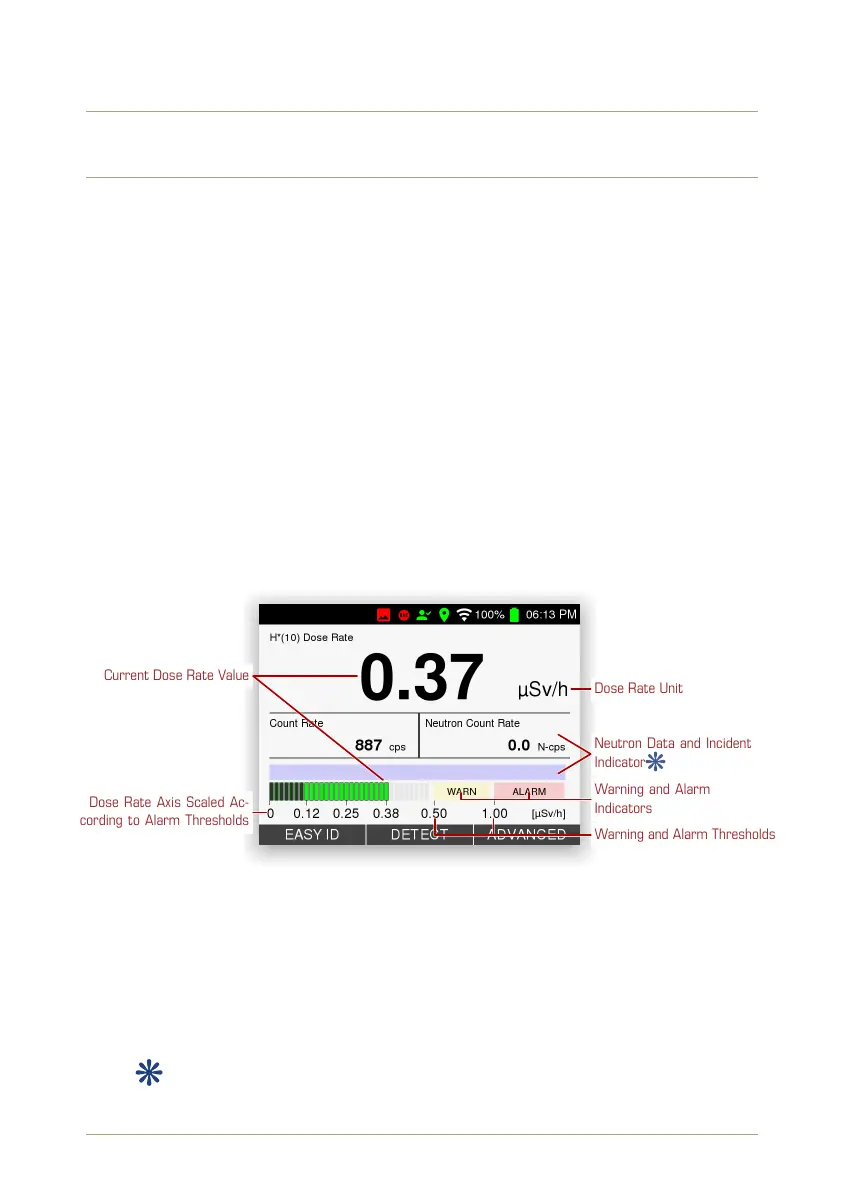
Dose Rate Axis Scaled Ac-
cording to Alarm Thresholds
Current Dose Rate Value
Dose Rate Unit
Neutron Data and Incident
Indicator
Warning and Alarm
Indicators
Warning and Alarm Thresholds
Figure 21: Dose rate display
Several representations of the current ambient dose rate (H*10) are shown (Fig. 21, p. 31):
Digital
Large digits show the current value and the unit. The unit adapts to the order of
magnitude of the value: µSv/h, mSv/h, Sv/h. You can select a Sievert or a rem-based
display, see 5.4, p. 49.
Additionally, the current gamma count rate is shown.
If your model is equipped with a neutron detector, the current neutron count
rate ist shown.
© innoRIID GmbH • 2019-04-11 Software 3.2.12 • Document 3.3.0o 31/147



 To Next Page