2.2 Using the radEAGLE Keys radEAGLE User Manual
2.2.3 Changing Values
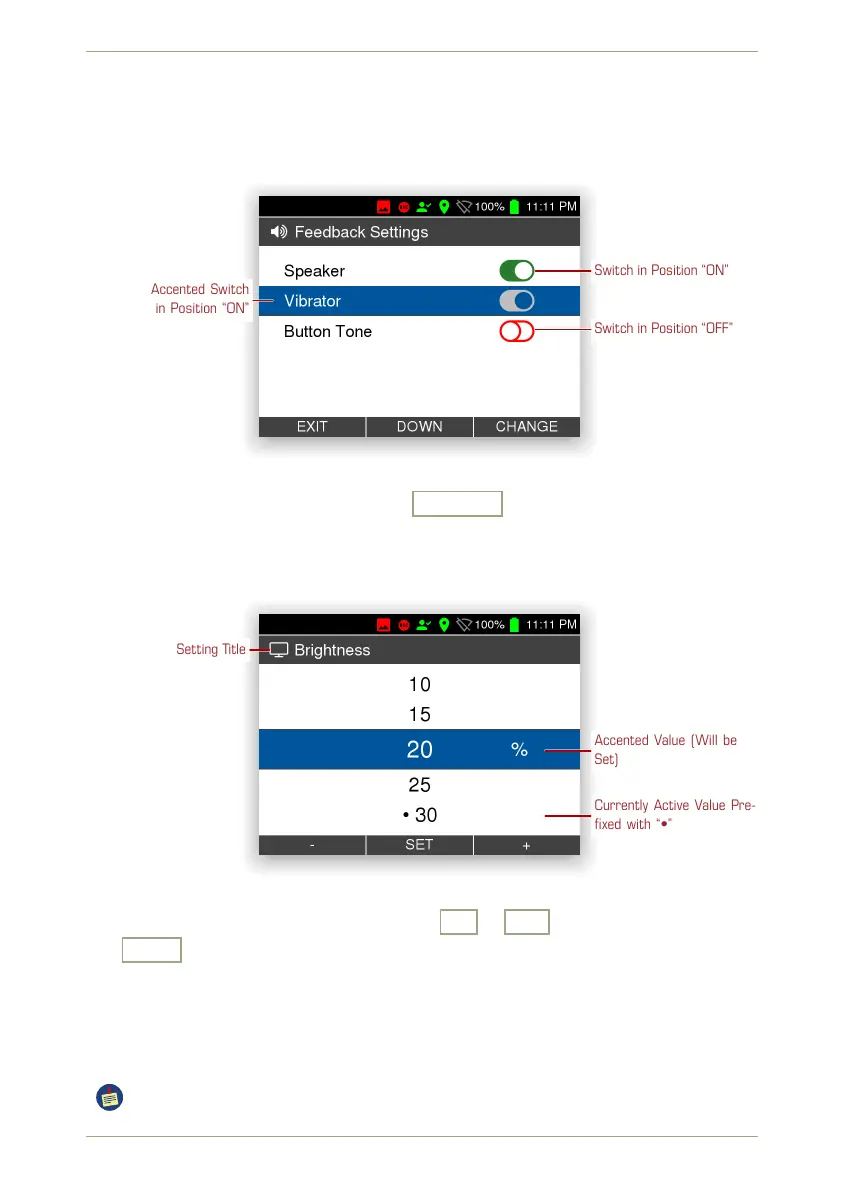
You can tailor the radEAGLE to your needs by changing settings. Some settings are simple
switches as shown in Fig. 12, p. 26.
Switch in Position “ON”
Accented Switch
in Position “ON”
Switch in Position “OFF”
Figure 12: Changing switches
You can toggle the state by simply pressing Change .
For other settings you can choose from a list of options, for example the screen brightness
(see 5.4, p. 49). When you select the setting for change the list of valid settings is displayed
(Fig. 13, p. 26).
Setting Title
Accented Value (Will be
Set)
Currently Active Value Pre-
fixed with “•”
Figure 13: Changing values by choosing from a list
You can choose other values from the list with
-
or
+
and set the accented value
with
Set
.
2.2.4 Entering the Password
Some settings and operations of the radEAGLE are locked behind a password. If you try to
use these items, you will be prompted to enter the password (Fig. 14, p. 27).
After successfull pasword entry, the radEAGLE ist unlocked for about 10 min.
26/147 Software 3.2.12 • Document 3.3.0o © innoRIID GmbH • 2019-04-11



 To Next Page