radEAGLE User Manual radEAGLE Web Interface
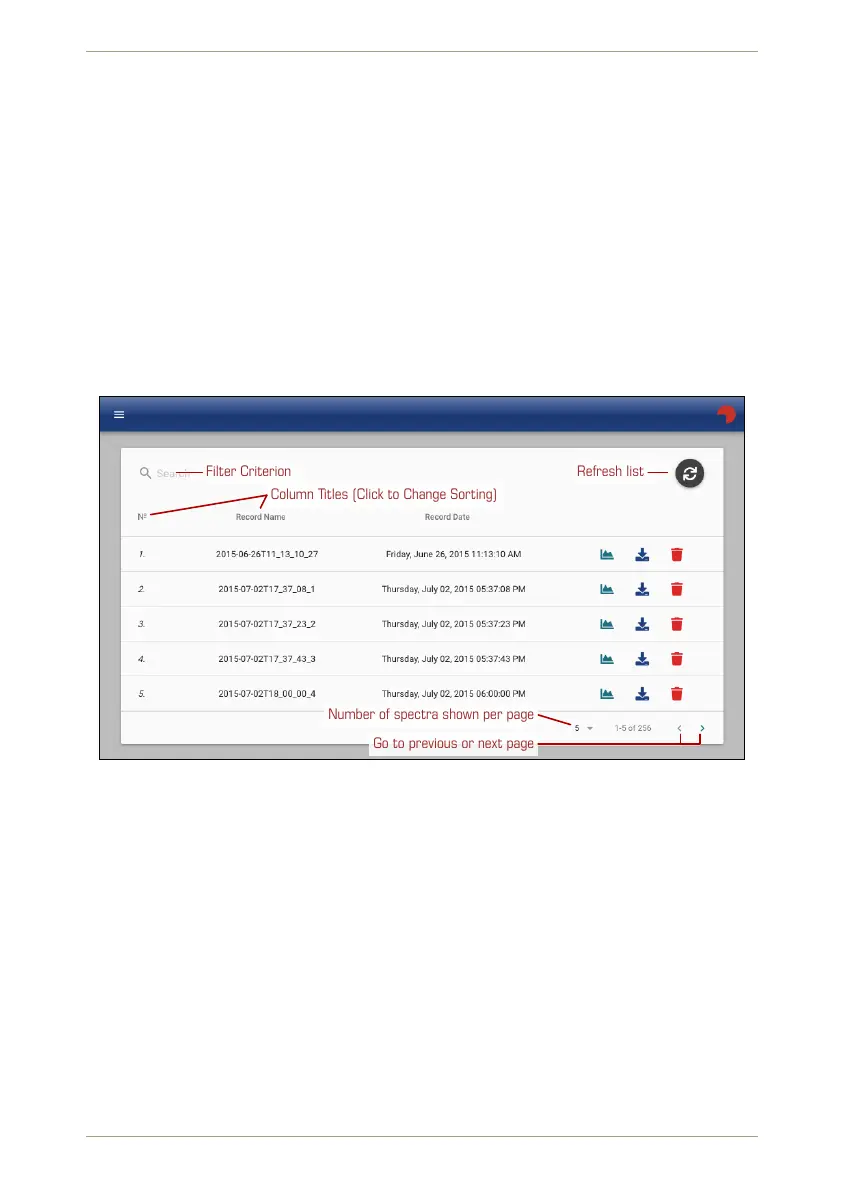
Ü To change the sorting criterion…
1. Click the column title.
2. Click again to switch between ascending and descending order.
Ü To filter the list…
1. Type part of the file name or part of the date into the box next to .
The list shows only records matching that criterion in any of the columns.
You can browse the list page by page with or and change the length of the list to
accomodate your screen size with .
RADEAGLE
18181
Refresh listFilter Criterion
Column Titles (Click to Change Sorting)
Go to previous or next page
Number of spectra shown per page
Figure 103: The spectrum browser in the Web interface
Several commands are available for the individual records:
Inspect the spectrum plus a lot of additional information (see 7.4.1, p. 89).
Download the record.
Delete the record.
7.4.1 Spectrum Inspector
The spectrum inspector shows a spectrum diagram for visual inspection (see 7.4.1.1, p. 90),
offers various methods for peak analysis, and provides several additional details about the
spectrum data.
© innoRIID GmbH • 2019-04-11 Software 3.2.12 • Document 3.3.0o 89/147



 To Next Page