3.1 Dose Rate Mode radEAGLE User Manual
Analog
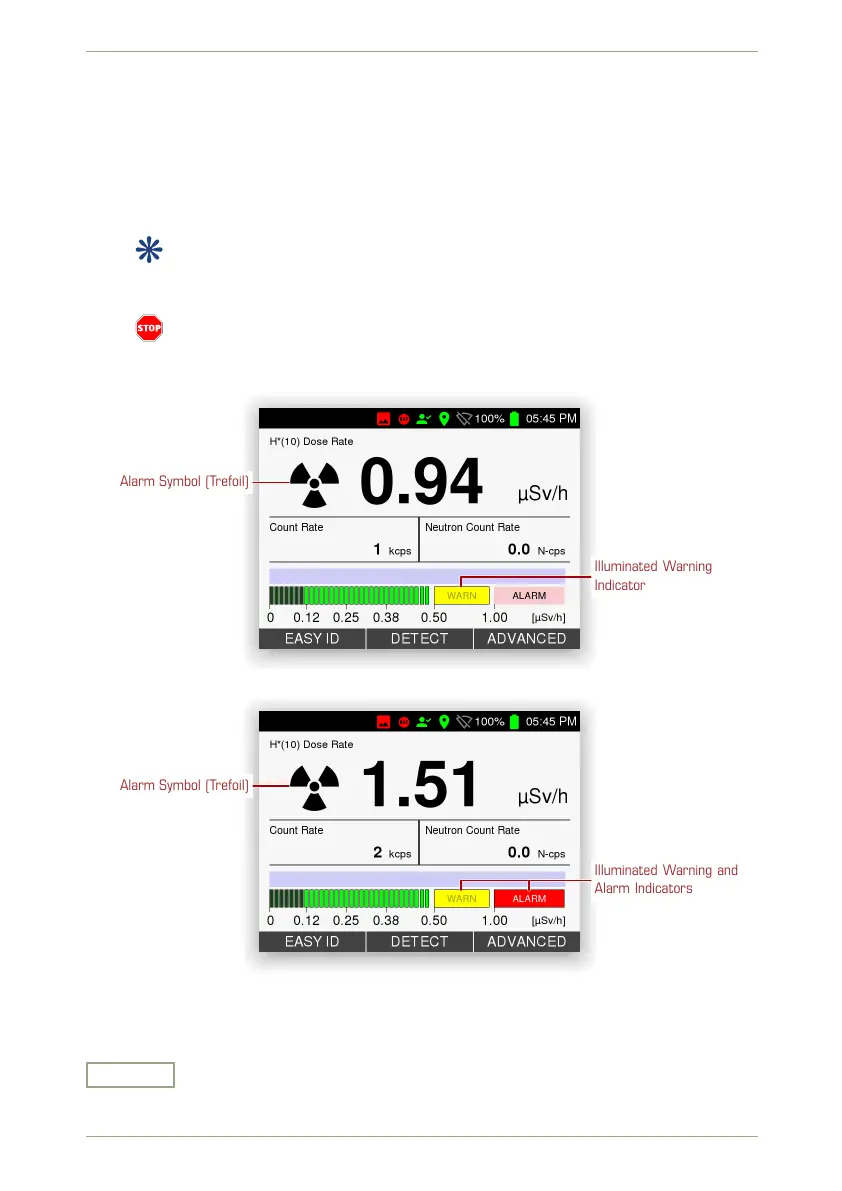
A schematic chart modelled after a traditional LED chain shows the current dose rate.
A horizontal scale along the chart reflects your current warning and alarm thresholds
(see 5.17, p. 66).
Warning and alarm indicators are illuminated if the dose rate rises above the thresh-
olds (Fig. 22, p. 32, Fig. 23, p. 32).
If your model is equipped with a neutron detector, the neutron data display
switches to a blue background for neutron incidents according to the specified
sensitivity, (see 5.17, p. 66).
Neutron sources are dangerous, they are always considered as threat. If the
instrument indicates the presence of neutron radiation, move away from the
source immediately.
Alarm Symbol (Trefoil)
Illuminated Warning
Indicator
Figure 22: Dose rate display with gamma warning
Alarm Symbol (Trefoil)
Illuminated Warning and
Alarm Indicators
Figure 23: Dose rate display with gamma alarm
Settings and Commands
Easy ID
Switch to the Easy ID mode, see 3.2, p. 33.
32/147 Software 3.2.12 • Document 3.3.0o © innoRIID GmbH • 2019-04-11



 To Next Page