radEAGLE User Manual radEAGLE Measuring Modes
Detect
Switch to the Detect mode, see 3.3, p. 34.
Advanced
Open the menu for advanced operations, see 5, p. 41.
3.2 Easy ID Mode
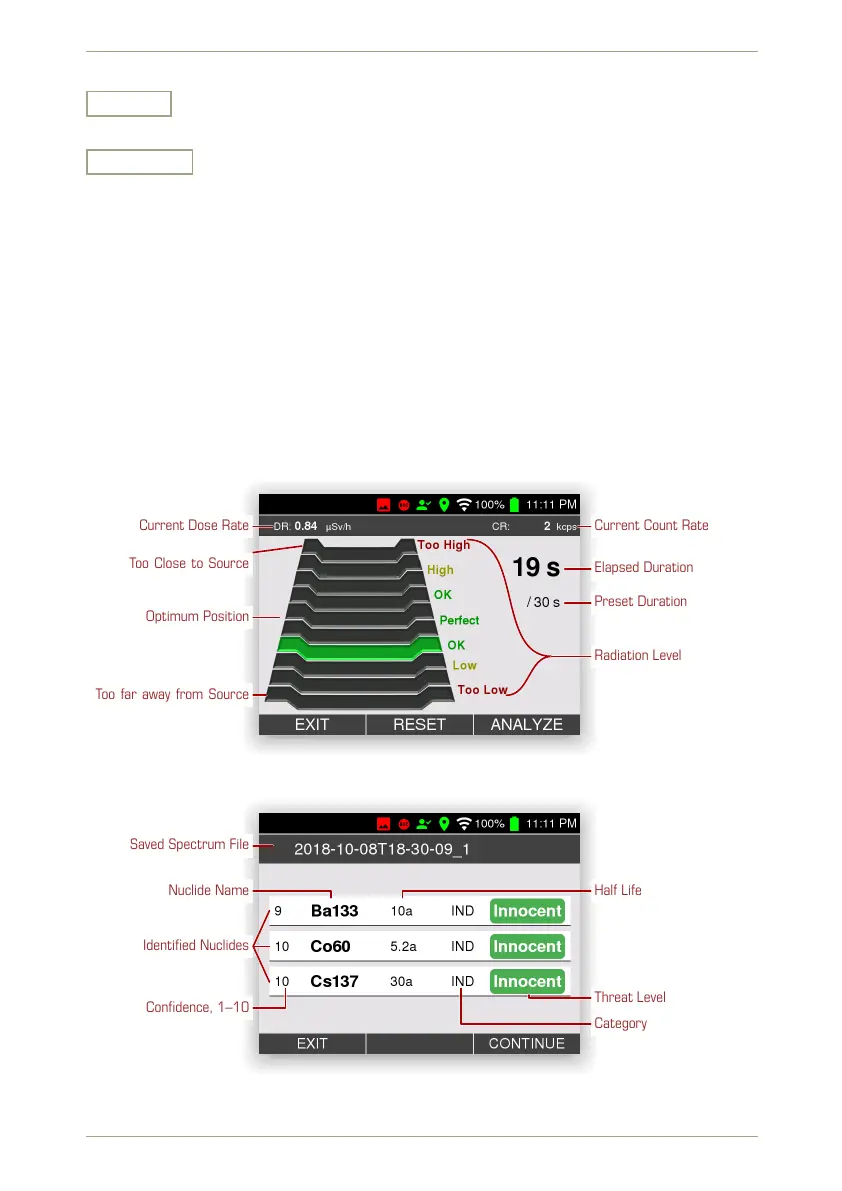
The Easy ID measuring mode helps you to quickly identify radiating nuclides. Your radEAGLE
will acquire a spectrum for a preset duration and then analyze and save it.
During the acquisition, a chart (Fig. 24, p. 33) instructs you to find the best distance between
the radEAGLE and the source in question.
The nuclides identified will be displayed (Fig. 25, p. 33). The recorded spectrum and the
analysis results are saved. The file name is composed of the current date and time followed
by an index number.
Current Dose Rate Current Count Rate
Elapsed Duration
Preset Duration
Radiation Level
Too Close to Source
Optimum Position
Too far away from Source
Figure 24: The Easy ID screen
Saved Spectrum File
Nuclide Name
Confidence, 1–10
Half Life
Threat Level
Category
Identified Nuclides
Figure 25: The Easy ID results
© innoRIID GmbH • 2019-04-11 Software 3.2.12 • Document 3.3.0o 33/147



 To Next Page