8.2 Replacing Batteries of the radEAGLE radEAGLE User Manual
4. Open the latch.
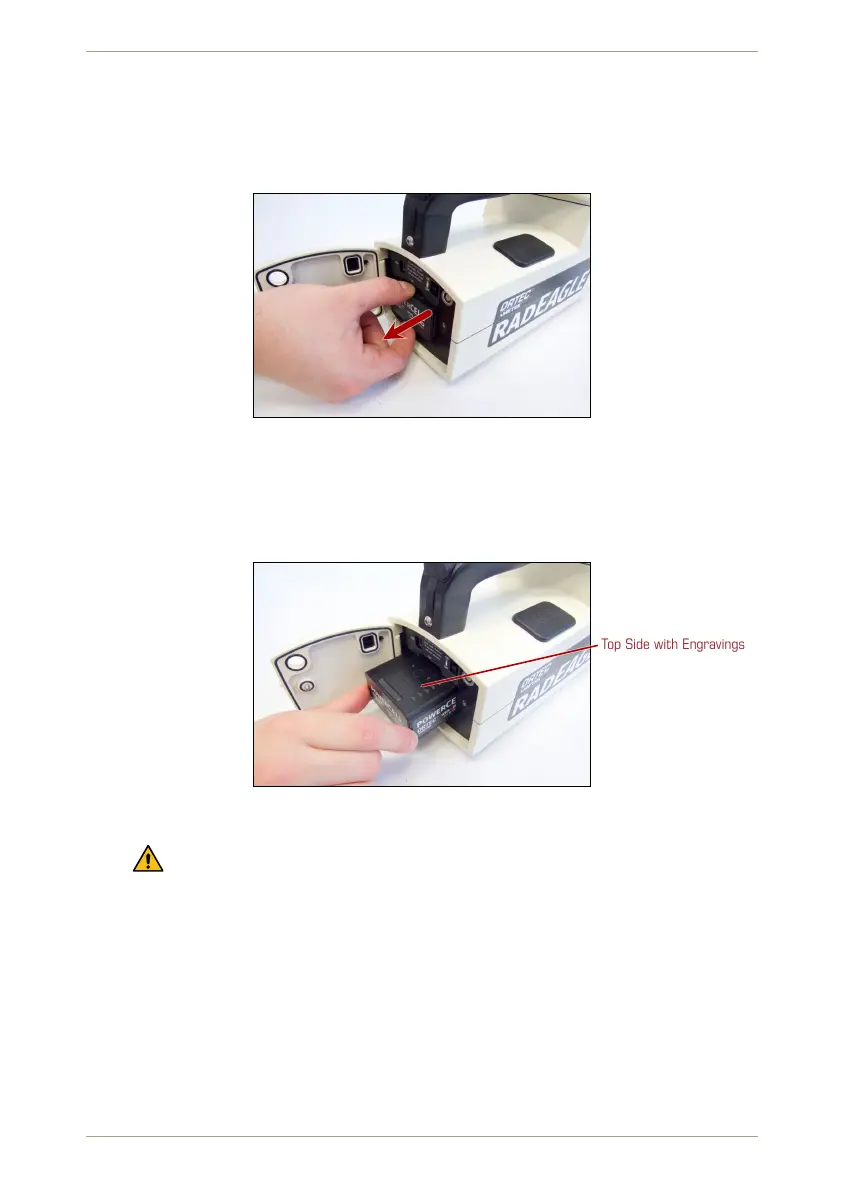
5. Grab the powerCELL and pull it backwards from the battery compartment (Fig. 131,
p. 110).
Figure 131: Removing the powerCELL from the radEAGLE
Ü To install a powerCELL…
1. Slide the battery pack into the compartment, contact side ahead (Fig. 132, p. 110).
Top Side with Engravings
Figure 132: Inserting a powerCELL
Observe the orientation marks:
– “TOP” and arrows are engraved in the top side of the pack (Fig. 125, p. 107).
– The triangle at the back side of the powerCELL pack must align with that
above the compartment in the instrument (Fig. 134, p. 111).
2. Push it lightly until it snaps into place (Fig. 133, p. 111).
3. Close the latch.
4. Close the lock by turning the screw clockwise.
5. Insert the bung to protect the power connector.
110/147 Software 3.2.12 • Document 3.3.0o © innoRIID GmbH • 2019-04-11



 To Next Page