MATE3 Settings
900-0117-01-00 Rev B 107
AGS Functional Test
Before any further programming, confirm that the generator is working properly. Using the generator’s
own controls, manually turn it on and then shut it off.
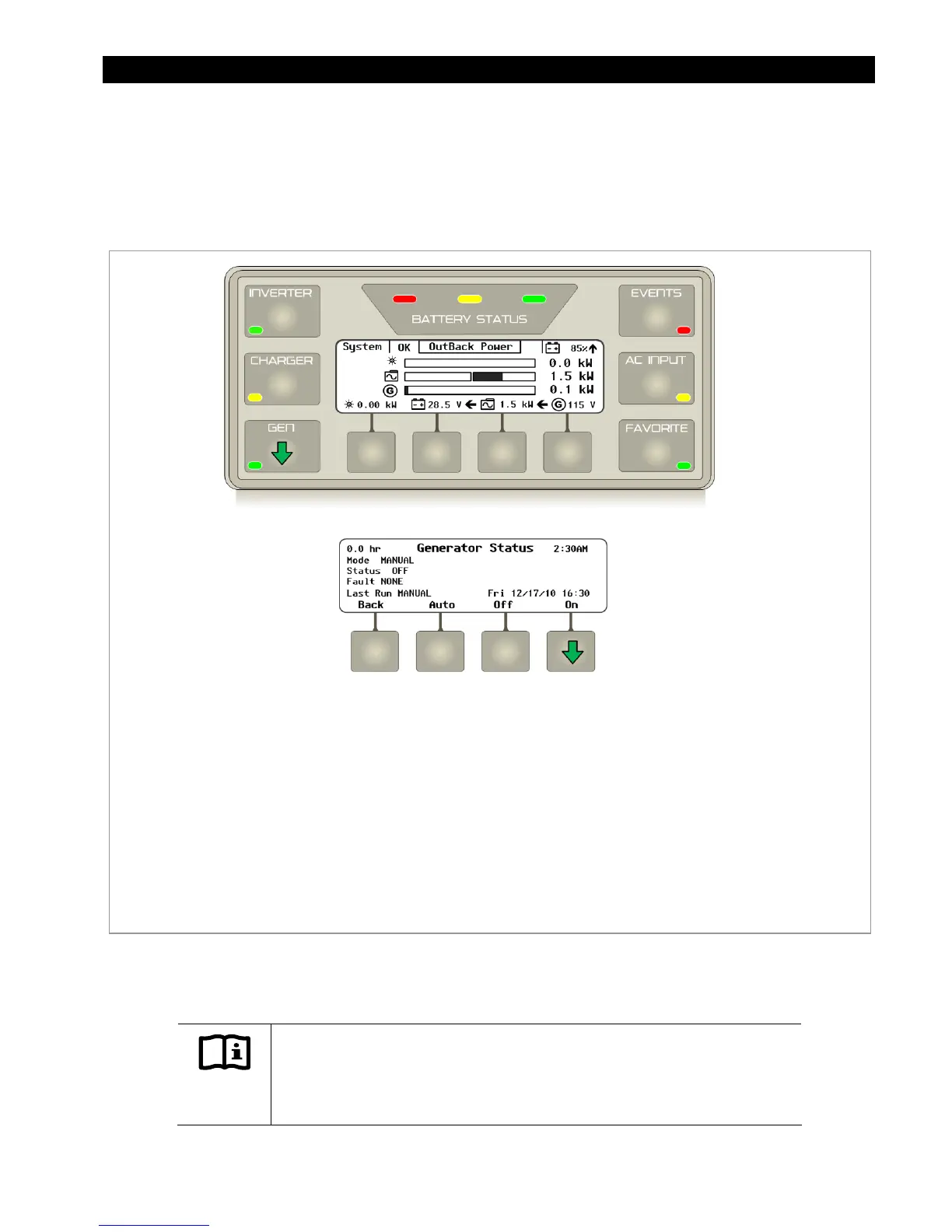
Next, test the remote start functionality by using the MATE3’s
Generator Status
screen.
Figure 130 AGS Functional Test
The AGS test confirms the AGS function works and the generator has been enabled during the AGS
programming.
IMPORTANT:
It is important not to confuse AGS with Gen Alert.
These are two separate
methods for requesting a generator to start. Gen Alert set points should not be
used as AGS set points.
To Test the AGS function through the MATE3:
1. Press the GEN hot key to brings up the
Generator Status
screen.
2. Press the <ON> soft key and wait for the generator to start running.
3. Press the <OFF> soft key to shut the generator off.
4. Press the <AUTO> soft key to put the generator in AUTO mode.
5. Press the <BAC
> soft key to return to the Home screen.


 To Next Page