Programming
82 900-0117-01-00 Rev B
Inverter Settings
The inverter settings in this section apply to the following models of OutBack inverters.
FX Inverter/Chargers
Grid-Tie Inverter/Chargers
Inverter
menu options include the following:
Search
----------------------------------------------------------- >
See below.
AC Input and Current Limit
----------------------------- >
See below.
Grid AC Input Voltage Limits
-------------------------- >
See page
35
84.
Gen AC Input Voltage Limits
--------------------------- >
See page
35
84.
AC Output
----------------------------------------------------- >
See page
35
84.
Low Battery
--------------------------------------------------- >
See page
35
85.
Battery Charger
--------------------------------------------- >
See page
35
86.
Battery Equalize
-------------------------------------------- >
See page
35
86.
Auxiliary Output
-------------------------------------------- >
See page
35
87.
Inverter Stacking
------------------------------------------- >
See page
35
89.
Grid-Tie Sell
-------------------------------------------------- >
See page
35
91.
Calibrate
------------------------------------------------------- >
See page
35
92.
Reset Inverter to Factory Defaults
------------------- >
See page
35
93.
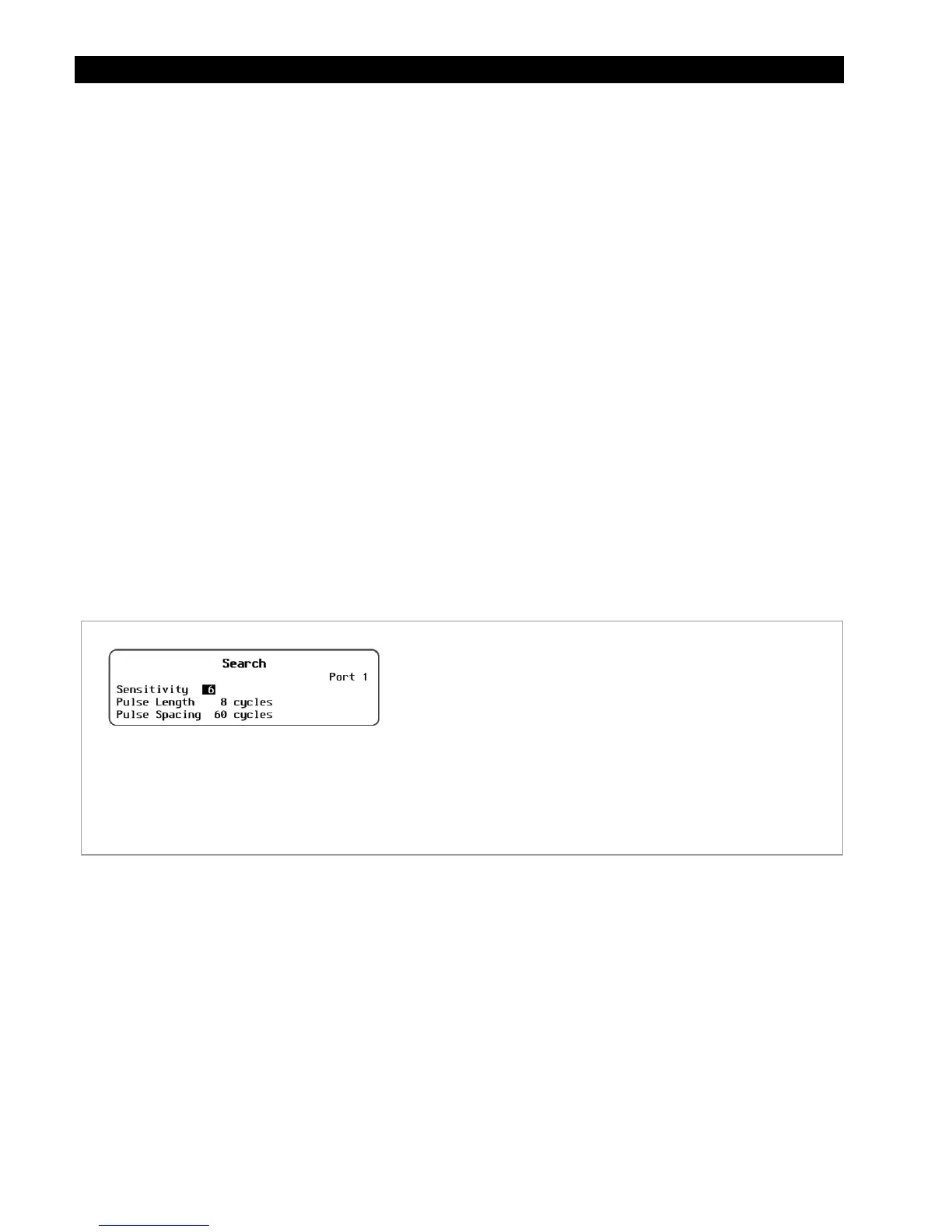
Search Menu
This menu adjusts the inverter’s search circuit, which minimizes power draw when no loads are present.
See the inverter Operator’s Manual for more information on the Search function.
Figure 90 Search Screen
AC Input and Current Limit
This menu controls the amount of current that the inverter can draw from the source(s). The menu has
independent settings for two different AC sources. In the most common applications, one source is the
utility grid and the other is an AC generator. The settings are labeled accordingly.
These settings should be adjusted to match the size of the input circuit breaker or input conductor. This is
intended to protect a generator or source that may not be large enough to supply enough current. If the
combined charging and loads exceed this setting, the inverter will reduce its charge rate and give priority
to the loads.
If the loads exceed this number on their own, the charge rate will be reduced to zero. This setting may be
assisted by the Input Support
function, if present in the inverter. (If present, see the inverter Operator’s
Manual for information about this function.)
Set Points:
Sensitivity
– Adjusts the Search mode sensitivity while
searching for loads. Setting this item to zero will disable
Search mode.
Pulse length
– Adjusts the duration of each search pulse (in
single AC cycles). A longer duration means inverter detects a
load more quickly. It also consumes more power.
Pulse spacing
– Adjusts the time between search pulses (in
single AC cycles). Shorter spacing means the inverter
detects a load more quickly. It also consumes more power.


 To Next Page