Configuration Wizard
900-0117-01-00 Rev B 125
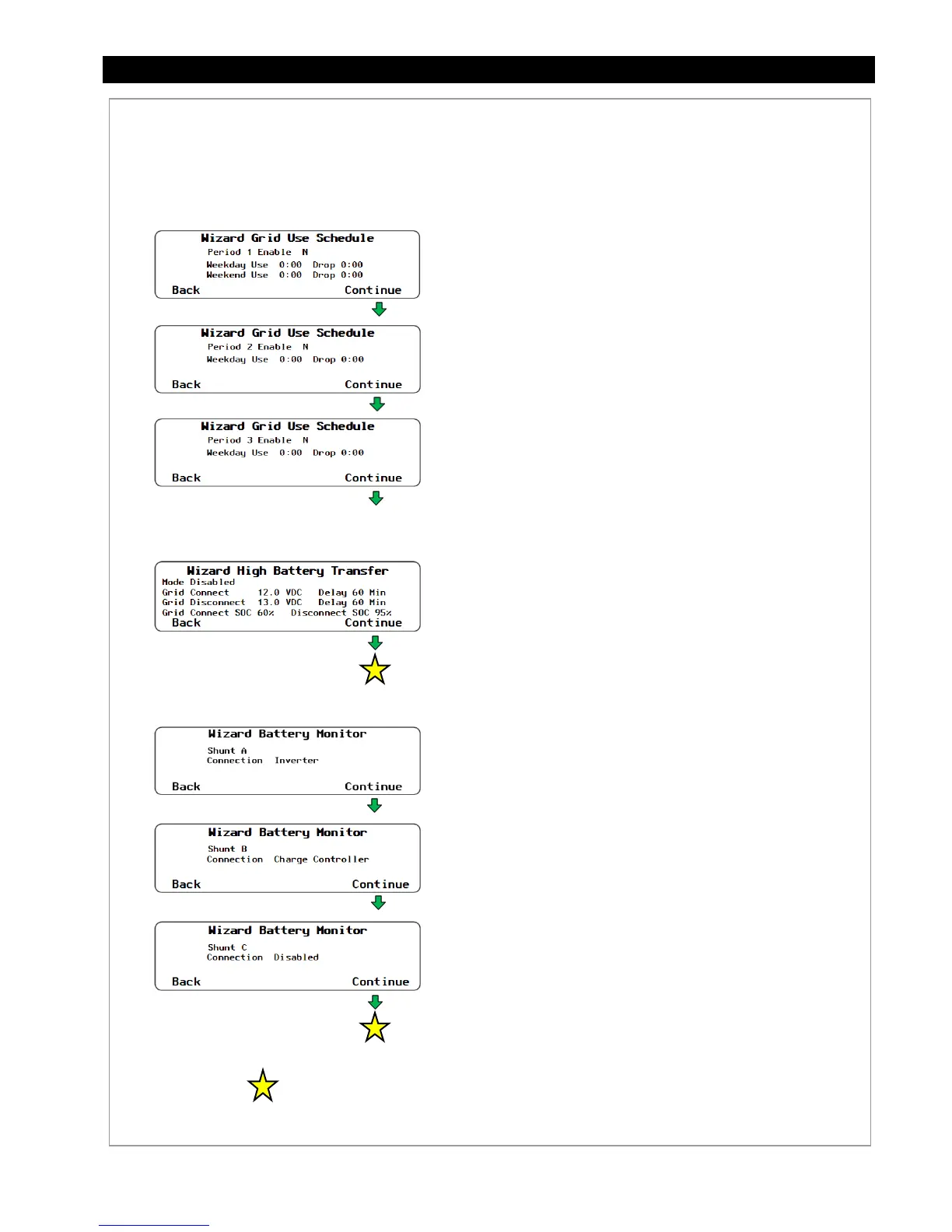
Figure 150 Restoring Configuration (continued)
Set Points:
Wizard Grid Use Schedule (see page 116):
Period 1 Enable - N
or
Y
Weekday Use - 0:00 Drop 0:00
Weekend Use - 0:00 Drop 0:00
Period 2 Enable - N
or
Y
Weekday Use - 0:00 Drop 0:00
Weekend Use - 0:00 Drop 0:00
Period 3 Enable - N
or
Y
Weekday Use - 0:00 Drop 0:00
Weekend Use - 0:00 Drop 0:00
Wizard High Battery Transfer (See pages 112and 115):
Mode
– Y or N
Grid Connect - xx.x VDC Delay xx min
Grid Disconnect - xx.x VDC Delay xx min
Grid Connect SOC xx% Disconnect SOC xx%
Wizard Battery Monitor (See page 102):
(These screens will only be available if a FLEXnet DC Battery
Monitor is installed in the system.)
Shunt A:
Connection
-
Disabled, Inverter, Charge Controller,
DC Load, DC Gen, Wind Turbine, Hydro
Shunt B:
Connection
-
Disabled, Inverter, Charge Controller,
DC Load, DC Gen, Wind Turbine, Hydro
Shunt C:
Connection
-
Disabled, Inverter, Charge Controller,
DC Load, DC Gen, Wind Turbine, Hydro
...continued from previous page.
Soft Keys:
<Back> moves back one screen.
<Continue> moves forward to the next screen.
Pressing <Continue> from the last setup screen takes the user to the
Setup
Complete
screen. See Figure 151 to apply the changes to the system.


 To Next Page