Polycom RealPresence Collaboration Server (RMX)1500/2000/4000 Deployment Guide for Maximum Security Environments
4-6 Polycom, Inc.
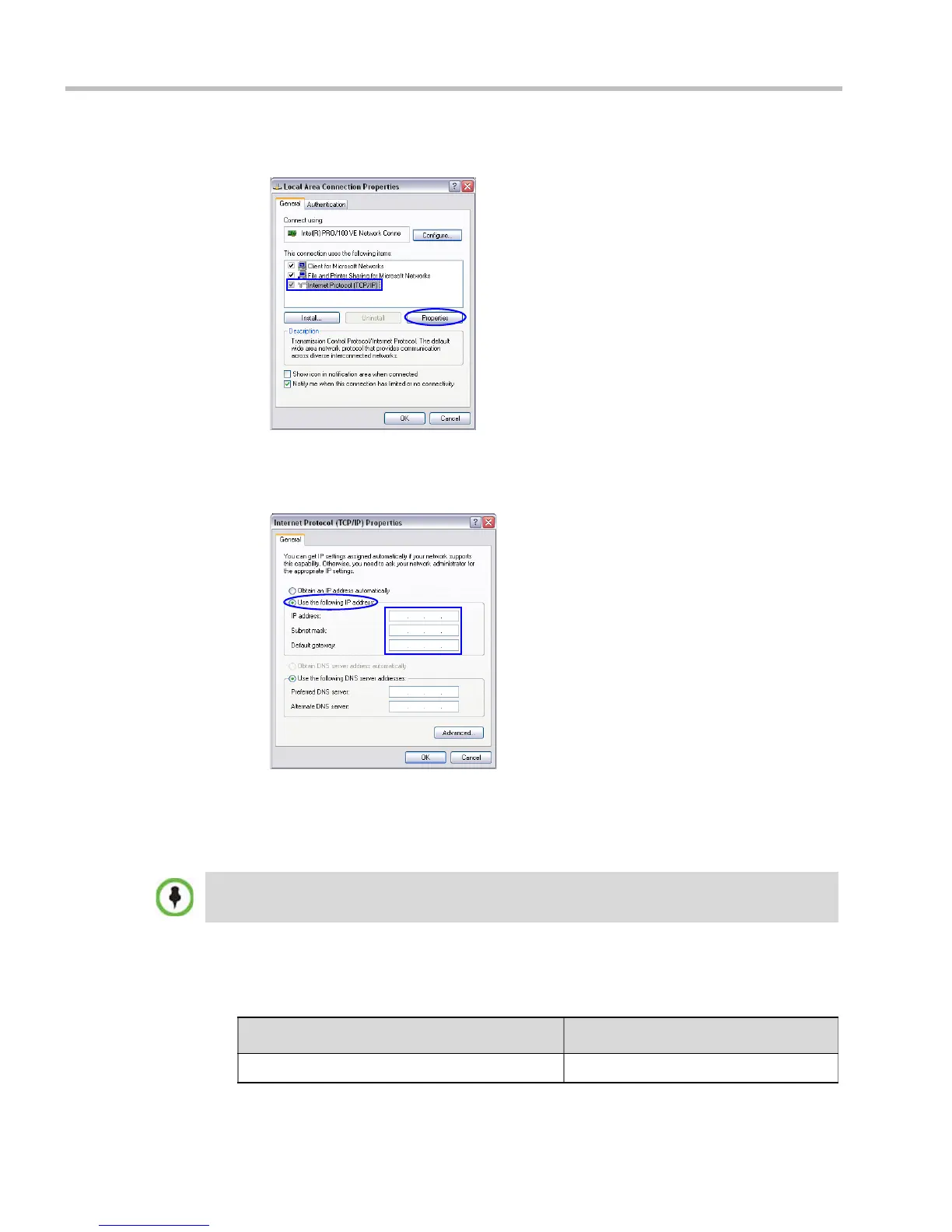
d In the Local Area Connection Properties dialog box, select Internet Protocol [TCP/IP]
> Properties.
e In the Internet Protocol (TCP/IP) Properties dialog box, select Use the following IP
address.
f Enter the IP address, Subnet mask and Default gateway for the workstation.
The workstation’s IP address should be in the same network neighborhood as the
RMX’s Control Unit IP address.
Example: IP address – near
169.254.192.nn
The addresses needed for connection to the RMX’s Alternate Management Network are
listed in Table 4-1.
None of the reserved IP addresses listed in Tab le 4-1 should be used for the IP Address.
Table 4-1 Reserved IP Addresses
Network Entity Alternate Network IP Address
Control Unit IP Address 169.254.192.10














 To Next Page