3. Installation and setup ABL800 FLEX Operator's Manual
Patient reports, Continued
Editing patient
result layout
You can do the following:
• select parameter groups and the parameters in each group, and
• make report layout by using layout commands.
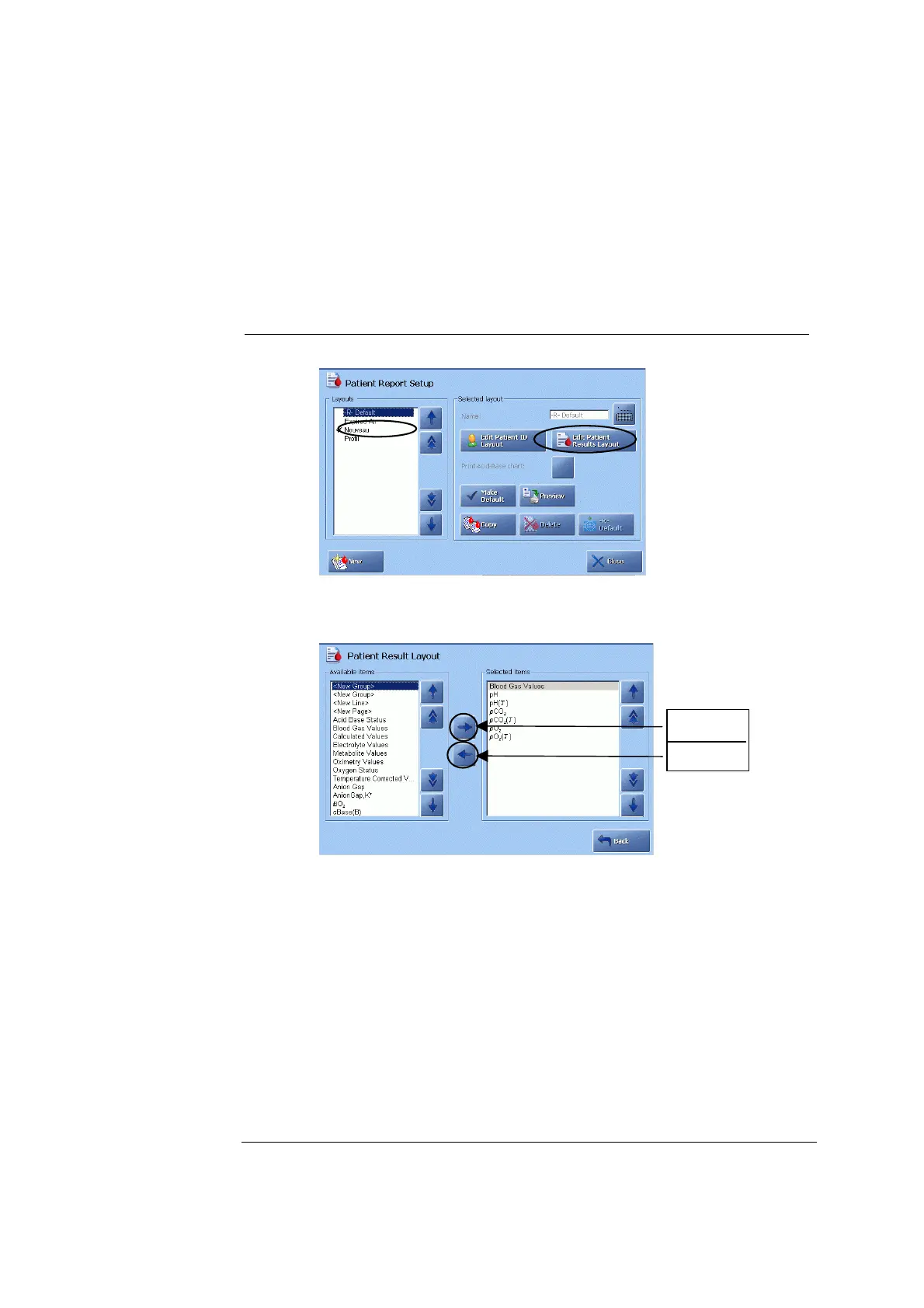
To edit a patient result layout, do the following:
Step Action
1.
Select the patient report layout by highlighting it on the screen and
press Edit Patient Results Layout.
2.
Use the arrow buttons to highlight a parameter group and press “→”
Include
Exclude
to include the group in the patient result. It will be shown in the
"Selected items" box.
3.
Select parameters for this parameter group by highlighting them one
by one and pressing “→” (Include).
4.
Select another parameter group and parameters for this group in the
same manner.
5.
Use layout commands <New group> (items following this command
are placed on the top of the next half of the screen), <New Line> (a
line is inserted between items) or <New Page> (items following this
command appear on next screen page) as desired and press “→”.
Continued on next page
3-30



 To Next Page