Service
Tables
USING SERVICE PROGRAM MODES
SM 5-23 B039/B040/B043
5
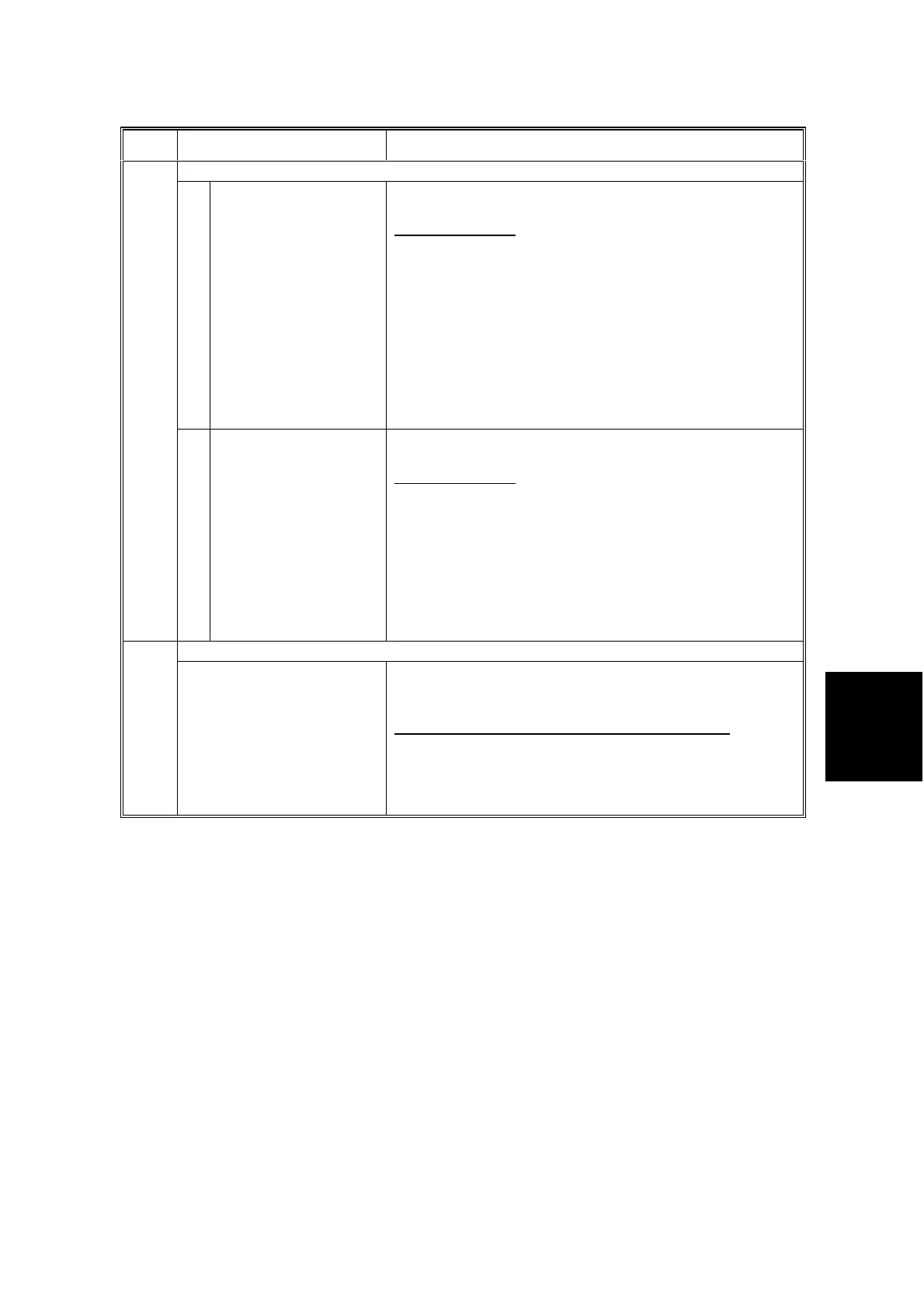
Mode Number/Name Function/[Setting]
8K/16K Detection
1 Platen cover Selects whether the machine will detect 8K/16K instead of
B4/B5 in platen cover mode.
[0 = No / 1 = Yes]
• For China models only
• To allow the machine to detect 8K/16K, first set this
mode to “Yes”, then change the APS sensor positions as
explained in Replacement & Adjustment – Changing the
Original Sensor Position”.
• Note that SP5-911 (APS A4/LT LEF Priority) is not
effective if this setting is “Yes”.
• If this setting is “No” (the default), the machine detects
B4/B5 and not 8K/16K.
☛
3.4.6 Changing the Original Sensor Position
955*
2 ADF/ARDF Selects whether or not the machine will detect 8K/16K
instead of A3/A4/B4/B5 in ADF/ARDF mode.
[0 = No / 1 = Yes]
• For China models only
• In this case, selecting “Yes” is sufficient to allow the
machine to detect 8K/16K
• Note that SP5-911 (APS A4/LT LEF Priority) is not
effective if this setting is “Yes”.
• If this setting is “No” (the default), the machine detects
A3/A4/B4/B5 and not 8K/16K.
☛
3.4.6 Changing the Original Sensor Position
SMC Printing992
Selects the machine status list to be printed. See the
“SMC Printing” section for details about how to print the
list.
[1 = SP / 2 = UP / 3 = Log / 4 = All / 5 = Big Font]
• Selection “5” is for printing reports to be sent by fax.
• B039 machines (outside North America) require optional
16MB memory to support this feature
☛
5.1.6 SMC Printing



 To Next Page