PAPER FEED SECTION
B039/B040/B043 3-28 SM
3.8 PAPER FEED SECTION
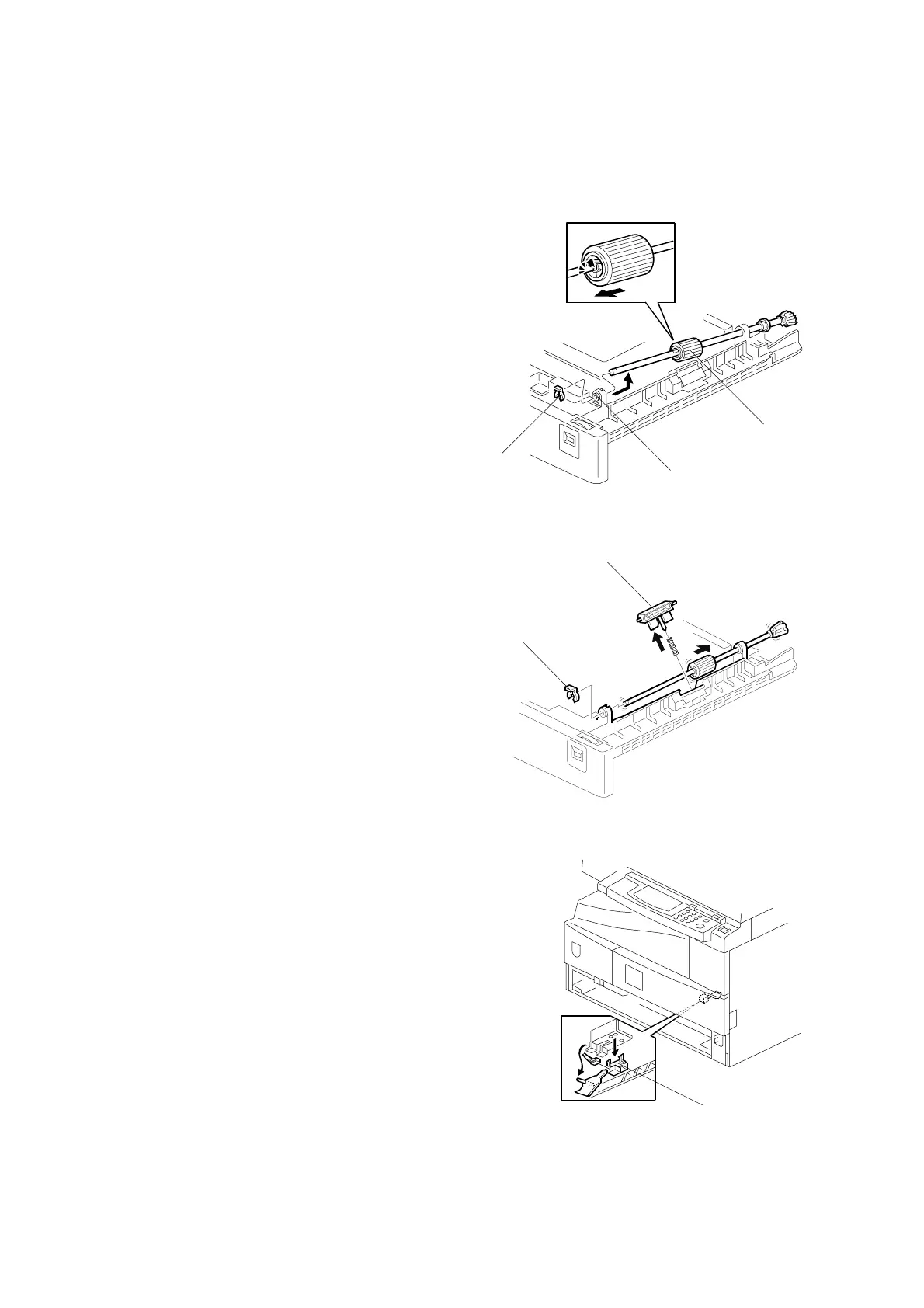
3.8.1 PAPER FEED ROLLER
1. Pull out the appropriate paper tray.
2. Clip [A]
3. Push the shaft back through the opening,
and tilt it up.
NOTE: If the black plastic bushing [B]
comes off, be sure to remount it
when reinstalling the shaft.
4. Paper feed roller [C]
3.8.2 FRICTION PAD
1. Pull the appropriate paper cassette out.
2. Clip [D]
3. Push the shaft back through the
opening, so that the roller moves clear
of the friction pad.
4. Friction pad [E]
3.8.3 PAPER END SENSOR
1. Pull the appropriate paper cassette out.
2. Paper end sensor [F] (" x 1)
B039R702.WMF
B039R703.WMF
B039R705.WMF
[A]
[D]
[F]
[B]
[C]
[E]



 To Next Page