Fax Unit B404
BIT SWITCHES
SM 5-15 B404
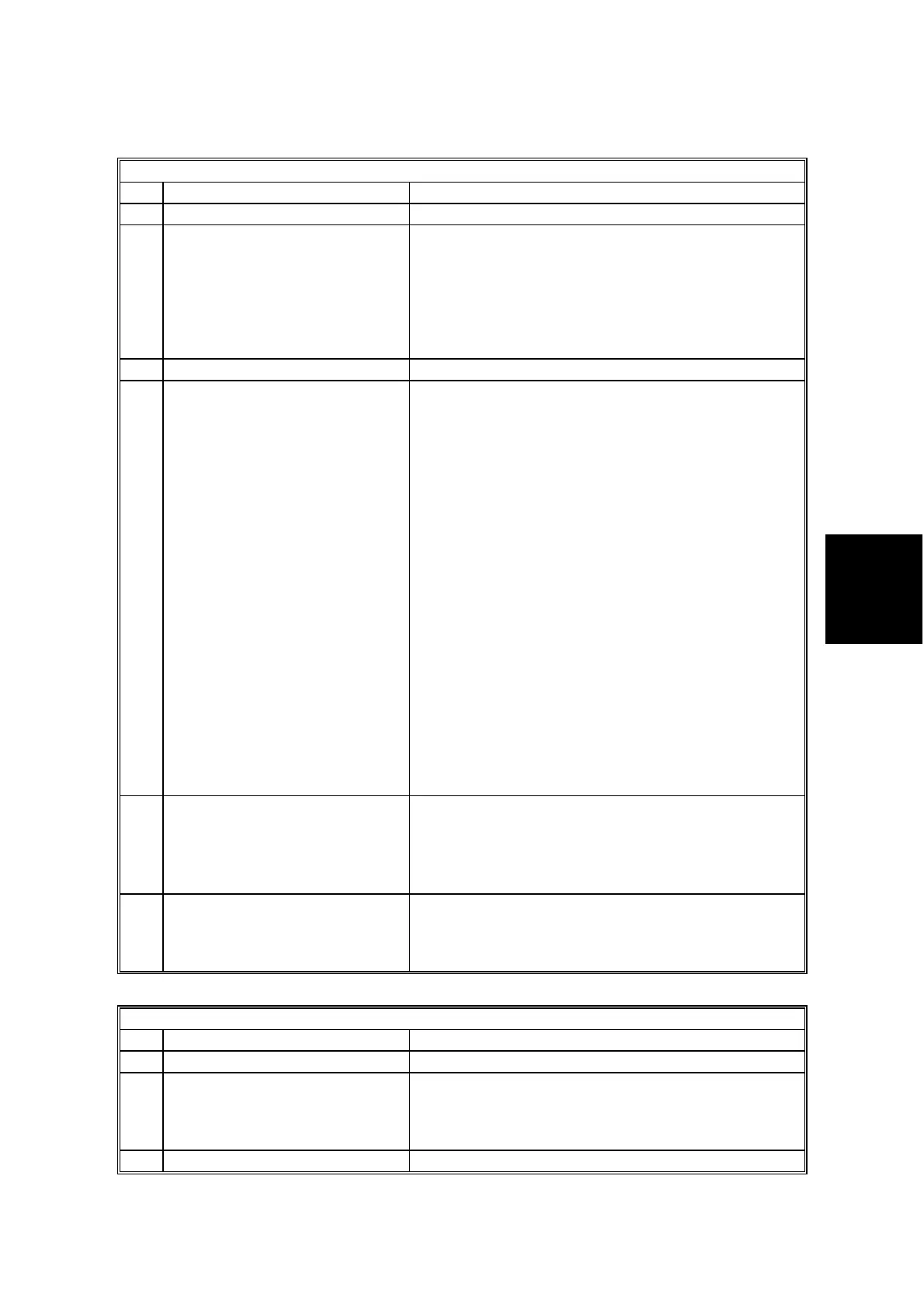
System Switch 04
No FUNCTION COMMENTS
0-2 Not used Do not change the settings.
3 Printing dedicated tx
parameters on Quick/Speed
Dial Lists
0: Disabled
1: Enabled
1: Each Quick/Speed dial number on the list is
printed with the dedicated tx parameters (8 bytes
each).
The last 10 bytes of data are the programmed
dedicated tx parameters; 32 bytes of data are
printed (the other 22 bytes have no use for service
technicians).
4 Not used Do not change the setting.
5
Memory file transfer operation
0: User level
1: Service level
If the machine is unable to print fax messages due
to a mechanical problem, change this bit to 0 to
transfer all messages in the memory (including
confidential rx messages) to an another terminal.
Always reset this bit to 1 after transfer. However,
this bit can be left at 0, if the customer’s key-
operators want to transfer the files themselves.
This machine does not support the confidential rx.
Procedure
1. Enter service mode and change this bit to 0.
2. Exit the service mode.
3. Enter the key-operator mode, and select ‘Key-
operator settings’.
4. Choose ‘03’ and specify a destination for the
machine to transfer all the files to.
5. Press ‘Start’.
6. After the machine transfers the memory files,
enter the service mode and reset this bit to 1.
Otherwise, anybody who knows how to enter the
key-operator mode can transfer confidential
messages.
6
G3 CSI/G4 Terminal ID
programming level
0: User level
1: Service level
1: The CSI and Terminal ID can only be
programmed by a technician (in the user tools).
The Terminal ID can only be programmed if a Group
4 option is installed.
This machine does not have a Group 4 option.
7
Telephone line type
programming mode
0: User level
1: Service level
1: Telephone line type selection (choosing tone dial
or pulse dial) can only be programmed by a
technician (in the user tools).
System Switch 05
No FUNCTION COMMENTS
0-1 Not used Do not change the settings.
2
Display of both RTI and CSI on
the LCD
0: Disabled
1: Enabled
1: An RTI will be displayed until phase B of the
protocol sequence, and a CSI will be displayed after
phase C.
3-7 Not used Do not change the settings.



 To Next Page