Fax Unit B404
BIT SWITCHES
SM 5-31 B404
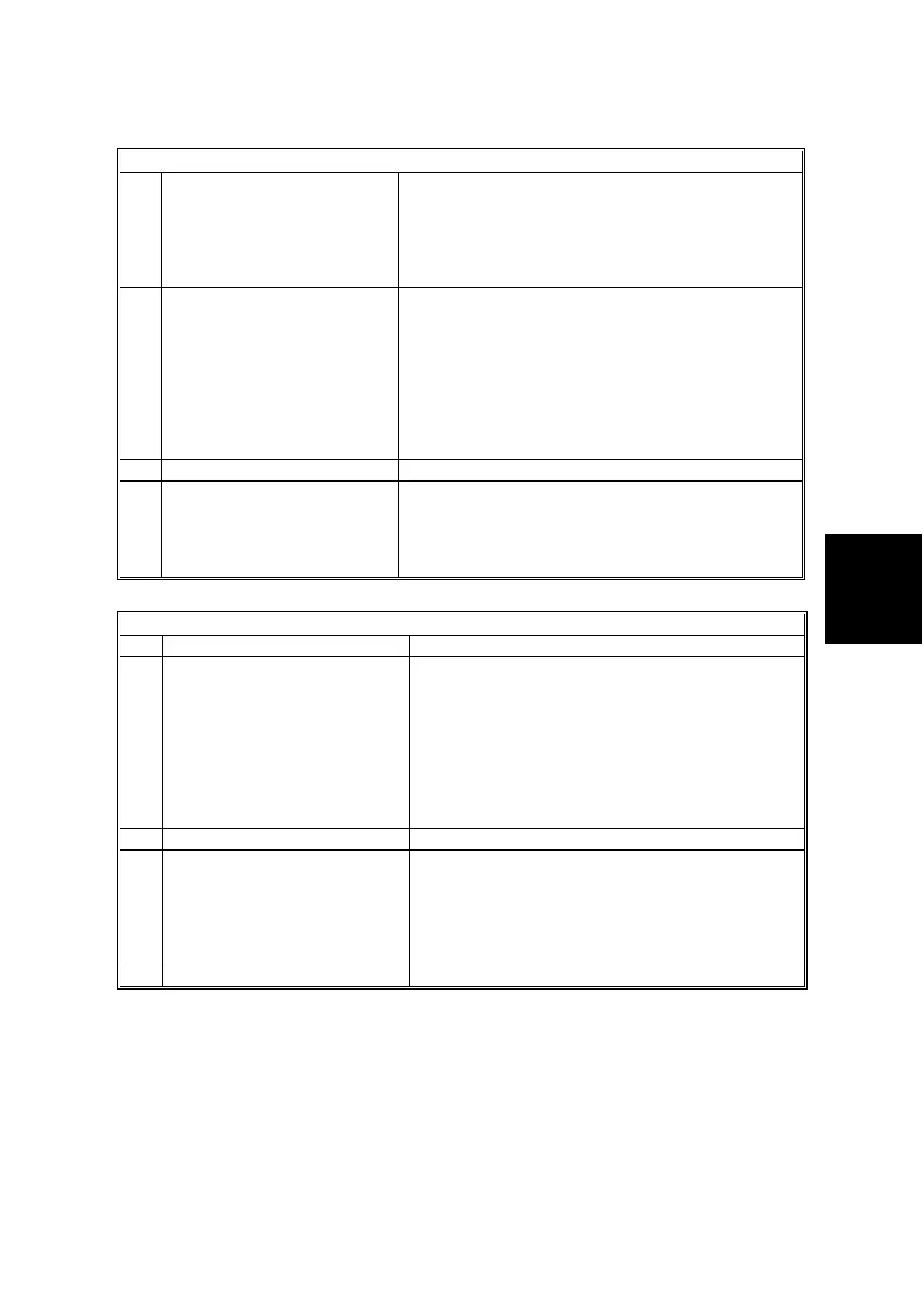
Plotter Switch 0E
2 Page separation
0: Enabled
1: Disabled
1: If all paper sizes in the machine require page
separation to print a received fax message, the
machine does not print the message (Substitute
Reception is used).
After a larger size of paper is set in a cassette, the
machine automatically prints the fax message.
3
to
4
Printing the sample image on
reports
Bit 4 Bit 3 Setting
0 0 The upper half
only
0 1 50% reduction
in sub-scan only
1 0 Same size
1 1 Not used
“Same size” means the sample image is printed at
100%, even if page separation occurs.
User Parameter Switch 19 bit 4 must be set to “0” to
enable this switch.
5-6 Not used Do not change the settings.
7
Equalizing the reduction ratio
among separated pages
(Page Separation)
0: Enabled
1: Disabled
0: When page separation has taken place, all the
pages are reduced with the same reduction ratio.
1: Only the last page is reduced to fit the selected
paper size when page separation has taken place.
Other pages are printed without reduction.
Plotter Switch 0F
No FUNCTION COMMENTS
0
to
1
Smoothing for received fax
images
Bit 1 Bit 0 Setting
0 0 Disabled
0 1 Disabled if the
sender used
halftone
1 0 Enabled
1 1 Not used
(0, 0): Smoothing is always disabled.
(0, 1): Smoothing is disabled only when half-tone
mode was selected by the transmitting side.
2-3 Not used Do not change the settings.
4 Printing fax messages in user
code mode.
0: Enabled
1: Disabled
1: The machine holds the received fax messages
until the machine exits the restricted access mode
(user code or key counter).
If the machine enters the restricted access mode
again while printing fax messages, it stops printing
until it exits the mode again.
5-7 Not used Do not change the settings.



 To Next Page