KEY COUNTER INSTALLATION
B039/B040/B043 1-28 SM
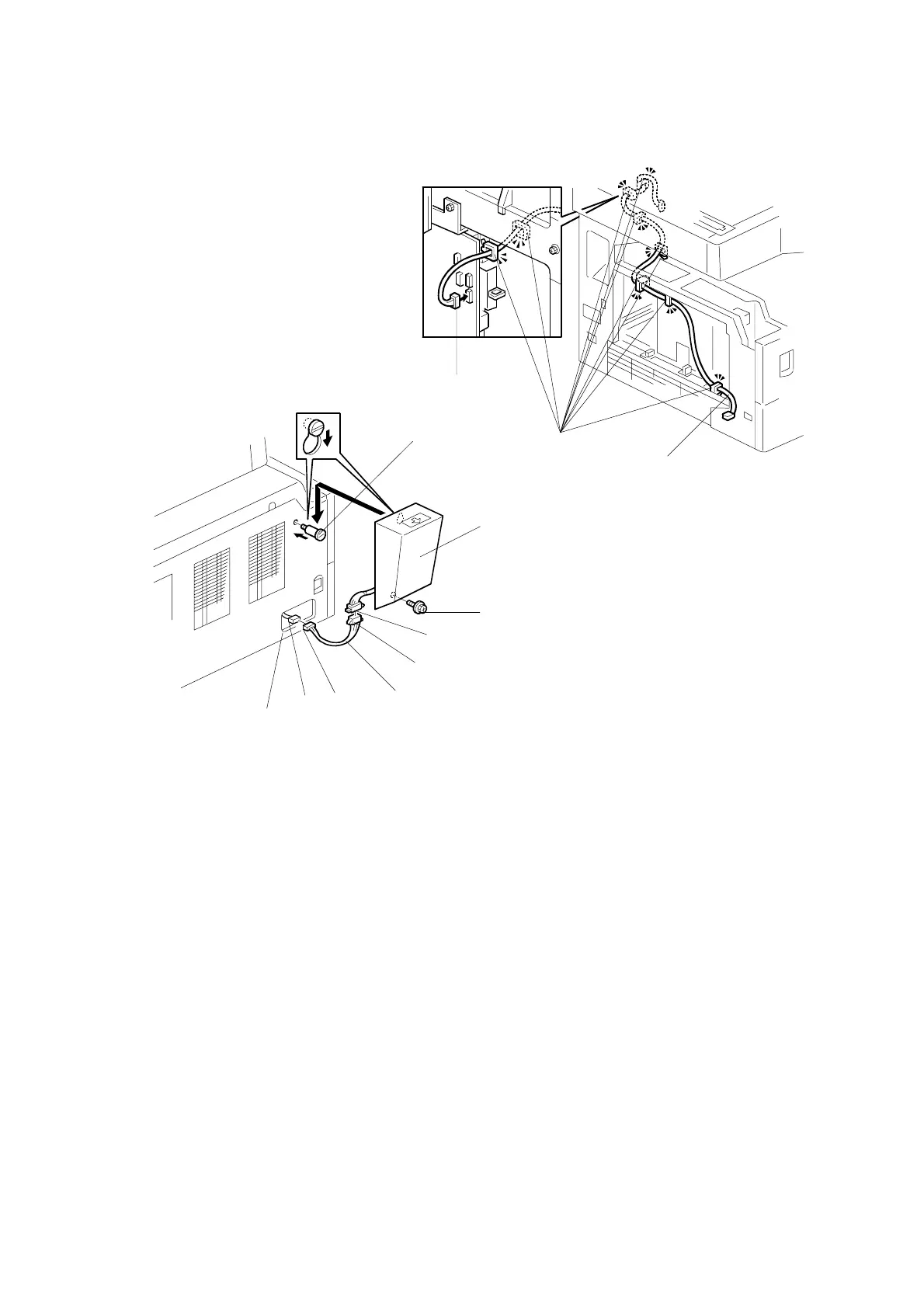
8. Clamp the relay cable [A] with the clamps [B], as shown.
NOTE: The relay cable [A] is not included in the key counter bracket
accessories.
9. Connect the connector [C] to CN306 on the IOB.
10. Reinstall the rear and left cover.
NOTE: When reinstalling the left cover, pass the relay cable connector [D]
through the opening [E].
11. Install the stepped screw [F].
12. Install the relay cable [G] and join the connectors [D, H].
13. Join the connectors [I, J].
14. Hook the key counter holder assembly [K] onto the stepped screw [F].
15. Secure the key counter holder assembly with a screw [L].
16. Change the value of SP5-113 to “1”.
B039I130.WMF
B039I131.WMF
[C]
[F]
[K]
[L]
[J]
[I]
[G]
[H]
[E]
[D]
[B]
[A]



 To Next Page