Setting Destinations and a Subject
133
5
H Press [OK].
To search for another destina-
tion, repeat from step B.
I Press [Exit].
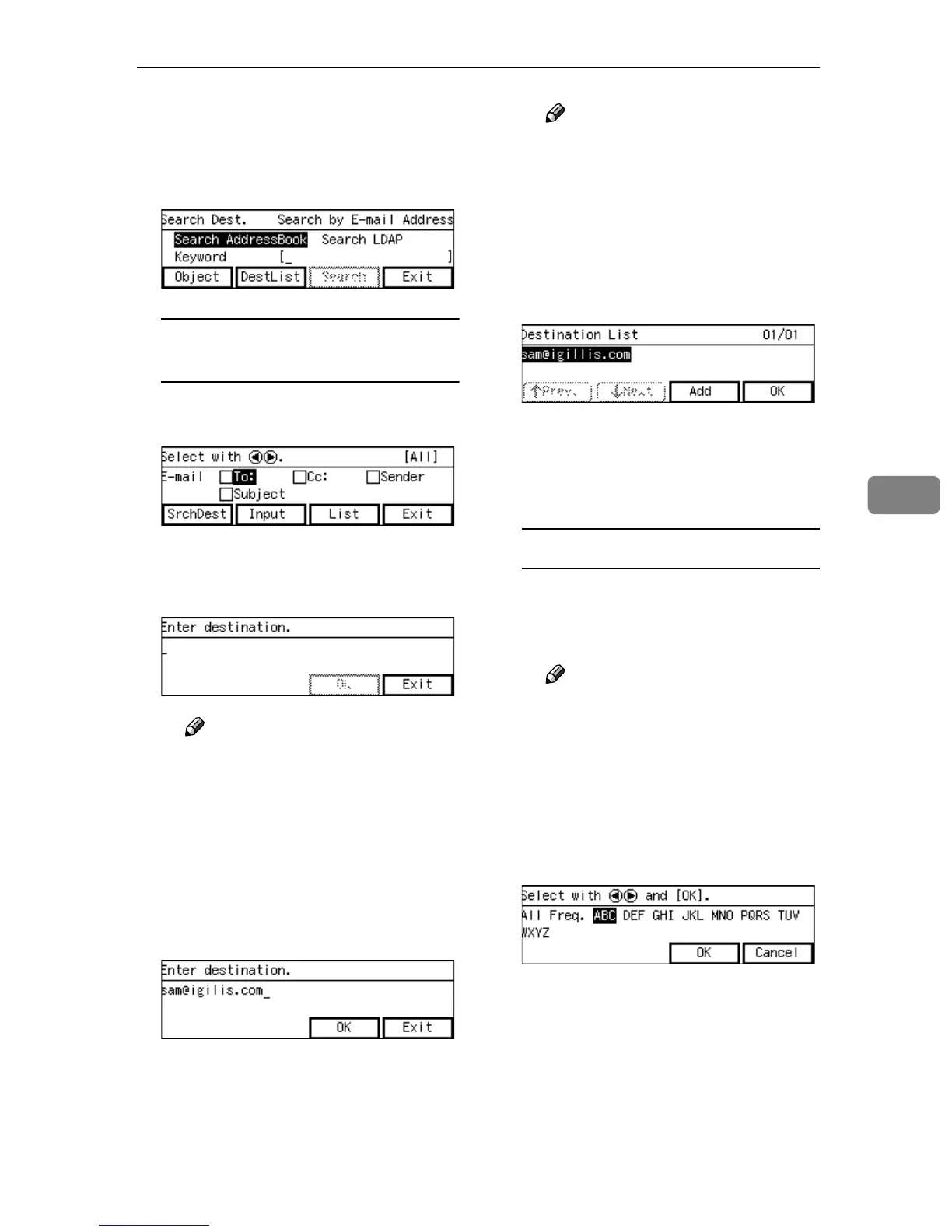
To enter an E-mail address(s)
directly from the keyboard
A While [To:] is highlighted,
press [Input].
B Enter the E-mail address of the
destination from the keyboard,
if it is the first time to enter.
Note
❒ If it is the second time or the
previous result of destination
still remains, [DestList] ap-
pears on the lower left of the
screen. Press [DestList] and
you can select, edit and de-
lete the E-mail addess(es) of
the destination.
C Press [OK].
Note
❒ If any inaccurate character is
contained in an E-mail ad-
dress you have entered,
“Contains characters that
cannot be used.” appears.
Press [Exit] and enter the cor-
rect E-mail address.
D Press [OK].
If you want to add another E-
mail address for the destination,
press [Add] and repeat from step
B.
To recall destinations using a title
A Press the {
{{
{./*}
}}
} (Title) key.
List of titles appears on the
screen.
Note
❒ Titles are displayed accord-
ing to the settings in [Configu-
ration] → [Basic Settings] →
[Scanner] → [Select Title] on
the Web Status Monitor.
B Use the {
{{
{1
11
1}
}}
} or {
{{
{0
00
0}
}}
} key to
highlight the title you want to
select, and then press [OK].
The destinations assigned to the
selected title are displayed.



 To Next Page