Scan Settings
77
3
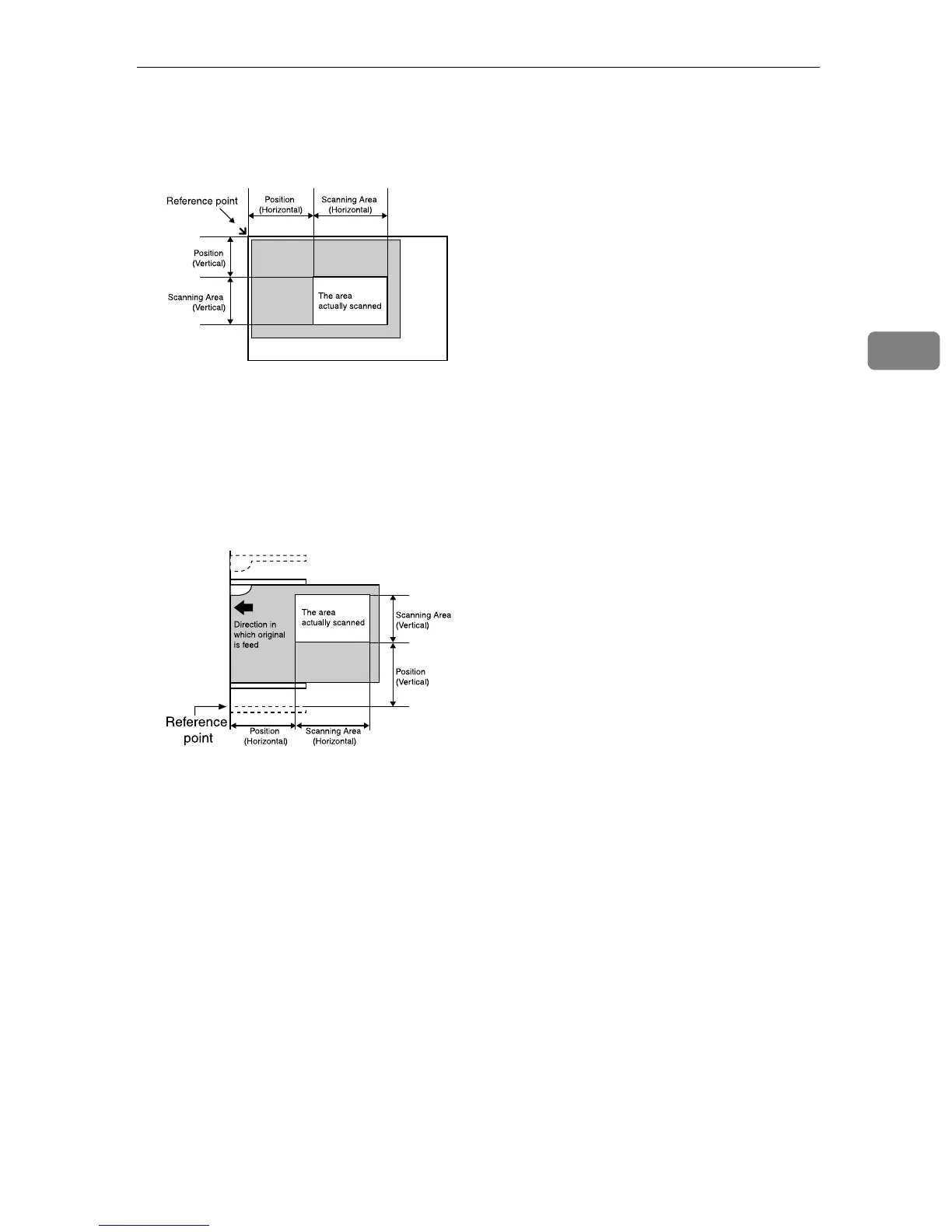
The following illustrates the reference point and actual scanning area in ac-
cordance with the place where you set the originals.
A
When the original is set on the Exposure glass
When you place an original on the Exposure glass, the available area for
scanning is 215mm (8.5”) (vertical) and 297mm (11.7”) (horizontal) from
the reference point, regardless of the setting in [Scan Type]. Be sure to spec-
ify [Position] and [Scanning Area] to be within the available area for scan-
ning.
B
When you place the originals in the ADF
When you place the originals in the ADF, the available area for scanning is as
follows depending on the setting in [Scan Type] and [Original Settings].
• When [Scan Type] is set to “Black and White:Text”, “Black and
White:Text/Photo” or “Black and White:Photo” and [Original Settings] is set
to a 1-sided option:
215mm (8.5”) (vertical) and 2000mm (80”) (horizontal) from the reference
point
• When [Scan Type] is set to other than the above, and [Original Settings] is set
to a 1-sided option:
215mm (8.5”) (vertical) and 630mm (24.8”) (horizontal) from the reference
point
• When [Original Settings] is set to a 2-sided option:
215mm (8.5”) (vertical) and 297mm (11.7”) (horizontal) from the reference
point
Be sure to specify [Start Positn.] and [Scanning Area] to be within the available
area for scanning.
ADG012S
ADG013S



 To Next Page