Scan Settings
79
3
Note
❒ When a send file operation is performed using the delivery server func-
tion, the file type is determined in accordance with the delivery server set-
ting.
• Single Page
Each page is saved as a single, separate file. When an original of two or
more pages is scanned, the same number of files as the number of original
pages is created.
Note
❒ When “Black and White:Gray Scale” or “Color:Full Color” is selected in
the [ Scan Type ] list, and “High Compression”, “Normal Compression”,
or “Low Compression” is selected in the [Compression (Gray Scale/Full Col-
or)] list under [System Settings], the scanned image is saved as a JPEG file.
Otherwise, it is saved as a TIFF file.
• PDF
The scanned image is saved as a PDF file.
• Multi-page TIFF
An original of two or more pages is saved as one file.
When “Black and White:Gray Scale” or “Color:Full Color” is selected in
the [Scan Type ] list, and “High Compression”, “Normal Compression”, or
“Low Compression” is selected in the [Compression (Gray Scale/Full Color)]
list under [System Settings], the scanned image is saved as a PDF file. Oth-
erwise, it is saved as a TIFF file.
❖
❖❖
❖ Original Settings
This item lets you select the orientation of the original, and whether to scan
one side or both sides of the original. See p.119 “Original Orientation” for de-
tails.
Note
❒ An original orientation is not available when an image file format is saved
in JPEG or TIFF.
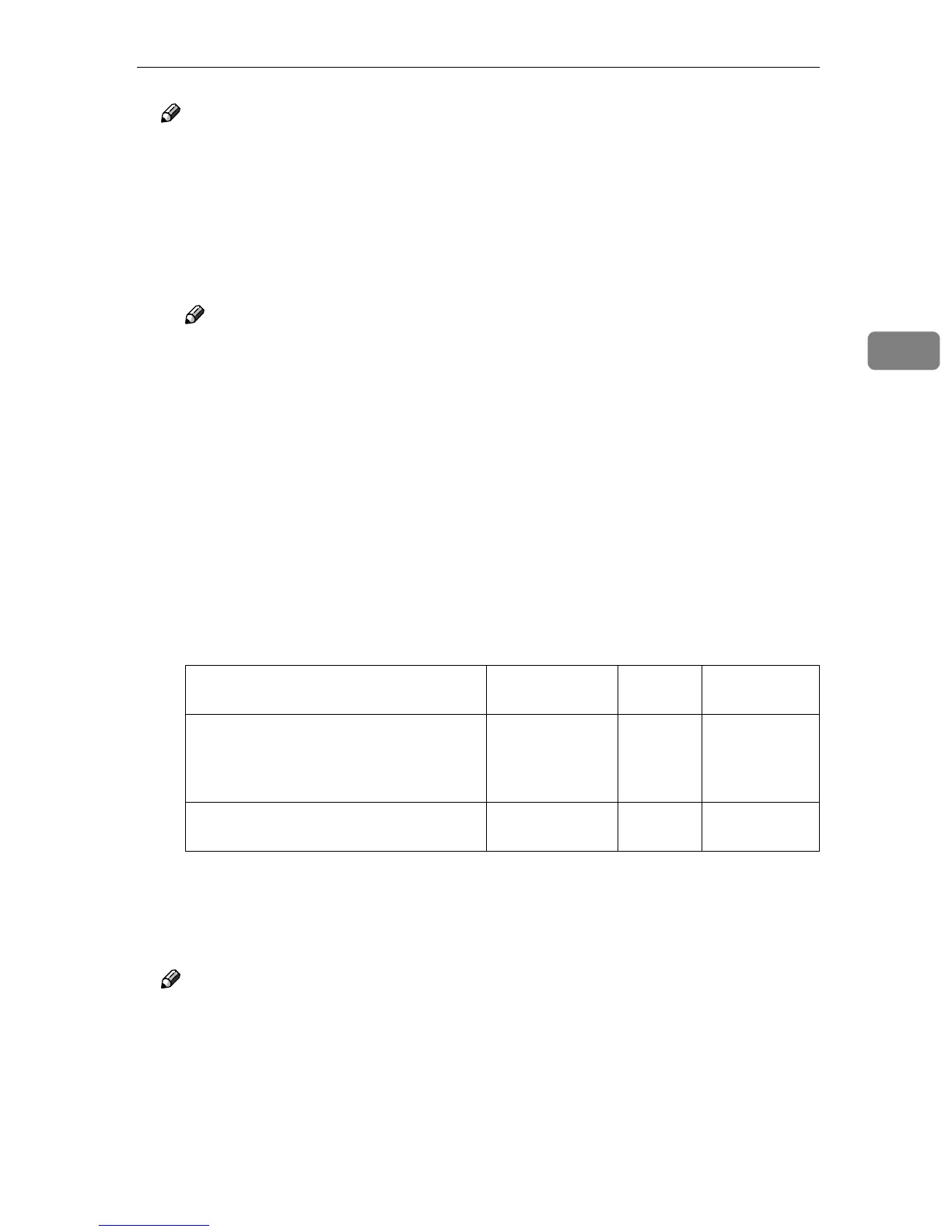
Single Page PDF Multi-page
TIFF
“Image file format when B&W:Gray
Scale or Color:Full Color and High Com-
pression, Normal Compression or Low
Compression are made:”
JPEG PDF PDF
Image file format when settings other
than the cell above are made:
TIFF PDF TIFF



 To Next Page