Adjusting
the Gamma
You
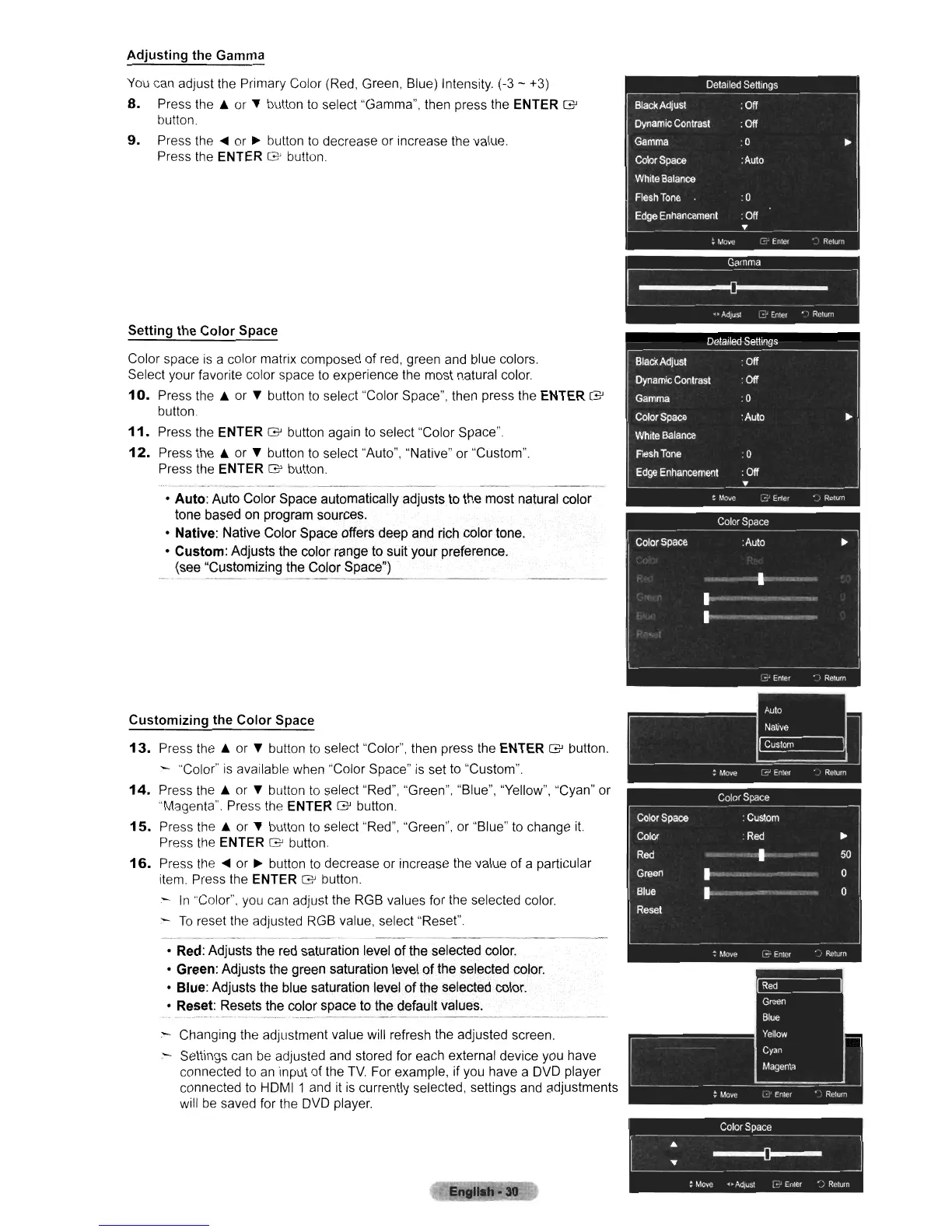
can adjust the Primary Color (Red, Green, Blue) Intensity. (-3 - +3)
8.
Press
the.
or " button
to
select "Gamma", then press the ENTER G
button.
9.
Press
the"
or
~
button
to
decrease or increase the value.
Press the ENTER
G'
bullon.
Setting
the
Color
Space
Color space is a color matrix composed
of
red, green and blue colors.
Select your favorite color space
to
experience the most natural color.
10.
Press
the.
or " button
to
select "Color Space", then press the ENTER G
bullon.
11.
Press the ENTER G button again
to
select "Color Space".
12.
Press
the.
or " button
to
select "Auto", "Native" or "Custom".
Press the ENTER
G button.
o
Auto:
Auto Color Space automatically adjusts to the most natural color
tone based on program sources,
o Native: Native Color Space offers deep and rich color tone.
o
Custom:
Adjusts the color range to suit your preference.
(see "Customizing the Color Space")
------------_._----
Customizing
the
Color
Space
13.
Press
the.
or " button
to
select "Color", then press the ENTER G button.
- "Color"
is
available when "Color Space"
is
set
to
"Custom".
14.
Press
the.
or " button
to
select "Red", "Green", "Blue", "Yellow", "Cyan" or
"Magenta" Press the ENTER
G button.
15.
Press
the.
or " button
to
select "Red", "Green", or "Blue"
to
change
it.
Press the ENTER G button.
16.
Press the
..
or
~
button
to
decrease or increase the value of a particular
item. Press the ENTER
G button.
-
In
"Color", you can adjust the RGB values for the selected color
:-
To
reset the adjusted RGB value, select "Reset".
o Red: Adjusts the red saturation level of the selected color.
o Green: Adjusts the green saturation level
of
the selected color.
o Blue: Adjusts the blue saturation level
of
the selected color.
o Reset: Resets the color space to the default values.
:-
Changing the adjustment value will refresh the adjusted screen.
:-
Settings can
be
adjusted and stored for each external device you have
connected
to
an
input of the
TV.
For example, if you have a DVD player
connected
to
HDMI 1 and it
is
currently selected, settings and adjustments
will
be
saved for the DVD player.
Gamma
~
...
Ad;uS!
~~
Enter • ,
Rclum
Color
Space
~
: Move
..
Adjust
~~
Enl~r
~
J Return












 To Next Page