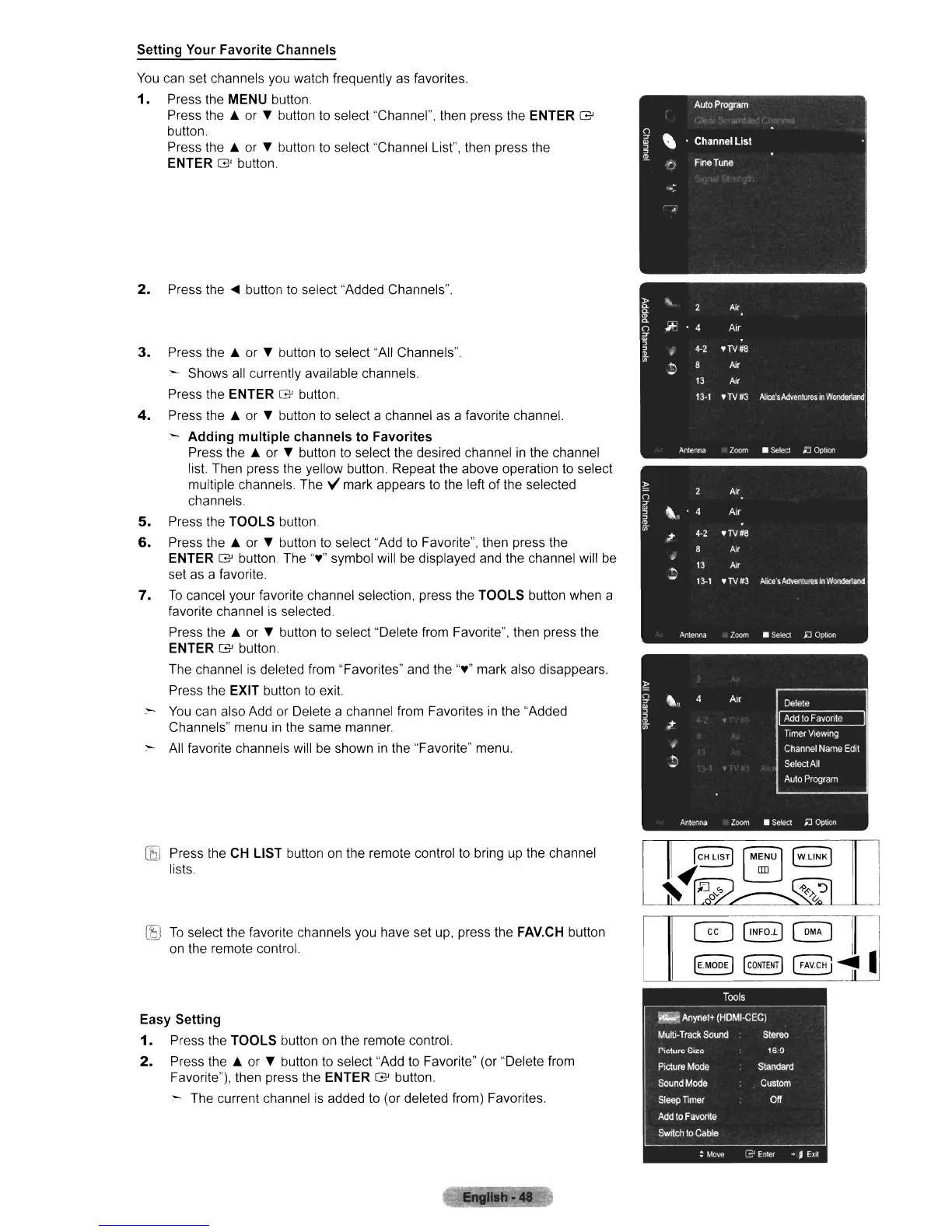
Setting Your Favorite Channels
You
can set channels you watch frequently as favorites.
1.
Press the MENU button.
Press the A
or
" button
to
select "Channel", then press the ENTER G
button.
Press the A or " button
to
select "Channel List", then press the
ENTER G button.
2.
Press
the'"
button
to
select "Added Channels".
3.
Press the A or " button to select "All Channels".
:"-
Shows all currently available channels.
Press the ENTER G button.
4.
Press the A or " button to select a channel as a favorite channel.
- Adding multiple channels to Favorites
Press the A or " button
to
select the desired channel
in
the channel
list
Then press the yellow button. Repeat the above operation
to
select
multiple channels
The"
mark appears to the left of the selected
channels
5.
Press the TOOLS button
6.
Press the A or " button
to
select "Add
to
Favorite", then press the
ENTER
G'
button. The ",," symbol will be displayed and the channel will
be
set as a favorite.
7.
To
cancel your favorite channel selection, press the TOOLS button when a
favorite channel
is
selected.
Press the A or " button
to
select "Delete from Favorite", then press the
ENTER G button
The channel
is
deleted from "Favorites" and the ",," mark also disappears.
Press the EXIT button
to
exit
-
You
can also Add or Delete a channel from Favorites
in
the "Added
Channels" menu
in
the same manner.
:"-
All favorite channels will be shown
in
the "Favorite" menu.
(EJ
Press the
CH
LIST button on the remote control to bring
up
the channel
lists.
C!5J
To
select the
faVOrite
channels you have set
up,
press the
FAV.CH
button
on
the remote control.
Easy Setting
1.
Press the TOOLS button
on
the remote control.
2.
Press the A or " button
to
select "Add
to
Favorite" (or "Delete from
Favorite"), then press the ENTER
G'
button.
:"-
The current channel
is
added
to
(or deleted from) Favorites.
~b."
GJ
(INFO.LJ
EJ
~MOD~
~ONTEN~












 To Next Page