Setting the On/Off Timer
1.
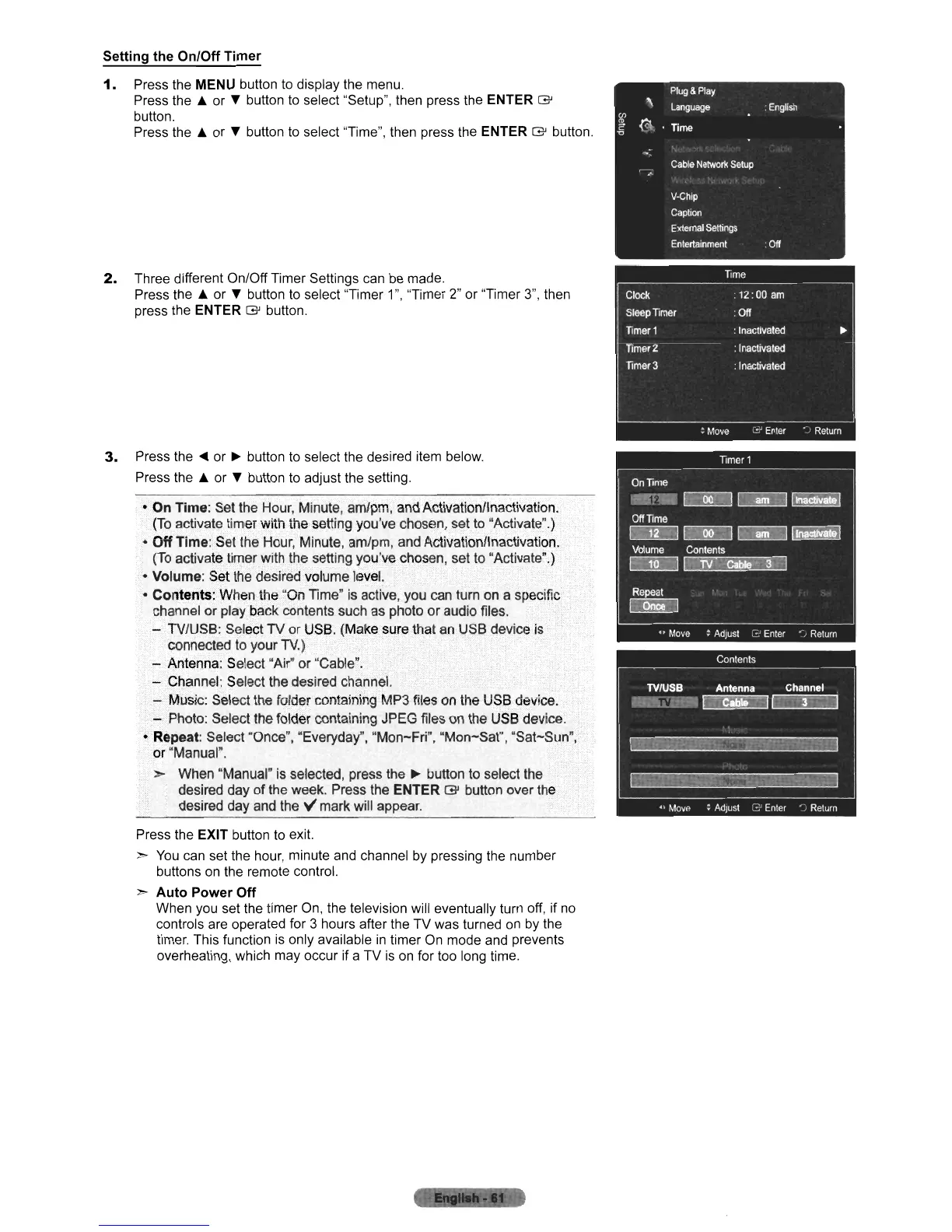
Press the MENU button
to
display the menu.
Press
the"
or
...
button
to
select "Setup", then press the ENTER
G'
button.
Press
the"
or
...
button
to
select "Time", then press the ENTER
G'
button.
2.
Three different On/Off Timer Settings can
be
made.
Press
the"
or
...
button
to
select "Timer 1", "Timer 2" or "Timer
3",
then
press the ENTER
G'
button.
3.
Press
the'"
or
~
button
to
select the desired item below.
Press
the"
or
...
button
to
adjust the setting.
•
On
Time: Set the Hour, Minute, am/pm,and Activationllnactivation.
(To
activate timer with the setting you've chosen. set to "Activate".)
•
Off
Time:
Set
the Hour, Minute, am/pm, and Activation/Inactivation.
(To
activate timer with the setting you've chosen, set
to
"Activate".)
• Volume: Set the desired volume level.
• Coritents:
When.the~On
Time"
is
active, you can turn on a specific
channel
or
play.
back
COntents
such as photo
or
audio files.
- TV/USB: Select TV
or
USB. (Make sure that an USB device
is
connected to your TV.)
· - Antenna: Select "Air" or "Cable".
- Channel: Select the desired channel.
- Music: Select the foldercontaining
MP3
files on the USB device.
...;
Photo: Select the folder containing JPEG files on the USB device.
• Repeat: Select "Once", "Everyday", "Mon-Fri", "Mon-Sat", "Sat-Sun"
or
"Manual".
>-
When "Manual" is selected, press the
~
button to select the
desired day
of
the week. Press the ENTER
G'
button over the
desired day and
the"
mark will appear.
Press the EXIT button to exit.
>-
You
can set the hour, minute and channel by pressing the number
buttons on the remote control.
>-
Auto
Power
Off
When you set the timer
On,
the television will eventually turn off, if
no
controls are operated for 3 hours after the TV was turned
on
by the
timer. This function
is
only available
in
timer
On
mode and prevents
overheating, which may occur if a TV
is
on
for too long time.
",-:'"
·.oL":"'f"':-_lo"Yifr
~!.::.;~
-
.......
_~
...
-
:l












 To Next Page