Commissioning and Diagnostics
5-26
ET 200X Distributed I/O Device
EWA 4NEB 780601602-06
Triggering a hardware interrupt from modules with analog inputs
You define a work area by assigning parameters to an upper and lower limit value.
If the process signal – for example, the ignition temperature – of a module leaves
this work area, the module triggers a hardware interrupt the ”enable hardware
interrupt upon limit exceeded” parameter has been assigned. The CPU interrupts
the processing of the user program and processes the hardware interrupt block
OB 40.
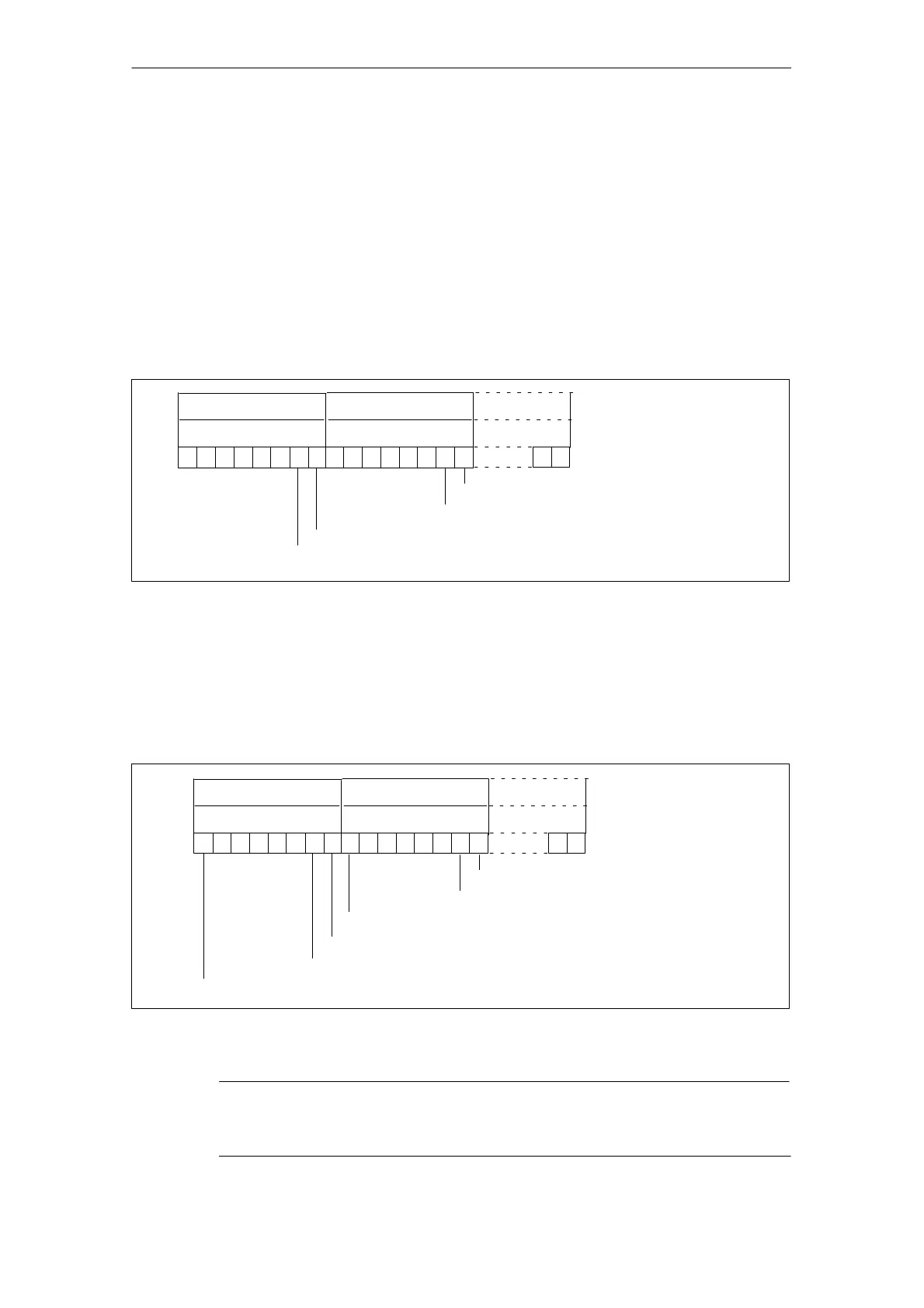
The channels violating a limit value and the limit value concerned are entered in
the start information of the OB 40 in tag OB40_POINT_ADDR. You will find an
assignment of the bits to local data double word 8 in the figure below.
1
16
Bit no.
17
3130
29 282726
LD 81
LB 8
LB 9
25 24
Upper limit value exceeded on channel 0
Lower limit value violated on channel 0
Upper limit value exceeded on channel 1
LB 11
0
1
Lower limit value violated on channel 1
11
18202223 1921
Figure 5-6 Start information of OB 40: modules with analog inputs
Triggering of a hardware interrupt in the case of the BM 141 DI 8 DC 24V
ECOFAST DIAG and EM 141 DI 8 DC 24V DIAG
The channel that triggered the hardware interrupt is entered in the start information
of the OB 40 in the variable OB40_POINT_ADDR. You will find an assignment of
the bits to local data double word 8 in the figure below.
1
16
Bit no.
17
3130
29 2827 26
LD 8
1
LB 8
LB 9
25 24
Rising edge, channel 0
Falling edge, channel 0
Rising edge, channel 1
LB 11
01
Falling edge, channel 1
11
Falling edge, channel 7
1
1
Rising edge, channel 1
:
:
:
:
181920212223
Figure 5-7 Start information of OB 40: BM 141 DI 8 DC 24V ECOFAST DIAG and
EM 141 DI 8 DC 24V DIAG
Note
You will find a description of OBs 40 and 82 in the System and Standard Functions
reference manual.



 To Next Page