Technical Specifications
7-15
ET 200X Distributed I/O Device
EWA 4NEB 780601602-06
Parameters
The following tables provide an overview of the parameters on the basic module
that can be set.
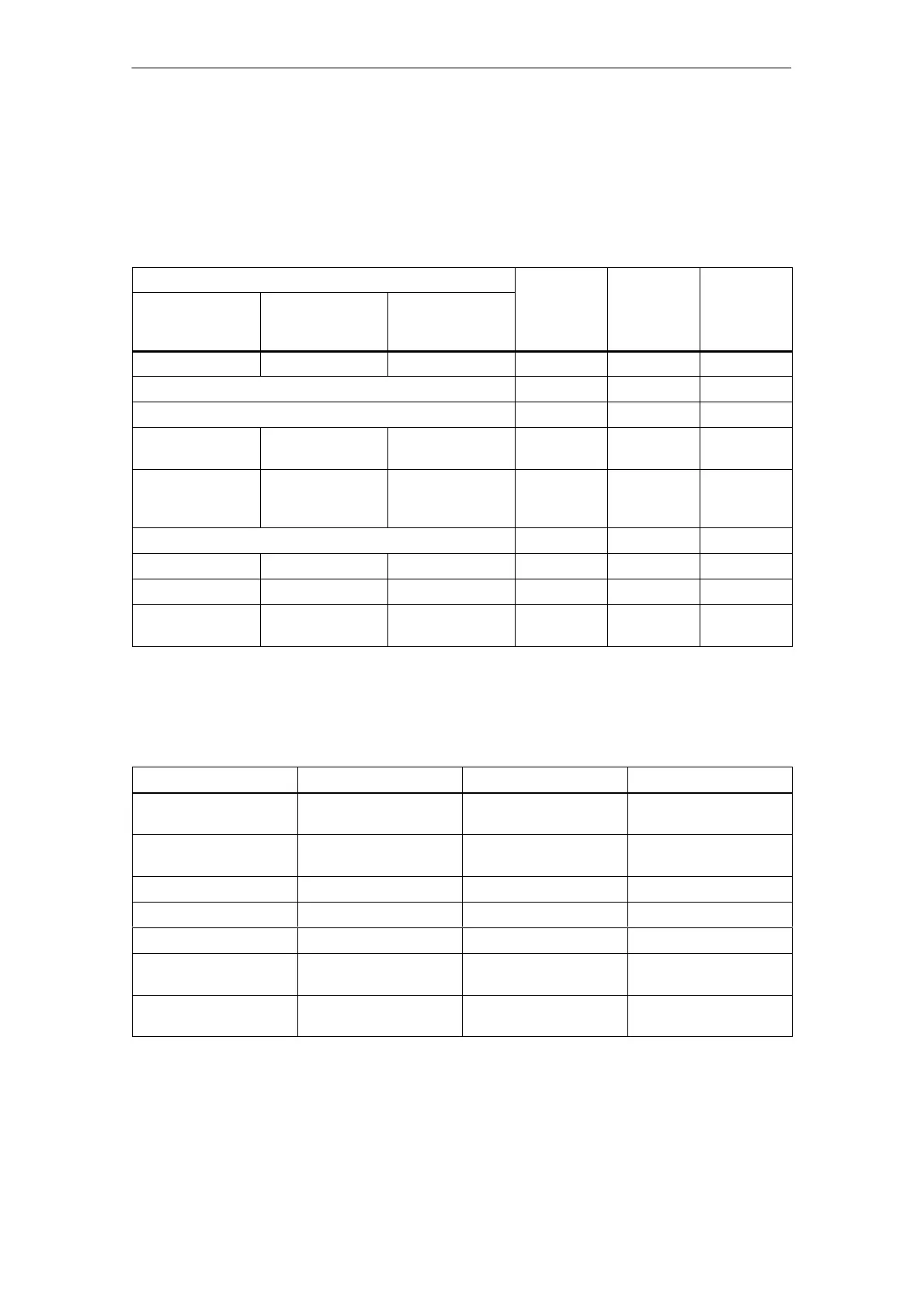
Table 7-6 Parameters of the BM 141 DI 8DC 24V ECOFAST DIAG
Parameters
Range Default Area
S7 slave with
HWCONFIG
Standard slave
with DDB file
SIEM80D3.GSG
1
Standard slave
with DDB file
SI0380D3.GSG
1
affected
––– ––– DP interrupt mode DPV0/DPV1 DPV1 ET 200X
Diagnostic interrupt Yes/no Yes ET 200X
Hardware interrupt Yes/no Yes ET 200X
––– Enhanced
diagnostics
2
–––
Yes/no Yes ET 200X
––– ––– Startup when
expected/actual
config. differ
Yes/no No ET 200X
Diagnosis: no load voltage (S) Yes/no Yes ET 200X
––– ––– Module diagnosis Yes/no Yes ET 200X
––– ––– Module status Yes/no Yes ET 200X
––– ––– Channel-specific
diagnosis
Yes/no Yes ET 200X
1
As of basic module 6ES7 141-1BF40-0AB0, version 2
2
The length of the diagnostic frame is 32 bytes
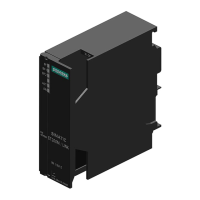
Table 7-7 Parameters of the BM 141 DI 8 DC 24V ECOFAST DIAG for digital inputs
Parameters
Range Default Area affected
Input delay
1
0.5 ms/ 3 ms/ 15 ms/
20 ms
3 ms Module
Diagnosis: short circuit
to M
Yes/no No Channel
Diagnosis: wire break Yes/no No Channel
Diagnostic interrupt Yes/no No Module
Hardware interrupt Yes/no No Module
Hardware interrupt on
rising edge
2
Yes/no No Channel
Hardware interrupt on
falling edge
2
Yes/no No Channel
1
The input delay applies at ”0” to ”1” and at ”1” to ”0”.
2
These parameters can only be set if you enable the hardware interrupt parameter.



 To Next Page