Wiring
4-18
ET 200X Distributed I/O Device
EWA 4NEB 780601602-06
Connection alternatives
The following connection alternatives are available for the ET 200X in accordance
with the configuration options:
Supply voltage for the electronics/sensors and PROFIBUS-DP fed via a
common cable
Supply voltage for the electronics/sensors and PROFIBUS-DP fed via separate
cables
The load voltage must either be fed separately to each ET 200X or looped through.
Wiring of PROFIBUS-DP and supply voltage
If you want to feed PROFIBUS-DP and the supply voltage for the
electronics/sensors to the basic module separately, you will need:
A connector
A 2-core cable, shielded for the PROFIBUS-DP terminal connection (the
braided shield must be twisted, inserted in a wire end ferrule and connected to
pin 2 of the shield; see Figure 4-10)
A 3-core, flexible copper cable for the supply voltage connection
If you want to feed PROFIBUS-DP and the supply voltage for the
electronics/sensors to the basic module via a common cable, you will need a
5-core, shielded cable in addition to the connector (6ES7 194-1LY00-0AA0-Z).
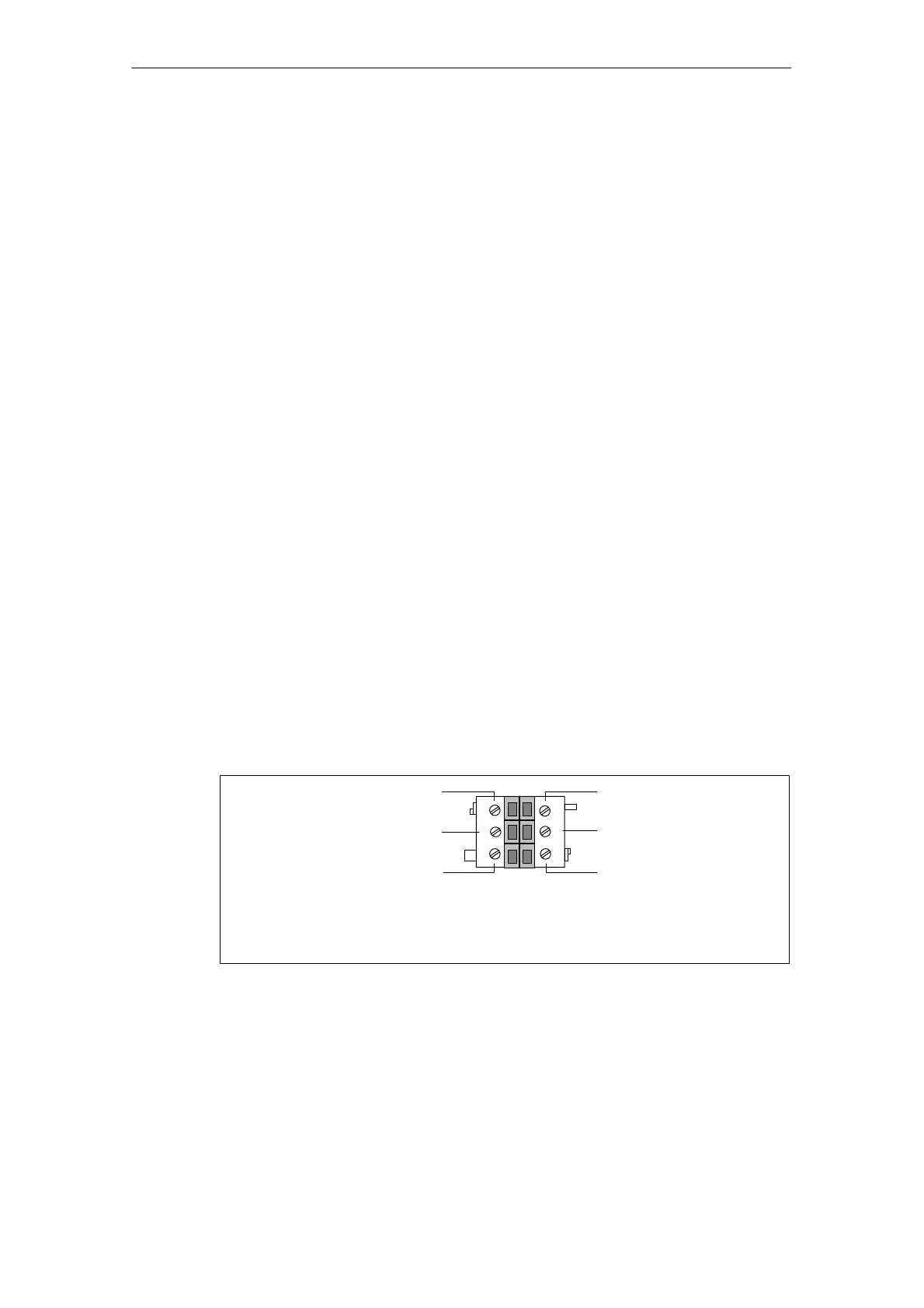
Connector pinout
You must always wire the connector as shown in the diagram below, irrespective of
whether you are using one or two cables. The pins for the PROFIBUS-DP terminal
connection are highlighted in bold type.
2
3
4
5
1
6
B (red)
Shield (PE)
A (green)
L+* (black)
M* (blue)
* Connect supply voltage for electronics/sensors to these pins; either do not connect the
cable’s 3rd core when using a BM 147/CPU or connect it to pin 3
BM 141/142: PE (green-yellow)*
BM 147/CPU: unassigned
Figure 4-10 Pinout of the connector for wiring PROFIBUS-DP and the supply voltage for
the electronics/sensors



 To Next Page