Installation
3-17
ET 200X Distributed I/O Device
EWA 4NEB 780601602-06
Procedure for BM 141, BM 142 and BM 147/CPU
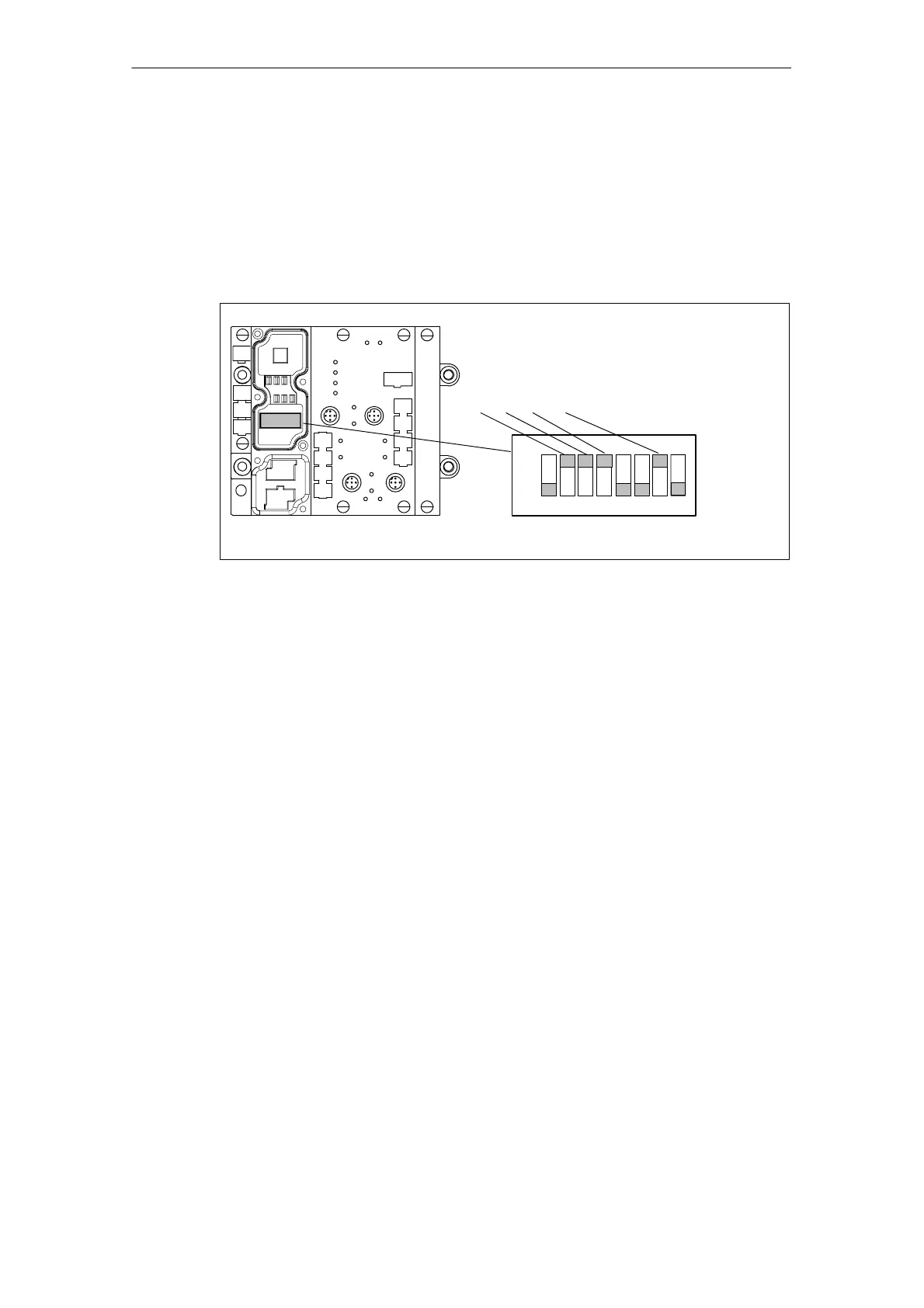
1. Remove the connector plate from the basic module before you set the
PROFIBUS address. The DIL switches are concealed by the connector plate.
2. Set the PROFIBUS address using the DIL switches.
The diagram below shows the location of the DIL switches in the basic module as
well as an example of the switch settings.
Example: PROFIBUS address 78
7654321
ON
* Switch 8 must be OFF!
8*
2
1
+2
2
+ 2
3
+ 2
6
= 2 + 4 + 8 + 64 = 78
Figure 3-11 Setting the PROFIBUS address
Note: The PROFIBUS address in the basic module must always correspond to the
PROFIBUS address specified in the configuration software for this ET 200X.



 To Next Page