Page 48 of 292
7.4 Description of the Mode Panel in Ventilation Off Mode
The Mode panel functions vary between modes of ventilation and Ventilation off.
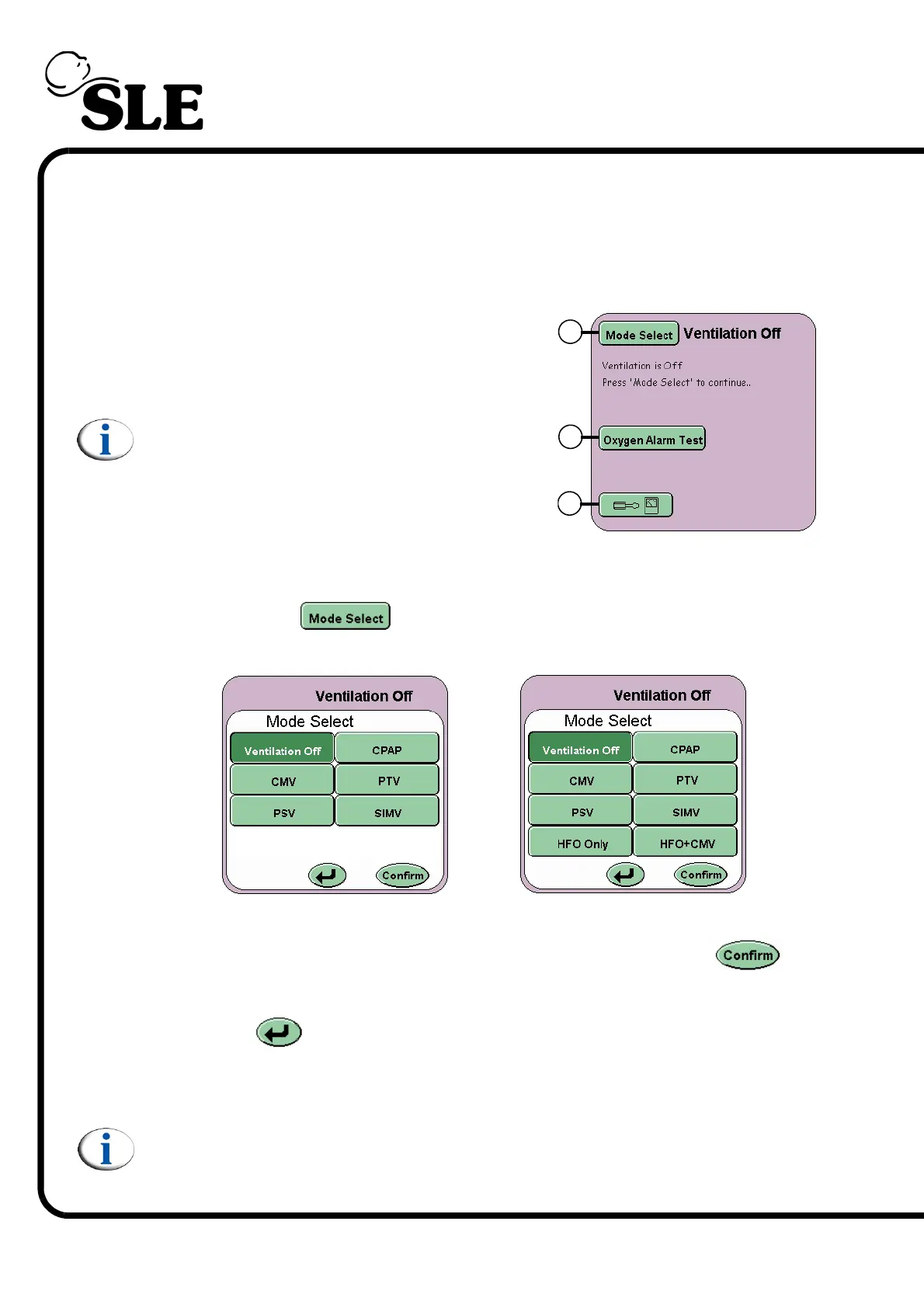
7.4.1 Mode Panel in Ventilation Off Mode
The Mode Panel displays the Mode Select
button (A), the Oxygen Alarm Test button (B)
and the Options and Service Data button (C).
Note: In Ventilation Off mode alarm sounds
are muted to the minimum setting (1).
7.4.2 Mode Select Button
The Mode Select button activates the Mode Select Panel. The panel
displays all the ventilation modes that can be selected.
Selection of the mode has to be confirmed by pressing the Confirm
button. (Note the confirm button flashes between green and white).
The Return button returns the user to the current mode and cancels any
parameter changes made in the preview mode.
Note: When changing between modes, for any alarms that have been
triggered the alarm sounder volume is set to its minimum setting, for a
period of 10 seconds. After the 10 seconds has expired the volume will
return to the user set value.
A
B
C
SLE4000
SLE5000



 To Next Page