Page 56 of 292
7.8.2 Apnoea Setup for CPAP
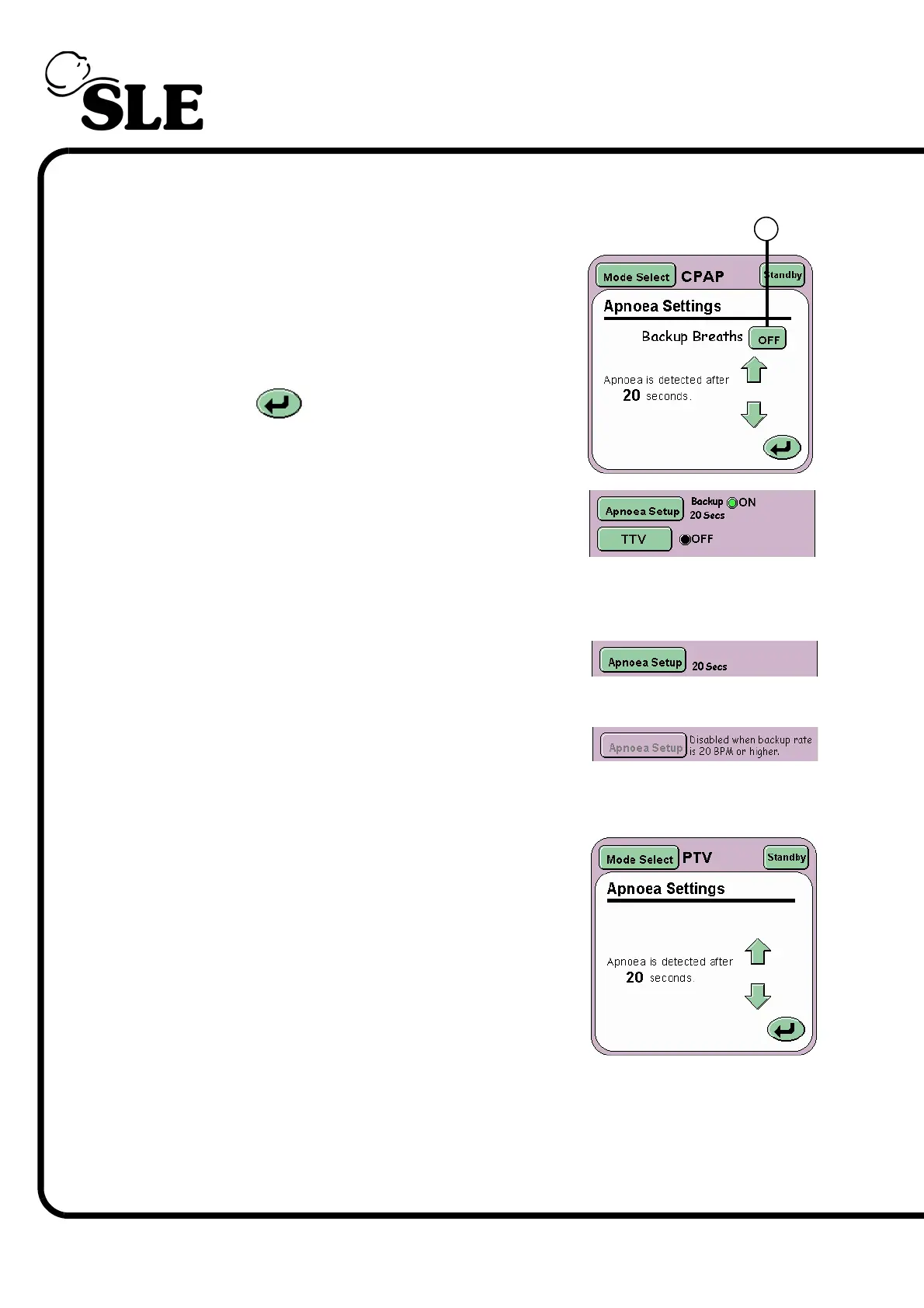
The Apnoea Settings panel allows the user to set
the Apnoea detection time and to activate backup
breaths if apnoea is detected.
The Backup breaths function is activated by the
ON/OFF toggle button (S) and the Apnoea Detect
time is controlled by the Arrow controls.
The Return button returns the user to the
current mode panel.
In the mode panel the function indicator will change
from black to green and display the word ON.
7.8.3 Apnoea Setup for PTV, PSV and SIMV
For PTV, PSV and SIMV the Apnoea setup button
only becomes active when the backup breath rate is
19 BPM or lower.
At 20 BPM and above the Apnoea alarm is inactive.
The ventilator defaults to 20 BPM so the Apnoea alarm is inactive.
The Apnoea Settings panel when active allows the
user to set the Apnoea detection time only.
The user at Backup rates of 19 BPM or lower can
set the apnoea detection time from 5 to 60 seconds.
The default is value is 20 seconds.
S



 To Next Page