3.2 POWER OF THE INSTRUMENT
SVAN 977A can be powered by one of the following sources:
• Four AA standard size internal batteries. In case of alkaline type, with a new fully charged set, the
instrument can operate more than 12 h (6.0 V / 1.6 Ah). Instead of the ordinary alkaline cells, four AA
rechargeable batteries can be used (a separate external charger is required for charging them). In this
case, using the best NiMH type, the operation time can be increased up to 16 h (4.8 V / 2.6 Ah)
• External DC power source – 7 V DC÷16 V DC (1.5 W)
• SA 17A external battery pack – operation time > 24 h (option)
• USB interface – 500 mA HUB
For each power source, there is a different view presented in the Battery screen of the Instrument list.
When the instrument is powered from its internal batteries, the “battery” icon is presented on the top line of the
display. When the voltage of the batteries is too low for reliable measurements, the icon is red or during attempt
to switch the instrument on, the Low Battery! message occurs on the display for 2 seconds and the instrument
switches itself off. A fully charged set of 4 batteries ensures more than 12 hours of continuous operation of the
instrument (with display Dim switched on). The battery condition can be checked by means of the Battery
function. It is also presented continuously on the top line of the display by means of the “battery” icon.
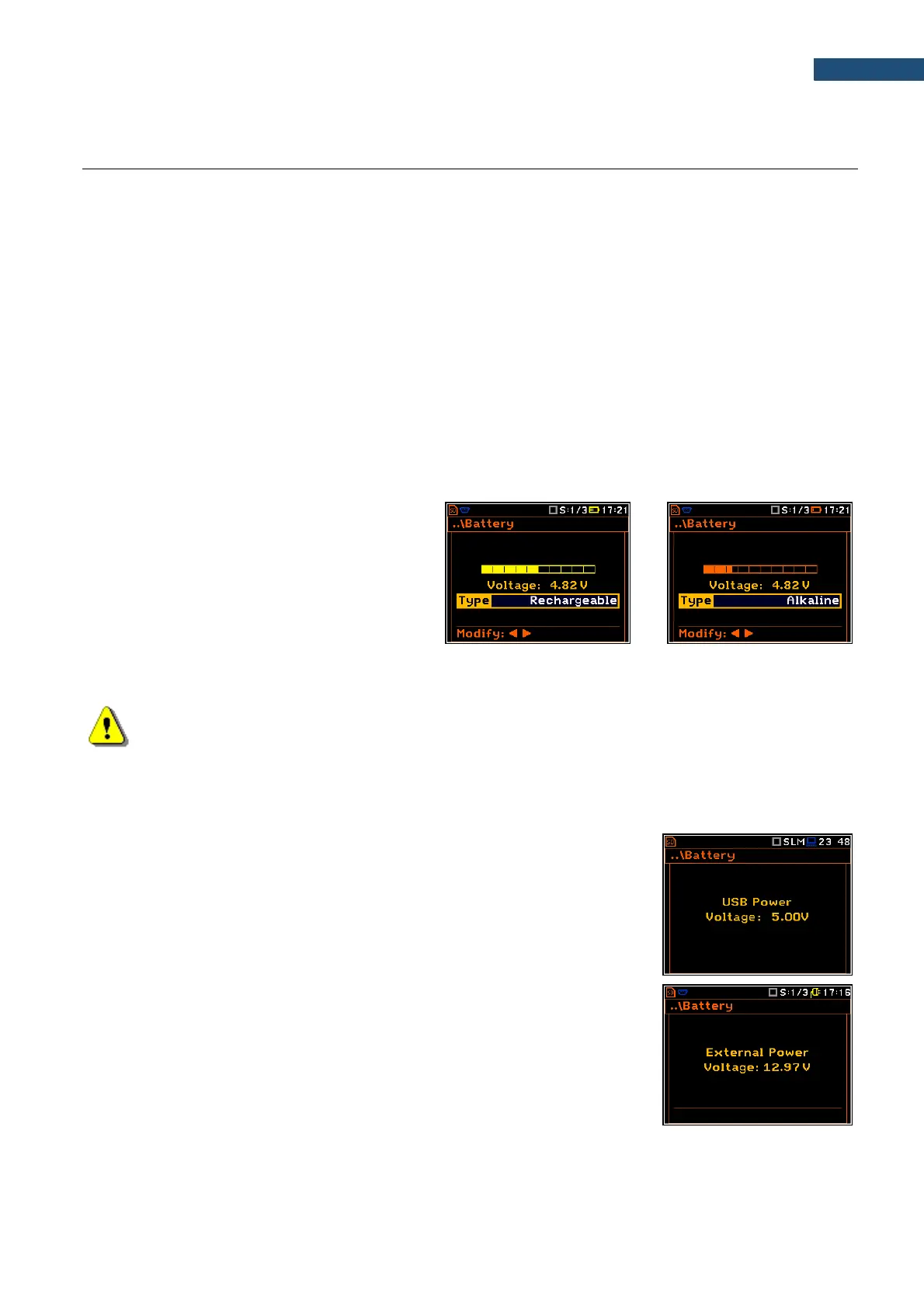
When the instrument is powered from the
internal batteries, the “battery” icon is
displayed on the top of the screen and the
Battery screen presents the battery status
scale and battery voltage: Voltage: x.xxV.
The colour of the battery and the scale reflects
the battery capacity: green (>75%), yellow
(>25%), red (<25%).
To have right indication of the battery status, select the battery type in the Type position: Alkaline or
Rechargeable.
Note: In the case when “battery” icon is red, it is strongly recommended to use an external power
adapter or USB interface as soon as possible to ensure reliable operation. If no suitable external
power source is provided the instrument will be switched off automatically after a short time!
Extension of the internal source of the instrument’s power can be achieved by reducing the brightness of the
screen when possible. The settings of Brightness and power saver function may be done in the Screen Setup
screen (path: <Menu> / Display / Screen Setup).
When there is a connection to the USB interface (USB Device socket is
connected by the cable to a PC), the „USB”icon is presented on the top of the
display and in the Battery screen there is the message: USB Power
Voltage: x.xxV.
When there is a connection to the 7–16V socket the “plug” icon is presented on
the top of the display and in the Battery screen there is the message:
External Power Voltage: yy.yyV.



 To Next Page