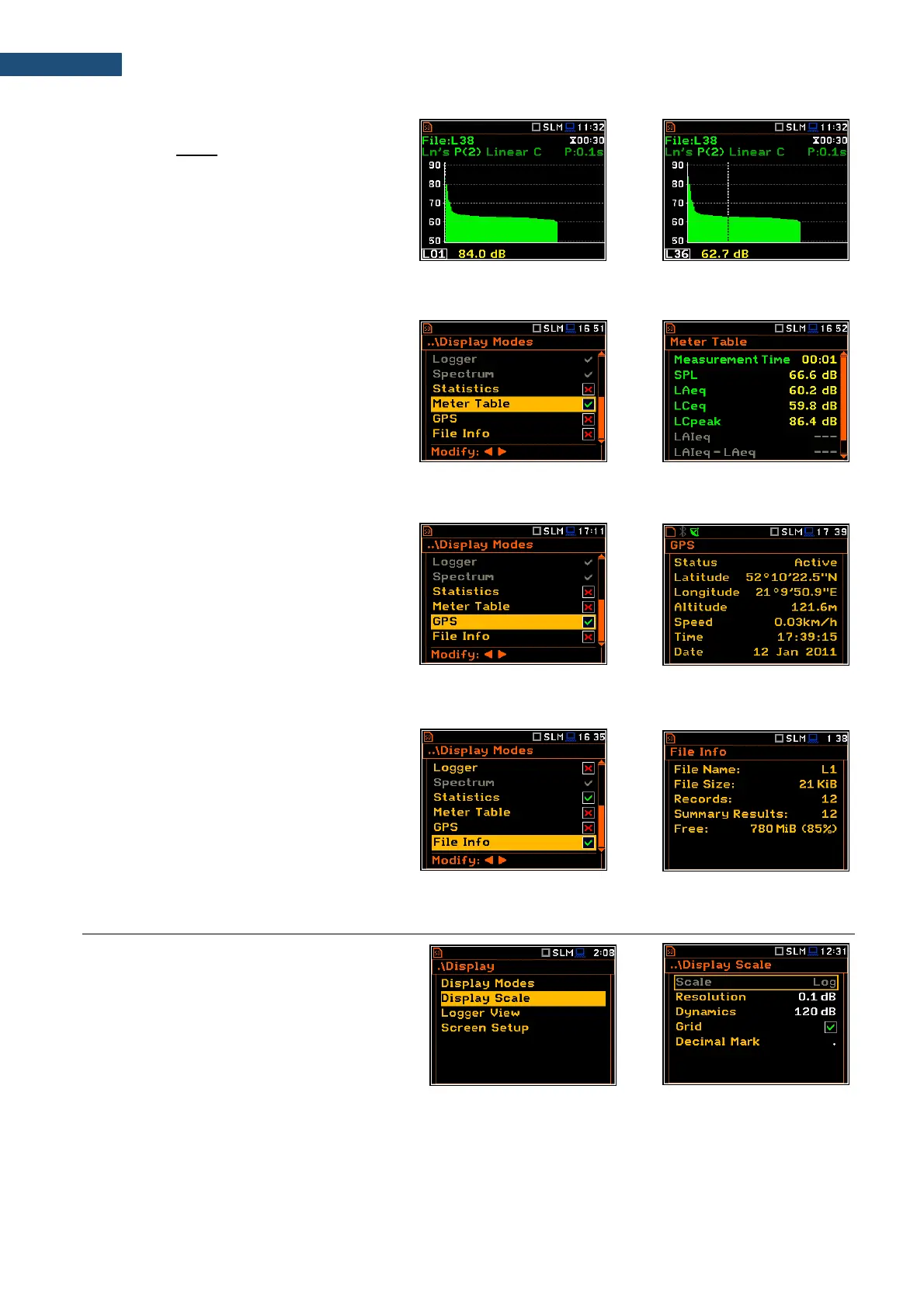
The cursor position is changing with the ◄ /
► key if the field 3 is selected. The statistical
level and appropriate value are presented in
the line below the plot.
Press the ◄ / ► key with <Shift> to go
straight to the first or last Lnn position on the
screen.
The Meter Table view displays a list of
predefined results with assigned weighting
filters and detector type without information
about profiles.
If specified in that list result is not measured in
any profile, it will be of grey colour and without
value (“---“).
When GPS is enabled in the
Communication Ports screen (path:
<Menu> / Instrument / Communication Ports)
it is possible to activate the GPS screen,
which shows the GPS status, co-ordinates,
etc., transmitted to the instrument from the
SV 58_H GPS module connected to the
Serial socket.
6.1.9 File information view
The File Info position enables the additional
file information view.
The File Info view displays the file name, its
size, number of records made with Logger
step, number of summary results blocks
(records made with Integration period), free
memory space etc.
6.2 ADJUSTING PLOT VIEWS - DISPLAY SCALE
The Display Scale list of parameters allows
to define the result units (absolute or
logarithmic), number of digits after decimal
point, decimal mark, adjust scale of plots and
toggle a grid.



 To Next Page