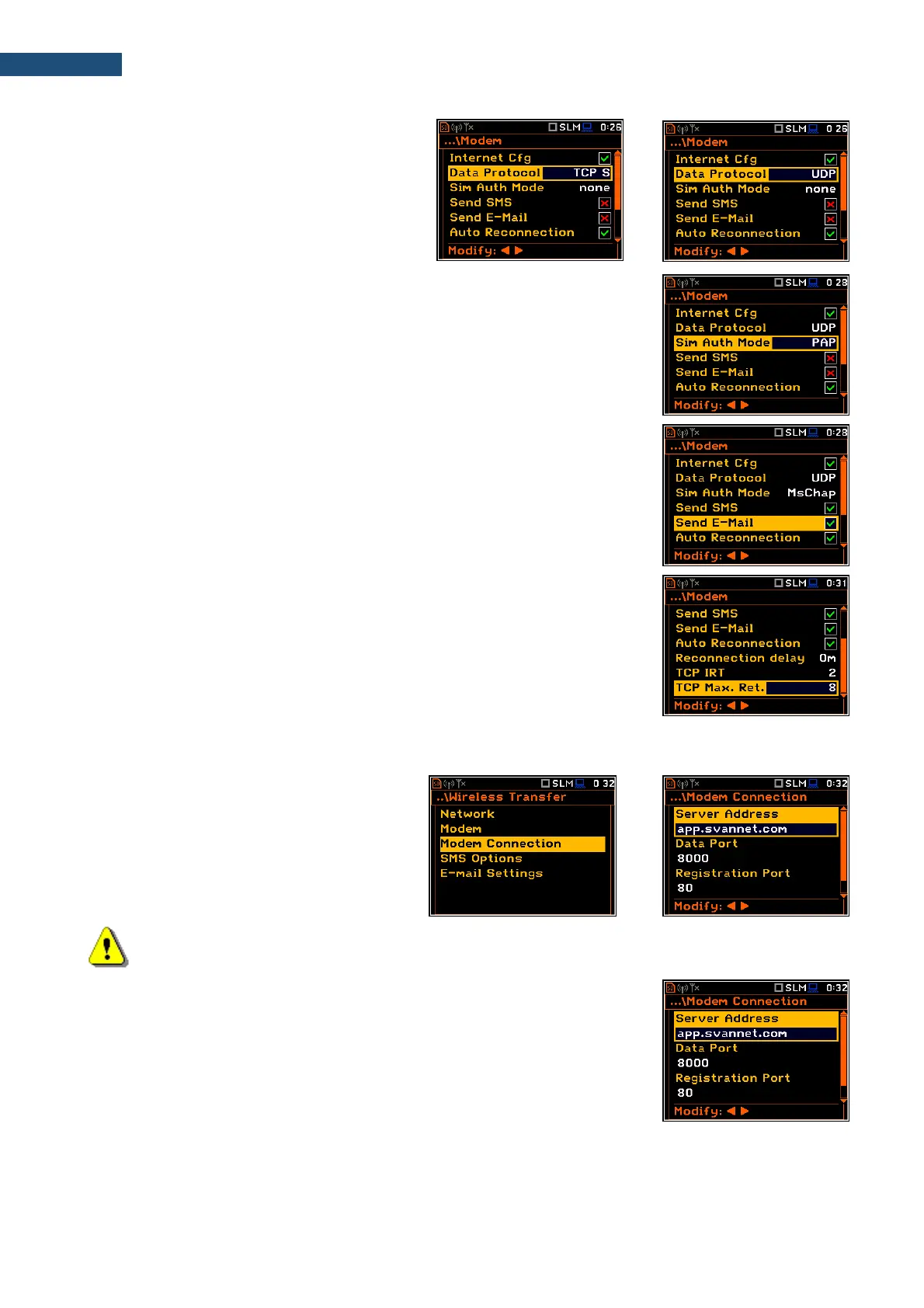
• Data Protocol – defines connection type
for data exchange. Available types are
TCP S (server mode), TCP C (client mode)
and UDP.
• Sim Auth Mode – defines the method of user verification by a SIM card
type. Depending on the SIM card, several options are possible, some of
them are recognized by the modem:
• none – no verification required.
• PAP
• CHAP
• MsChap – denotes MsChap in version 1.
• Send SMS – selecting this option will enable SMS alarm notifications.
• Send E-Mail – selecting this option will enable e-mail alarm notifications.
• Auto Reconnection – selecting this option will make the device attempt to
reconnect the modem in case of errors or sudden disconnection.
• Reconnection Delay – defines time between each reconnection attempts.
• TCP IRT - defines TCP Initial Retransmission Timeout. In some cases,
extending this timeout may be helpful in case of slow connections, but the
default setting is recommended.
• TCP Max. Ret. - defines maximum reconnection attempts performed within
a simple connection cycle. In some cases, setting higher value may be
helpful in case of slow connections, but the default setting is recommended.
8.9.3. Configuring connections - Modem Connection
The Modem Connection position allows to
configure several parameters to establish
internet connection.
Note: For connection with the SvanNET server the parameters in the Modem Connection list should
be set on default values as is shown on the screenshots above and below.
The Modem Connection screen contains the following positions:
• Server Address – allows to enter up to 32 characters of either IP or domain
address, where the registration data will be sent during the registration
process (Data Protocol: TCP S or UDP) or to which the modem will connect
to (Data Protocol: TCP C). By default, the server address is
app.svannet.com and all other settings, presented in this chapter, are
default settings, which enabled the connection with the SvanNET server.



 To Next Page