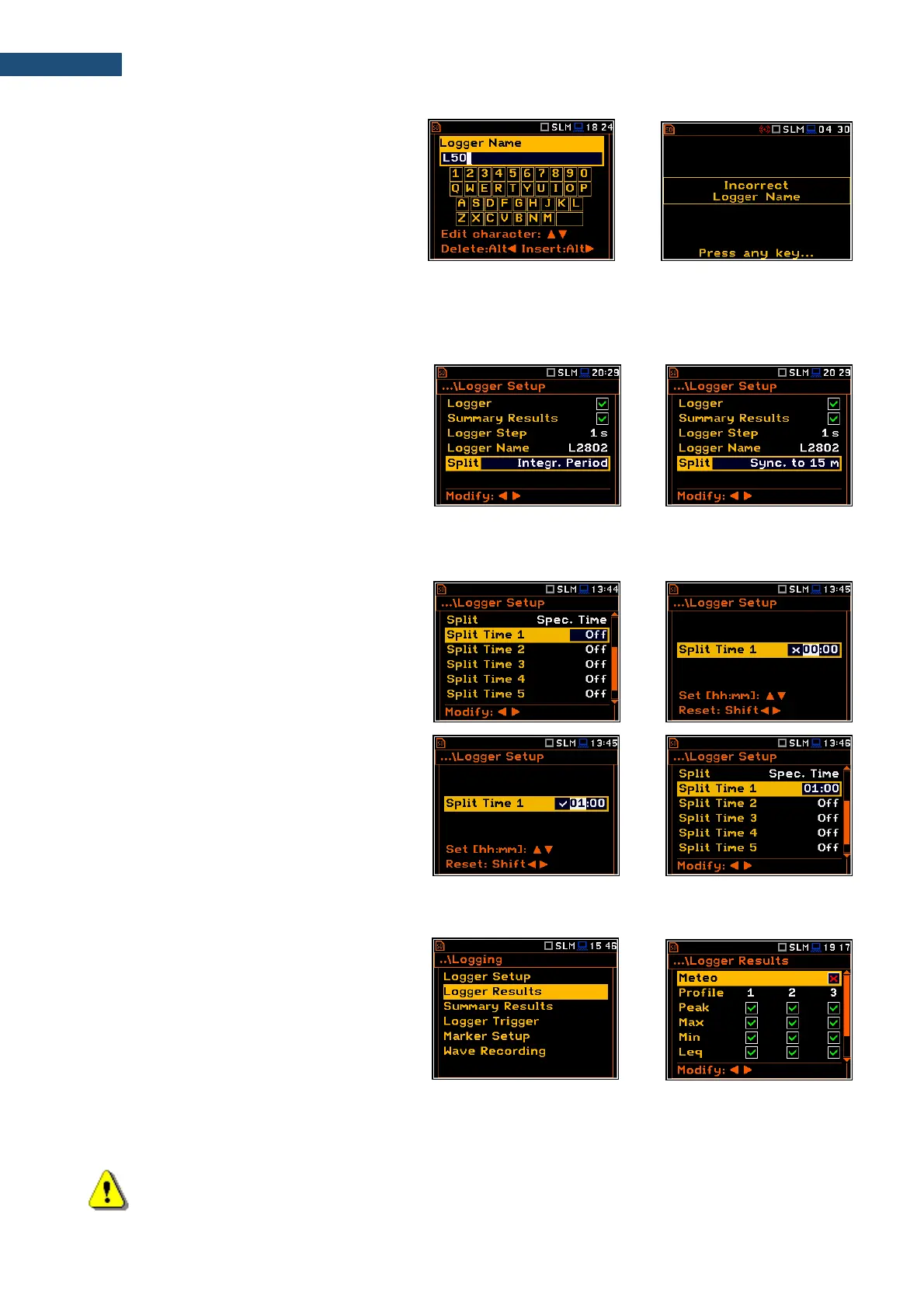
The special warning is displayed in case a file
with the edited name already exists in the
memory. The instrument waits then for your
reaction (any key should be pressed except
<Shift> or <Alt>).
Logger file splitting
The Split position allows you to split the logging data registration into separate files. If the Split parameter is
Off the registration of logging data will be continuously performed in one logger file with the name defined in
the Logger Name position.
In other cases, the registration will be done in
separate files. There are several options to
start the registration in a new file: after the
integration period (Integr. Period), or with
synchronization to a quarter of an hour
(Sync. to 15m), with synchronization to a half
of an hour (Sync. to 30m), with
synchronization to an hour (Sync. to 1h), or
on specified times (Spec. Time).
Every time when the split time is achieved the logger file is closed and a new file with the increased by one
number in its name is opened for subsequent logging data.
If Spec. Time is selected, 6 additional
positions appear in the end of the
Logger Setup list (Split Time).
After opening each line, you can define the
time of the day when splitting should occur.
The special screen with time editor is opened
after pressing the ► key.
In the time edition line, you may define hour
and minute of the split operation and switch on
() or off () the current split.
After pressing <ENTER> the Split Time list
will show the active times of the day when the
logger will be split.
5.4.2 Selecting logger results – Logger Results
The Logger Results list allows you to activate
results for three independent user defined
profiles (Peak, Max, Min, Leq, LXY, LR1 and
LR2 for Sound measurements and Peak, P-P,
Max and RMS for Vibration measurements)
and results taken from the weather station
(Meteo) which will be recorded to the logger
file during the measurement period with the
Logger Step. Activation/ deactivation can be
done with the ◄ / ► key pressed together with
<Alt>. The position is changed with the ◄ / ►
or ▲ / ▼ key.
Note: LXY is an abbreviation for the L (or Spl) result measured with X filter and Y detector time
constant – see Appendix D.



 To Next Page