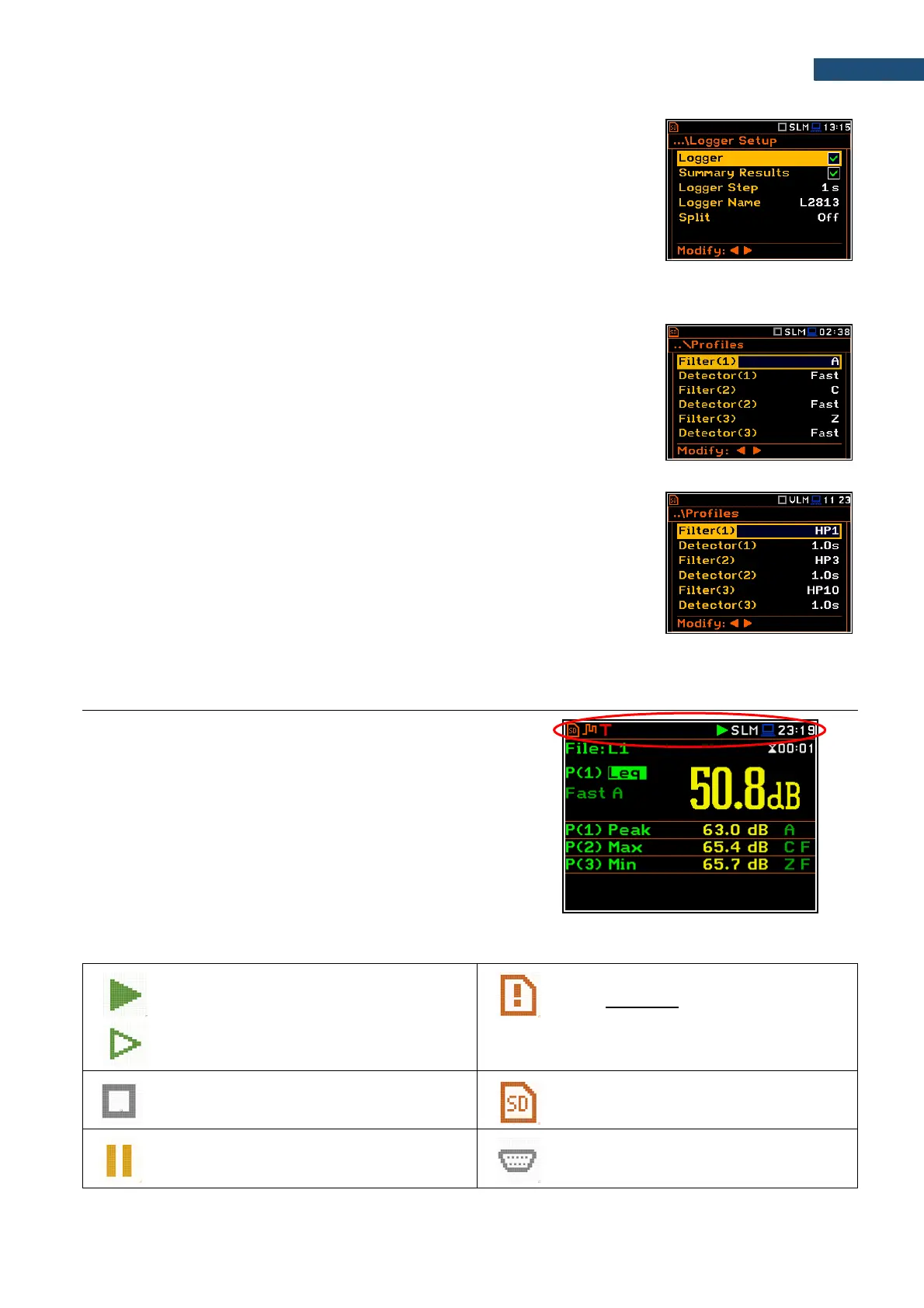
The logger and summary results will be automatically saved in the file with the
name defined by the instrument and presented in the Logger Setup screen
(Logger Name: Lxxxx).
Other functions are switched off, like:
- measurement trigger (Measurement Trigger: Off),
- logger trigger (Logger Trigger: Off),
- wave recording (Wave Rec.: Off),
- timer (Timer: Mode: Off).
Default profile settings for Sound measurements:
Profile 1 - A weighting filter (Filter(1)=A), Fast RMS detector
(Detector(1)=Fast);
Profile 2 - C weighting filter (Filter(2)=C), Fast RMS detector
(Detector(2)=Fast);
Profile 3 - Z weighting filter (Filter(3)=Z), Fast RMS detector
(Detector(3)=Fast).
Default profiles settings for Vibration measurements:
Profile 1 - HP1 weighting filter (Filter(1)=HP1); 1.0s RMS detector
(Detector(1)=1.0s);
Profile 2 - HP3 weighting filter (Filter(2)=HP3), 1.0s RMS detector
(Detector(2)=1.0s);
Profile 3 - HP10 weighting filter (Filter(3)=HP10), 1.0s RMS detector
(Detector(3)=1.0s).
Description of the instrument state
Additional information about the instrument’s state is given by
means of the row of icons visible in the top of the display.
The type of measurement function and the measurement mode
(SLM, VLM, S:1/1 etc.) as well as real time clock (RTC) is also
displayed in the same line together with icons.
Meanings of the icons are as follows:
“measurement” icon is displayed when the
measurement is running, and the icon shape
is changing from self to contoured.
“memory warning” icon is displayed
when there is no inserted micro SD-card.
“stop” icon is displayed when the
measurement is stopped.
“SD-card” icon is displayed when the
micro SD-card memory is inserted.
“pause” icon is displayed when the
measurement is paused.
“RS232” icon is displayed when the
RS232 port is activated.



 To Next Page