5.1 SETTING UP GENERAL MEASUREMENT PARAMETERS - GENERAL SETTINGS
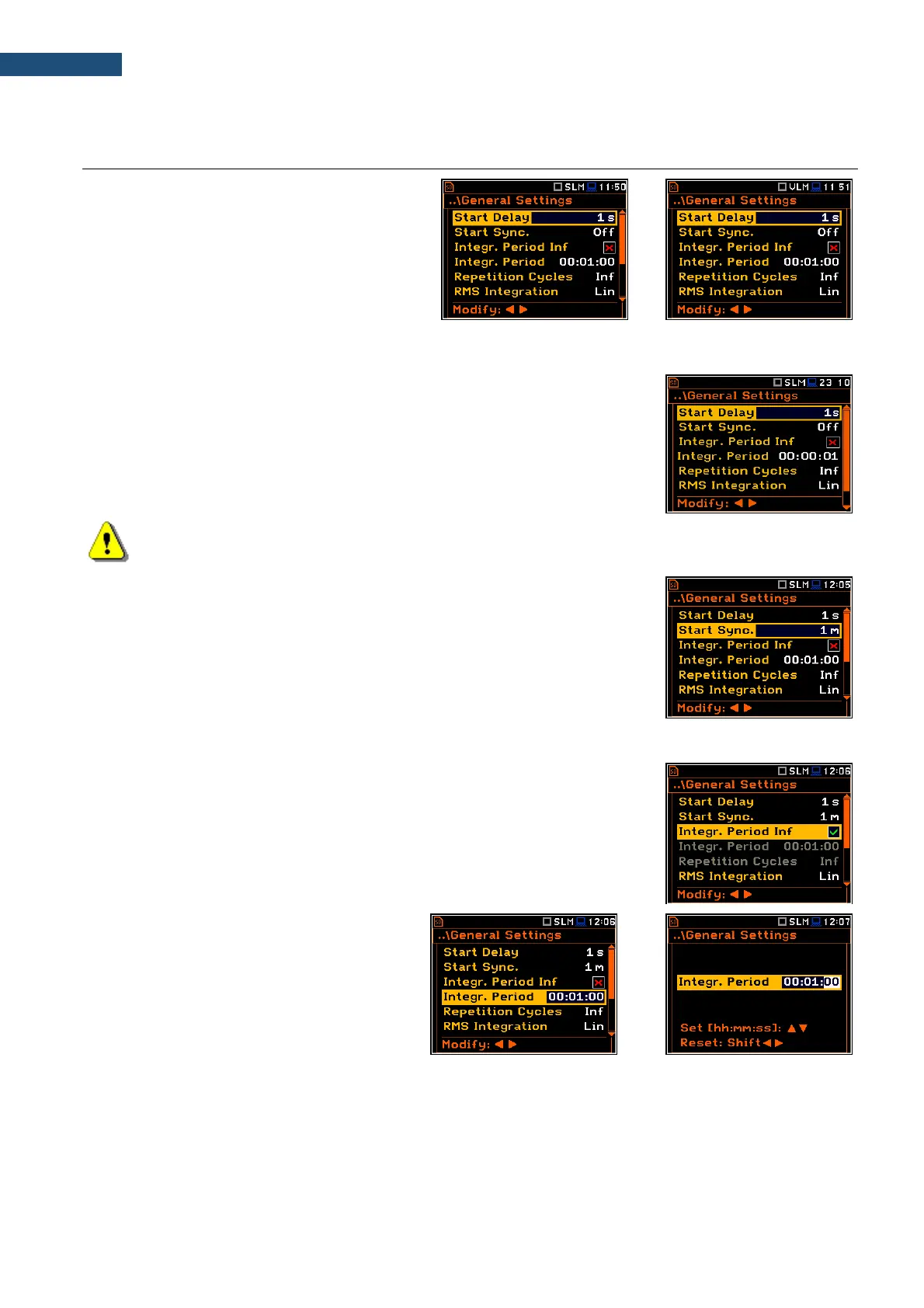
The General Settings list allows you to set up
general measurement parameters:
measurement start delay (Start Delay),
maximum delay period for the synchronization
with RTC (Start Sync.), measurement period
(Integration Period), repetition of
measurement cycles (Repetition Cycles),
RMS detector type (RMS Integration), day time
hours (Day Time Limits) and time window for
the LRm results (Rolling Time).
Delay of measurement start
The Start Delay parameter defines the delay period from the <Start/Stop>
keystroke to the real start of the measurement (digital filters of the instrument
constantly analyses the input signal even when the measurement is stopped).
This delay period can be set from 0 second to 60 seconds.
Note: The minimum delay period is equal to 0 second. In the Calibration mode, the delay period is
always equal to 3 seconds.
Synchronisation of measurement start.
The Start Sync parameter defines maximum delay period from the
<Start/Stop> keystroke to the start of the measurements to allow
synchronisation with the instrument’s RTC. The Start Sync. parameter can be
set as: Off, 1m, 15m, 30m and 1h. For example, if 1h is selected, the
measurement will start from the beginning of the first second of next hour after
the <Start/Stop> keystroke, and then will be repeated after the integration time
has elapsed if the number of cycles is greater than one. The default value is set
to Off.
Disabling the measurement period definition
The integration period can be set as infinite or can be defined together with the
Repetition Cycles number. The Integr. Period Inf parameter activates the
infinite integration period. In this case the signal will be averaged all the time until
the <Stop> keystroke.
If the Integr. Period Inf parameter is Off, then two next positions become active.
Measurement period
The Integr. Period parameter (integration
period) defines the period during which the
signal is being measured (and for some
results integrated) and measured values
logged in the result file as Summary Results.
The integration period can be set in the
special screen, which is opened with the ◄ /
► key.



 To Next Page