Note: When a wave recording is waiting for the External,
Integration Period or Integration Period Split trigger the “trigger”
icon appears alternatively with the „wave” icon.
Trigger source
Only one measured result can be used as a trigger source (Source) for checking of the trigger condition in the
Level Meter mode, namely the output signal from the RMS detector coming from the first profile which is denoted
here as Leq(1) in the sound mode and RMS(1) in the vibration mode. This position cannot be changed.
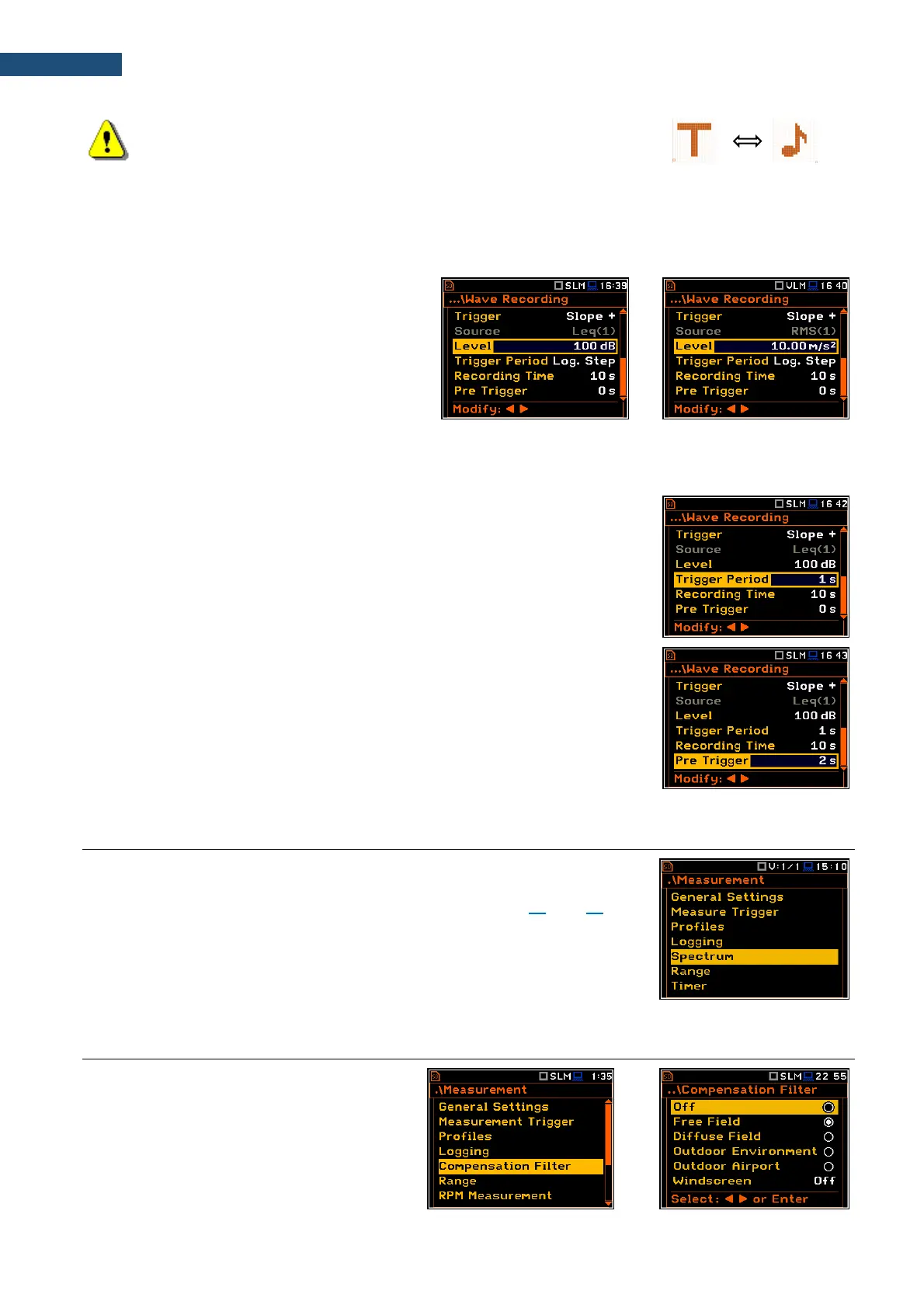
Threshold level
The threshold level for the logger trigger
(Level) can be set with 1 dB steps in the range
from 24 dB to 136 dB in the sound mode and
from 1mm/s
2
(60 dB) to 10 km/s
2
(200 dB) in
the vibration mode.
An instantaneous value of the RMS or LEQ result calculated with selected Filter and Detector constant for the
first profile (path: <Menu> / Measurement / Profiles) compares with the Level value with the time interval defined
by the Trigger Period.
The Trigger Period parameter defines the time interval of checking the trigger
conditions. This parameter can be set as: Log. Step (same as Logger Step
value), 0.5ms, 100.0ms and 1s.
The Recording Time parameter defines the time of signal recording after every
trigger. The available values can be selected from 1s to 8h or Inf (recording will
last until measurement stop).
When Pre Trigger is higher than 0 then the wave signal starts to be recorded
before the trigger. The period of such recording depends on the sample
frequency and bits per sample. The pre-trigger periods are:
• for 24 bits per sample: 2s for 48 kHz, 4s for 24 kHz and 8s for 12 kHz.
• for 16 bits per sample: 4s for 48 kHz, 8s for 24 kHz and 16s for 12 kHz.
5.5 SETTING SPECTRA – SPECTRUM
The Spectrum position appears in the Measurement list when the 1/1 Octave,
1/3 Octave or FFT function is selected in the Measurement Function list (path:
<Menu> / Function / Measurement Function) - see Chapters 10 and 11 for
details.
5.6 SELECTING MICROPHONE COMPENSATION FILTERS – COMPENSATION FILTER
The Compensation Filter position is
available only in the Sound meter modes. It
allows you to select the appropriate
compensation filter for different measurement
applications.



 To Next Page