4 FUNCTIONS OF THE INSTRUMENT – Function
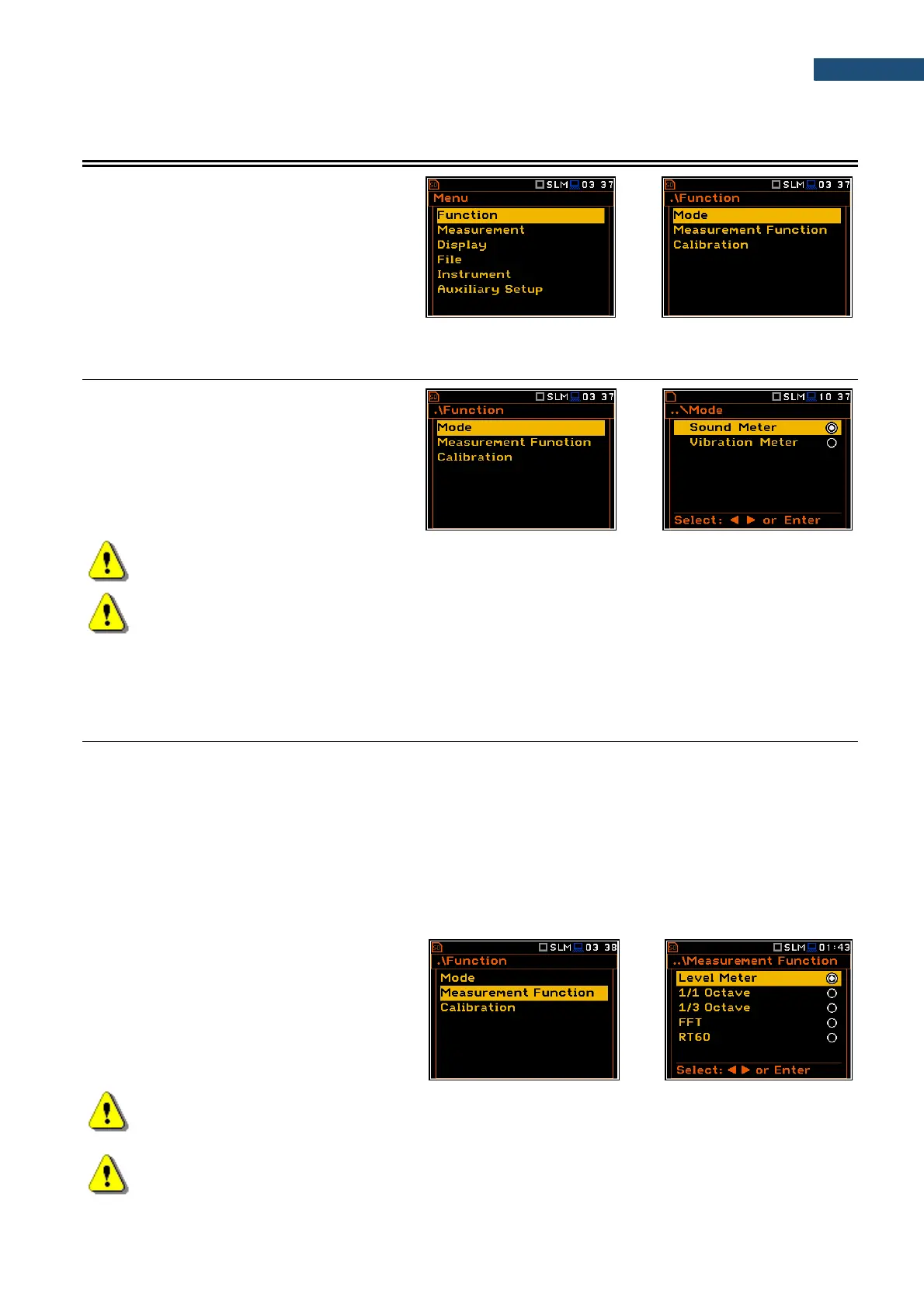
In the Function section, you can select a
measurement mode (Mode) which relates to
the transducer type, a measurement function
(Measurement Function) and perform the
instrument check or calibration (Calibration).
4.1 SELECTING THE INSTRUMENT MODE – MODE
The instrument can work in two modes:
Sound Meter and Vibration Meter.
The Mode relates to the type of transducer
connected to the instrument: microphone with
preamplifier or accelerometer.
Note: The instrument doesn’t recognize the type of transducer, connected to its input socket.
Remember to switch the Mode all the time you change the transducer.
Note: In the manual text the Sound mode (or Sound measurements) refers to the Sound Meter
modes and the appropriate functions dedicated to the measurement and analysis of the acoustic
signal: Level Meter, 1/1 Octave, 1/3 Octave, FFT etc.; the Vibration mode (or Vibration
measurements) refers to the Vibration Meter modes and the appropriate functions dedicated for the
measurement and analysis of the vibration signal: Level Meter, 1/1 Octave, 1/3 Octave, FFT etc.
4.2 MEASUREMENT FUNCTIONS OF THE INSTRUMENT - MEASUREMENT FUNCTION
The main function of the instrument is the measurement of Sound pressure or Vibration broad band levels
(Level Meter). The Sound Level Meter (SLM) meets the standard IEC 61672-1:2013 for Class 1 accuracy and
the Vibration Level Meter (VLM) meets the standard ISO 8041-1:2017. The instrument can also be used for
medium to the long-term monitoring using the huge capacity data logger in which all measurement results can
be stored.
You may also use 1/1 and 1/3 real time octave band or FFT frequency analysis functions. These functions extend
the main Level Meter functionality of the instrument, because the selected 1/1 and 1/3 octave or FFT analysis is
performed along with all calculations of the broadband Level Meter results.
The instrument offers also the specialized function dedicated for the reverberation time assessments - RT60.
To activate a function, open the
Measurement Function list, select the
required function and press <ENTER> to
confirm selection.
Note: It is not possible to change the measurement function during a measurement run. In this case,
the instrument displays for about 3 seconds the message: “Measurement in Progress”. To change
the function of the instrument the current measurement must be stopped!
Note: The type of measurement function and the measurement mode is displayed in the upper line
of the screen in the form of abbreviation as presented below:



 To Next Page