Home
Svantek
Measuring Instruments
SVAN 977A
Page 31
Svantek SVAN 977A - Page 31
302 pages
Manual
Save Page as PDF
To Next Page
To Next Page
To Previous Page
To Previous Page
Loading...
31
SVAN
977A U
ser Manu
al
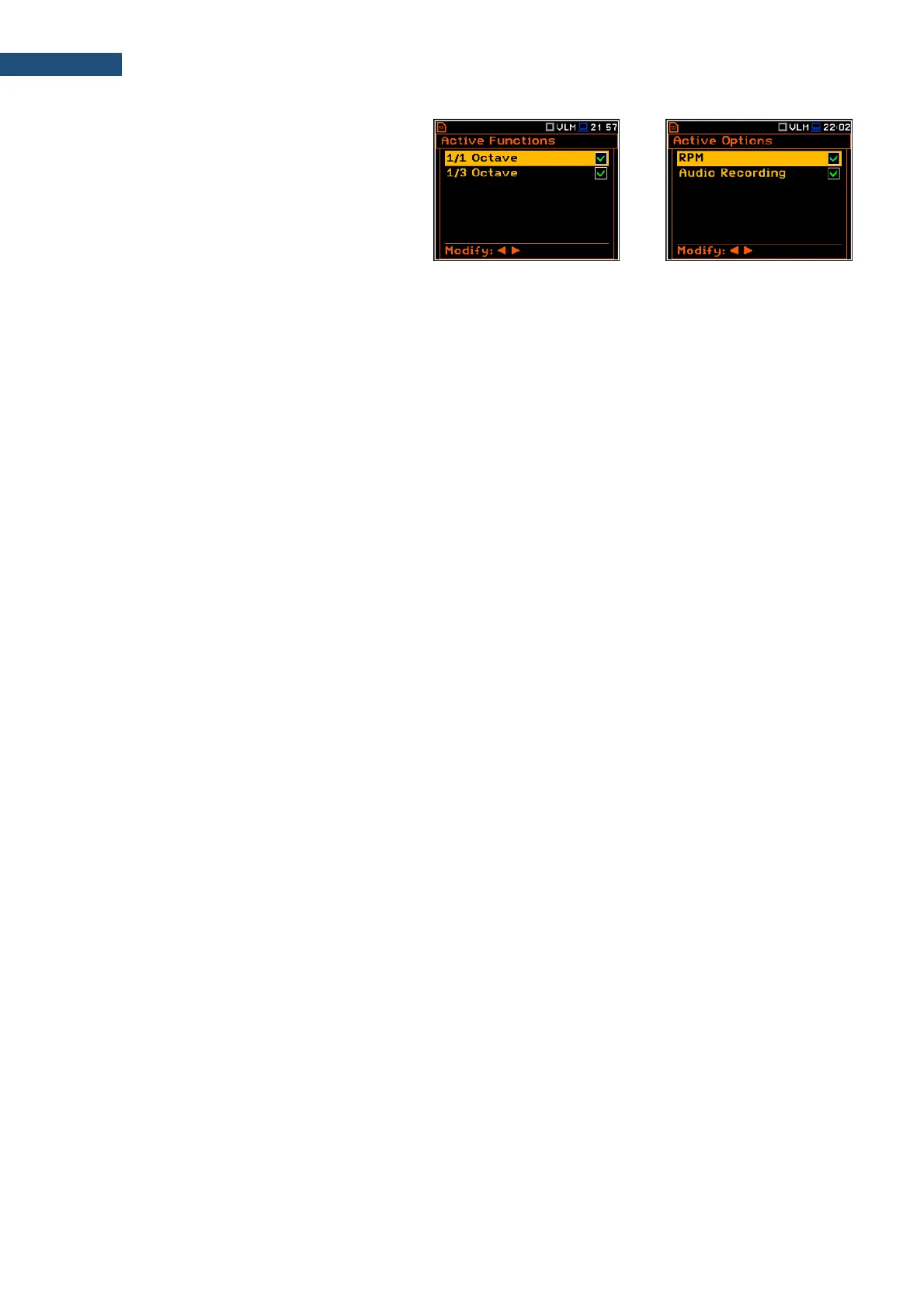
Pressing
simultane
ously
<Shift>
and ◄
keys
right
after
turning
on
the
instrument
allo
ws
to
check an
d lock back earl
y unlocked o
ptions.
To
select
other
op
t
ion
s,
press
the
<ENTER
>
key,
which
opens
another
page
of
the
Active Fu
nctions
list.
<ENT>
30
32
Table of Contents
Main Page
Default Chapter
3
Table of Contents
3
Index
8
1 Introduction
11
SVAN 977A as Sound Level Meter & Analyser
12
SVAN 977A as Vibration Level Meter & Analyser
12
General Features of SVAN 977A
12
Accessories Included
13
Accessories Available
13
Firmware Options Available
13
2 Manual Control of the Instrument
14
Control Keys on the Front Panel
14
Input and Output Sockets of the Instrument
17
3 General Information
18
Basis of the Instruments Control
18
Measurement Mode
18
Configuration Mode
18
Power of the Instrument
22
Getting Started
23
Description of Icons
24
Data Saving
26
Files Downloading and Uploading
30
Activation of Optional Functions
30
4 FUNCTIONS of the INSTRUMENT - Function
32
Selecting the Instrument Mode - Mode
32
Measurement Functions of the Instrument - Measurement Function
32
Instrument's Calibration - Calibration
33
System Check
34
Calibration by Sensitivity (Acoustic Signal)
34
Calibration by Sensitivity (Vibration Signal)
35
Calibration by Measurement (Acoustic Signal)
35
Calibration by Measurement (Vibration Signal)
36
History of Performed Calibrations - Calibration History
37
Erasing Calibration Records - Clear Calibr. History
38
Automatic Calibration - Auto Calibration
38
Post Measurement Calibration - Post Calibration
39
5 CONFIGURING MEASUREMENT PARAMETERS - Measurement
40
Setting up General Measurement Parameters - General Settings
41
Setting up the Measurement Trigger - Measurement Trigger
43
Setting Parameters for Profiles - Profiles
46
Data Logging - Logging
47
Setting Logger General Parameters - Logger Setup
48
Selecting Logger Results - Logger Results
49
Selecting Additional Summary Results for Saving - Summary Results
50
Triggering the Logger Results Saving - Logger Trigger
50
Setting up Markers - Marker Setup
51
Wave Recording Settings - Wave Recording
52
Setting Spectra - Spectrum
55
Selecting Microphone Compensation Filters - Compensation Filter
55
Measurement Range Selection - Range
56
RPM Measurement Settings - RPM Measurement
57
Setting up the Exposure Time - Exposure Time
58
Statistical Levels Settings - Statistical Levels
58
Programming the Instruments Internal Timer - Timer
58
Example of Timer Execution
59
Advanced Alarm Function - Alarms
60
6 CONFIGURING DATA VIEWING - Display
61
Activation of the Display Modes - Display Modes
61
Running SPL View
62
Single Profile View
62
Combined Views
63
Logger View
65
Spectrum View
66
Statistics View
66
Meter Table View
67
GPS View
67
File Information View
67
Adjusting Plot Views - Display Scale
67
Adjusting the Logger View - Logger View
69
Setting the Display Brightness and Power Saver - Screen Setup
69
7 MANAGING FILES - File
71
Managing Files Saved in the Memory - File Manager
71
Assigning Directory for Data Files Saving - Set as Working dir
72
Opening Files/Directories - Open
72
Deleting Files/Directories - Delete
73
Erasing All Files in a Directory - Delete All
73
Renaming Files/Directories - Rename
74
Viewing Information about Files/Directories - Info
74
Managing the Setup Files - Setup Manager
74
8 CONFIGURING INSTRUMENT PARAMETERS - Instrument
76
Measurement Auto Start - Auto Start
76
Checking Power - Battery
76
Interface Parameters Settings - Communication Ports
77
External Power Settings- External Power
78
Selecting IEPE Current Supply - IEPE Current
78
Programming Keyboard - Keyboard Settings
78
Setting Parameters of the I/Oport - Multifunction I/O
79
Programming the Instruments Internal Real Time Clock - Rtc
81
Remote Communication Settings - Wireless Transfer
81
Selecting Network Type - Network
82
Configuring Modem Basic Settings - Modem
82
Configuring Connections - Modem Connection
83
Configuring SMS Service - SMS Options
84
Configuring E-Mail Service - E-Mail Settings
85
Introducing the Instrument Name - Unit Name
86
Checking the Instrument Properties - Unit Label
86
9 AUXILIARY SETTINGS - Auxiliary Setup
87
Selecting the User Interface Language - Language
87
Restoring the Factory Settings - Factory Settings
87
Setting the Reference Levels - Reference Levels
87
Selecting Units for Vibration Results - Vibration Units
88
Warnings Setup - Warnings
88
10 1/1-Octave and 1/3-Octave Analyser
90
Selecting the 1/1 Octave or 1/3 Octave Function
90
Configuring 1/1 or 1/3-Octave Analyser
91
General Settings for 1/1 and 1/3-Octave Analysis - General Settings
91
Selecting the Measurement Range for 1/1 and 1/3-Octave Analysis - Range
91
Logging of 1/1-Octave and 1/3-Octave Spectra - Logging
91
Setting Parameters of 1/1-Octave and 1/3-Octave Analysis - Spectrum
92
Configuring 1/1 and 1/3 Octave Spectra Views
94
Presentation of 1/1 and 1/3 Octave Spectra
94
Adjusting Scales of the Spectrum Plot - Display Scale
95
Selecting Spectra to be Viewed - Spectrum View
96
Changing Spectrum Type in Vibration Modes - Spectrum Type
97
11 Fft Analyser
98
Selecting FFT Function
98
Configuring FFT Analyser
98
General Measurement Settings of FFT Analysis - General Settings
98
Selecting Measurement Range for FFT Analysis - Range
98
Logging of FFT Spectra - Logging
99
Setting Parameters of FFT Analysis - FFT
99
Configuring FFT Spectra View
100
Presentation of FFT Spectra
100
Setting up the Scale of Spectrum Plot - Display Scale
101
Selection of Spectra to be Viewed - Spectrum View
102
Changing Spectrum Type in Vibration Modes - Spectrum Type
103
12 Reverberation Time Measurements - Rt60
104
Selecting the RT 60 Function
104
Settings of the RT60 Analysis
104
Configuring RT60 Views
107
Start RT60 Measurements
107
Viewing of RT60 Results
109
13 Remote Control Tools
112
14 Maintenance
113
Powering of the Instrument
113
Memory Card Extraction and Insertion
114
Transducers
114
Resetting the Instrument
115
Firmware Upgrade
116
Preservation of Internal Batteries
116
Transportation and Storage
116
Cleaning
116
Troubleshooting
117
15 Glossary
118
Modes and Measurement Functions
118
Calibration
119
Definitions of Measured Results
120
Measurement Parameters
123
Display Parameters
136
Instrument Parameters
140
Auxiliary Parameters
148
Appendix A. Remote Control
149
Function #1 - Input/Output of the Control Setting Codes
149
Function #2 - Read out of the Main Measurement Results
150
Function #3 - Read out of the Measurement Results in 1/X OCTAVE or FFT Mode
152
Function #7 - Special Control Functions
152
Function #D - Read / Write the Data Files from the External Memory (SD-Card)
162
Control Setting Codes
163
APPENDIX B. DATA FILE STRUCTURES (Firmware Revision 1.21)
170
General Structure of the SVAN 977 Files
170
Structure of the File Containing Results from Logger's File
194
The Contents of the Logger File
195
Record with the Results
195
Record with the State of the Markers
196
Record with the Breaks in the Results Registration
197
Record with the Breaks Account PAUSE in the Results Registration
197
Record with the Wave File Name
197
Record with Summary Results
197
Record with METEO Data
198
Record with Name of the Comment File
198
Structure of the SETUP File
199
Date and Time
199
Appendix C. Technical Specifications
200
Specification of SVAN 977A as a Sound Level Meter
200
Specification of SVAN 977A as SLM in the Standard Configuration
200
Effect of the SA 22 Windscreen
219
Effect of the SA 277 Outdoor Protection Unit
221
Specification of SVAN 977A as a Vibration Level Meter
221
Specification of SVAN 977A as 1/1 OCTAVE and 1/3 OCTAVE Analyser
227
Frequency Characteristics of the Implemented Broadband Digital Filters
243
Miscellaneous Specification of SVAN 977A
250
Specification of SV 80 Accelerometer
256
Using of the SA 277 Outdoor Microphone Protection Unit
257
Declaration of Conformity
288
Appendix D. Definitions and Formulae of Measured Values
290
Sound Level Meter
290
Basic Terms and Definitions (SLM Mode)
290
Definitions and Formulas of SLM Results
291
Vibration Level Meter
294
Basic Terms and Definitions (VLM Mode)
294
Definitions and Formulas of the VLM Result
294
Statistical Levels - Lnn Definition
295
Appendix E. Reverberation Time Calculations
297
Introduction
297
Definitions and Calculation of the RT 60 Reverberation Time
298
Description of the Decay Curve Recording in Different Measurement Methods
300
Related product manuals
Svantek SVAN 979
377 pages
Svantek SVAN 971
220 pages
Svantek SVAN 974
79 pages
Svantek SVAN 958
13 pages
Svantek SVAN 953
2 pages
Svantek SVAN 958A
306 pages
Svantek SV103
9 pages
Svantek SV 973
212 pages
Svantek SV 106
97 pages
Svantek SV 104
71 pages
Svantek SV 106A
92 pages
Svantek SV 977D
380 pages



 To Next Page