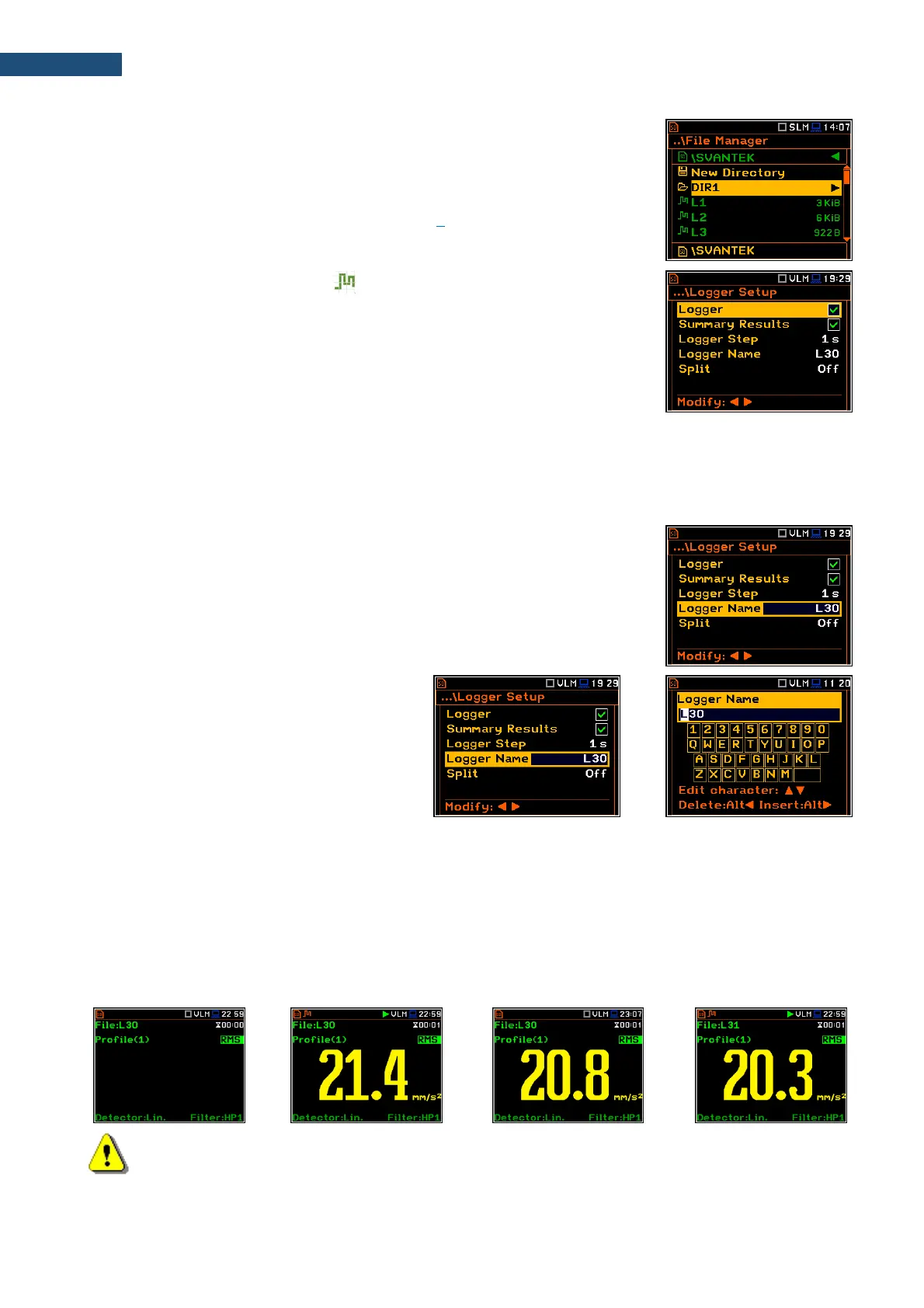
Files are saved in the directory, which was assigned as a working directory. The
working directory is displayed in the bottom line of the File Manager screen
together with the memory icon.
Directories are created manually with the use of <New Directory> position.
In more details, File menu is described in Chapter 7.
Automatic logger files saving ( )
Files which contain the logger data are saved automatically in the SD Card
memory with an extension .SVL. To enable automatic saving next conditions
should be fulfilled:
• SD-card should be inserted and there should be enough space on it.
• The Logger (path: <Menu> / Measurement / Logging / Logger Setup)
should be switched on.
The logger file name is defined automatically using a pattern LLdd, where LL is the string of letters (so called
prefix) and dd is a string of digits that forms a number (path: <Menu> / Measurement / Logging / Logger Setup /
Logger Name). Up to 8 characters can be used to name a file.
The default prefix for the logger files is “L”.
The instrument assigns an individual counter to every prefix of files the
instrument has already created and saved in the working directory. This counter
is equal to the maximum number in the set of files with the same prefix. For
example, if there are files with names: L0, L16 and L29, the counter value is 29.
The number of the new automatically created file will have the value of the
counter plus one. So, for the above example, new file name will be L30.
You can change the automatically generated
file name in the special screen, which is
opened after pressing the ◄ / ► key.
After changing the file name number without
changing the prefix and pressing <ENTER>,
the counter will be adjusted to the new
number.
The instrument accepts only that name which
number is higher than the counter, assigned to
the file’s prefix.
You can change the automatically proposed prefix. In such case the instrument assigns the new counter to the
new prefix.
The screens below show the automatic file saving during two subsequent measurements. Before and during the
first measurement the file name L30 is displayed. This file is saved automatically in the SD-card memory after
the measurement stop. After start of second measurement the instrument automatically changes the file name
to L31 and this file is saved after stop of the second measurement and so on.
Note: During the measurement run with data logging to the logger file, the „logging” icon is displayed.



 To Next Page