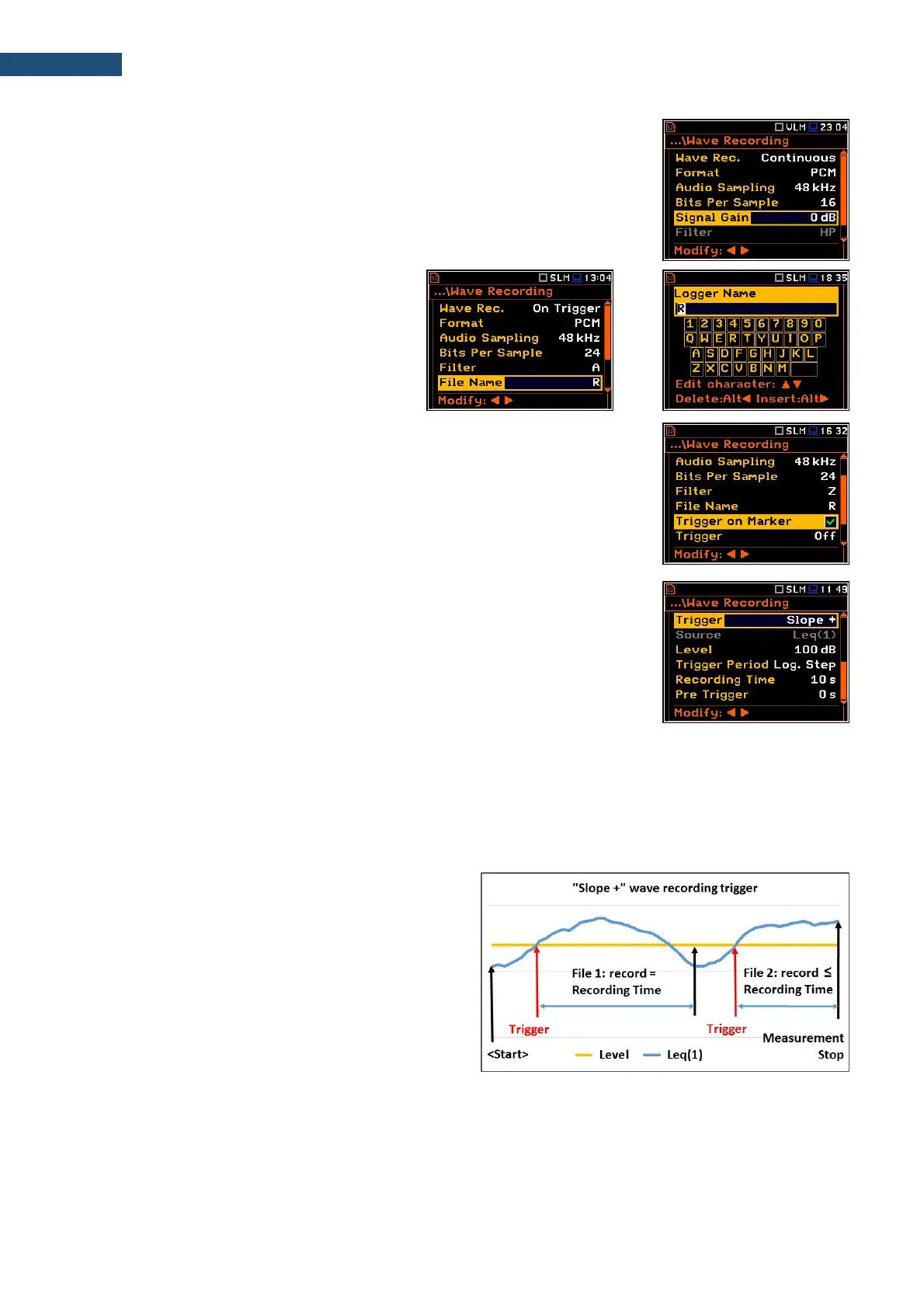
The Signal Gain parameter defines the gain of the recorded signal, when 16
bits per sample was selected: 0dB … 40dB.
The File Name parameter defines the name of
the wave file.
You can edit this name in the editor screen,
which is opened with the ◄ / ► key.
Wave Trigger
When Trigger on Marker is switched on, a wave recording will start by initiation
of one of the markers. Markers for triggering are defined in the Markers Setup
screen.
The Trigger parameter defines additional wave recording trigger, which can be
switched off (Off) or switched on by selecting the trigger type: Slope +, Slope -,
Level +, Level –, External, Integr. Period and Int. Period Split.
Slope type trigger
The Slope + trigger starts recording under the condition: rising value of the RMS
result (Source) averaged during 0,5 ms passes above the threshold level
(Level).
After pressing the <Start> key the instrument checks the trigger condition with Trigger Period intervals and if
condition is met starts recording. Recording lasts minimum Recording Time and during this time the instrument
continues to check the trigger condition (provided that Trigger Period is shorter than Recording Time). If next
trigger condition is met during Recording Time the instrument triggers recording again, so it will be continued
from this moment by additional Recording Time and so on. If during next recording time there are no triggers,
recording will be stopped after the last trigger plus Recording Time. Assuming, that after first recording the
trigger conditions continue to be checked, new recording may start during the same measurement time.
The example shows that between
measurement start and stop two records were
created. The first record is equal to Recording
Time, because during this period no second
trigger condition has been met. The second
recording is stopped by the measurement stop
and this record can be shorter than
Recording Time.



 To Next Page