Service Manual FB 7100
January, 2005 5G - 1
G Housing / Cabinet
G.1 Adjustments
Not available here.
G.2 (Dis-)assemblies
G.2.1 Removing the fan
Preparation Before removing the fan:
• Open the door
• Switch off the mains switch.
• Remove all canisters.
• Remove tray under canisters.
• Remove cover plate for instant module, see chap. 5.C.2.3, page 5C-3.
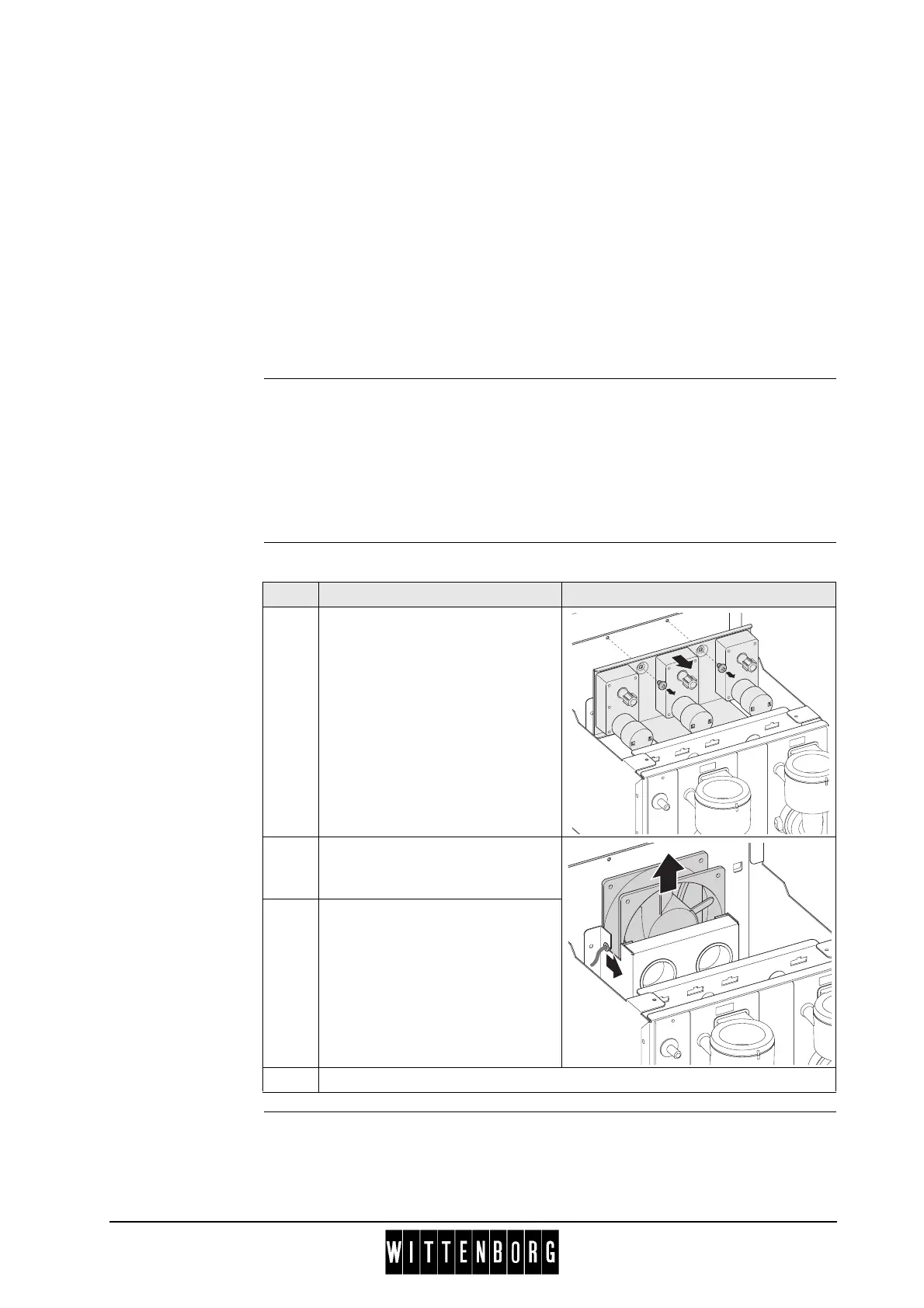
Removal Follow these steps to remove the fan:
Installation Installation is done in reverse order.
Step Action Illustration
1 Remove two screws from the
ingredient motor bracket.
Move bracket to the side, and rest
it on the side of the instant
module bracket. Its is not
necessary to remove electrical
connections.
2 Pull the rubber busing with the
elctrical wire out of the groove
(1).
3 Slide the fan out of its holder.
4 Disconnect electrical connection to the fan.
1



 To Next Page