EasyManua.ls Logo

Wittenborg FB 7100 - Page 224

Wittenborg FB 7100
284 pages
Print Icon
To Next Page IconTo Next Page
To Previous Page IconTo Previous Page
Loading...
Service Manual FB 7100 Replacing a selection button
5G - 8 January, 2005
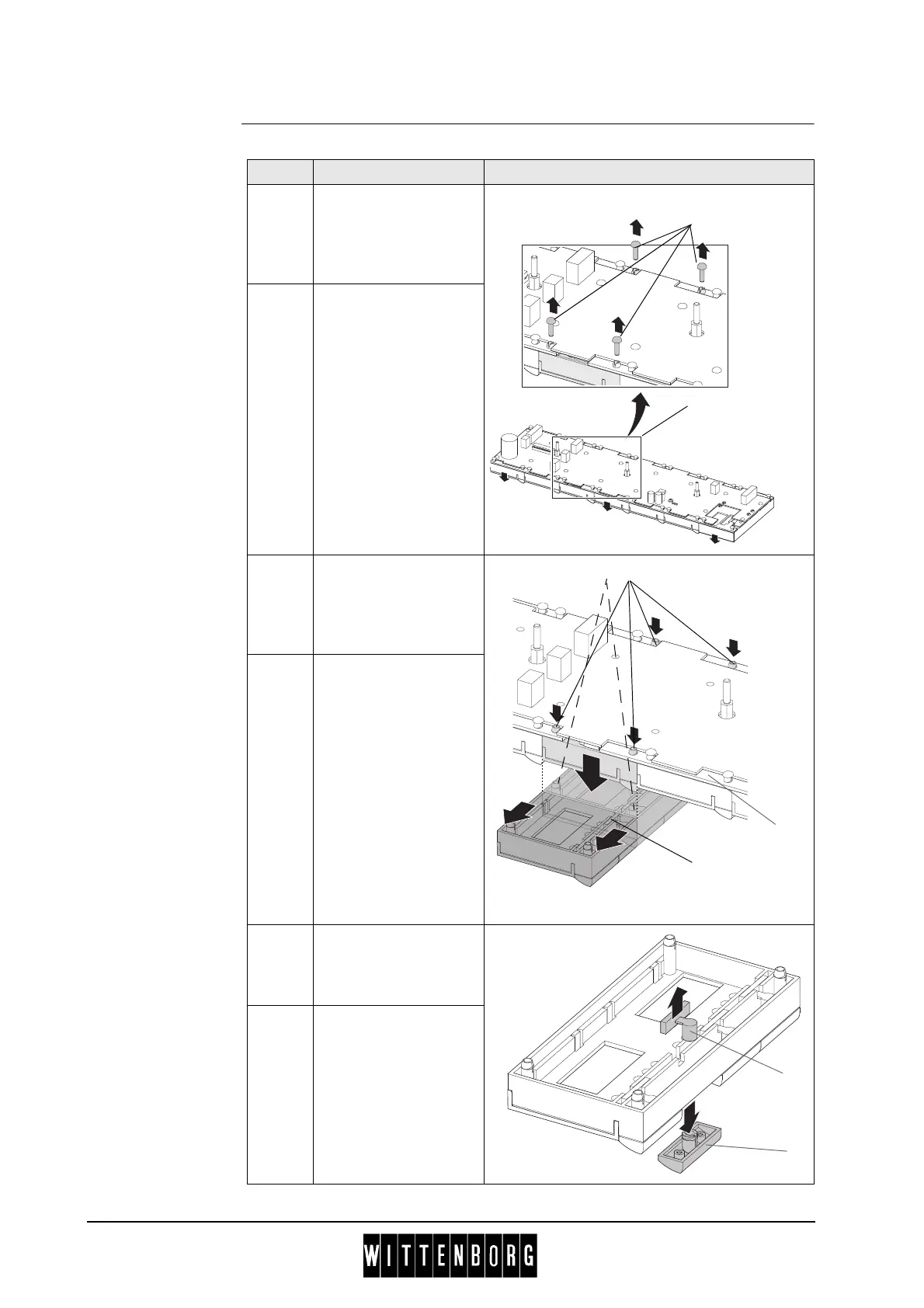
Removal Follow these steps to remove a selection button:
Step Action Illustration
1 Place the selection
panel (
1) on a flat
surface with the
selection buttons
facing downwards.
2 Remove four rivets (2)
from the spacing legs
of the base module
holding the selection
button to be replaced.
3 Release the base
module (
3) by pressing
the spacing legs (
4)
out of the mounting
frame (
5).
4 Lift the selection panel
(
1) slightly with one
hand and with the
other lift out the base
module (
3) without
turning it.
5 Remove the white
plastic spring (
6) from
the push button in
question.
6 Push the push button
(
7) out of the base
frame.
2
1
4
3
4
5
6
7

Table of Contents

Other manuals for Wittenborg FB 7100

Related product manuals