30 | PGC5000 GEN 2 | 892 J006 MNAH
3.5 Calibrate the analyzer
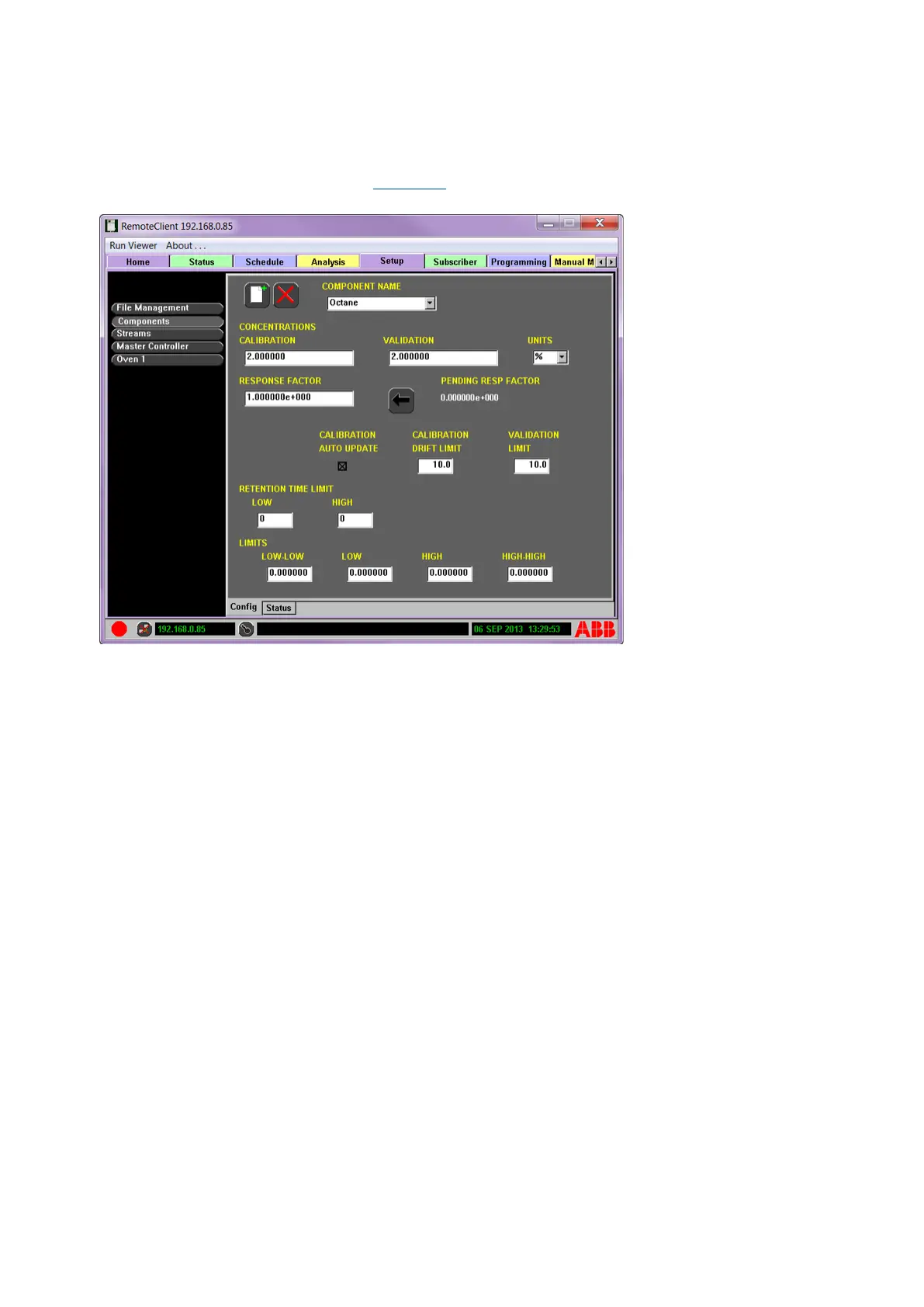
Use the Setup tab to enter the calibration concentration for all components being calibrated. Follow
the steps below to calibrate using either the LUI or RUI.
1. Navigate to the Setup tab (see Figure 3-8).
Figure 3-8: Setup Tab, showing calibration concentration
2. Select Components from the Function Selectors list.
3. Verify that the Config subtab at the bottom of the screen is selected.
4. Select the component to calibrate from the COMPONENTS NAME drop-down menu.
5. Enter the concentration and unit information into the CONCENTRATIONS CALIBRATION and
UNITS fields. (Example: Enter 10 in the Calibration field and % in the Units field for 10%; ppm
and ppb are also available).
6. Turn on the Calibration sample.
7. Select the Schedule tab and verify that the Demand subtab is selected.
8. Select Run to run the Calibration.
9. On successful completion, return to the Setup tab and select Components.
10. Ensure the current component name is selected; the PENDING RESP FACTOR appears.
11. Select the Apply Response Factor button (left arrow next to PENDING RESP FACTOR) to insert
the pending response factor as the current response factor.
12. To automatically update response factors, select the CALIBRATION AUTO UPDATE box.
3.6 Validation run
Follow the steps below to initiate a Validation Run using either the LUI or RUI:
1. Navigate to the Schedule tab and select the Step or Demand Subtab.
2. Select Add.
3. On the drop-down screen, choose the validation stream and select Next to continue.
4. On the drop-down screen, choose the desired analysis and select Next to continue.
5. To confirm the choice, select Accept. The validation analysis is now listed in the Step >
Demand subtab.
6. Turn on the Validation sample and set the flow.
7. Either add to the schedule by selecting the analysis Active box in the Step subtab screen or
select the Start Schedule button to execute one time.



 To Next Page