892 J006 MNAH | PGC5000 G EN 2 | 47
4.4.3 Multiple oven and schedule relationship
Each schedule can use the oven hardware in more than one oven, allowing more than one oven
association with a single schedule. Each oven operates independently in the system. If an oven goes
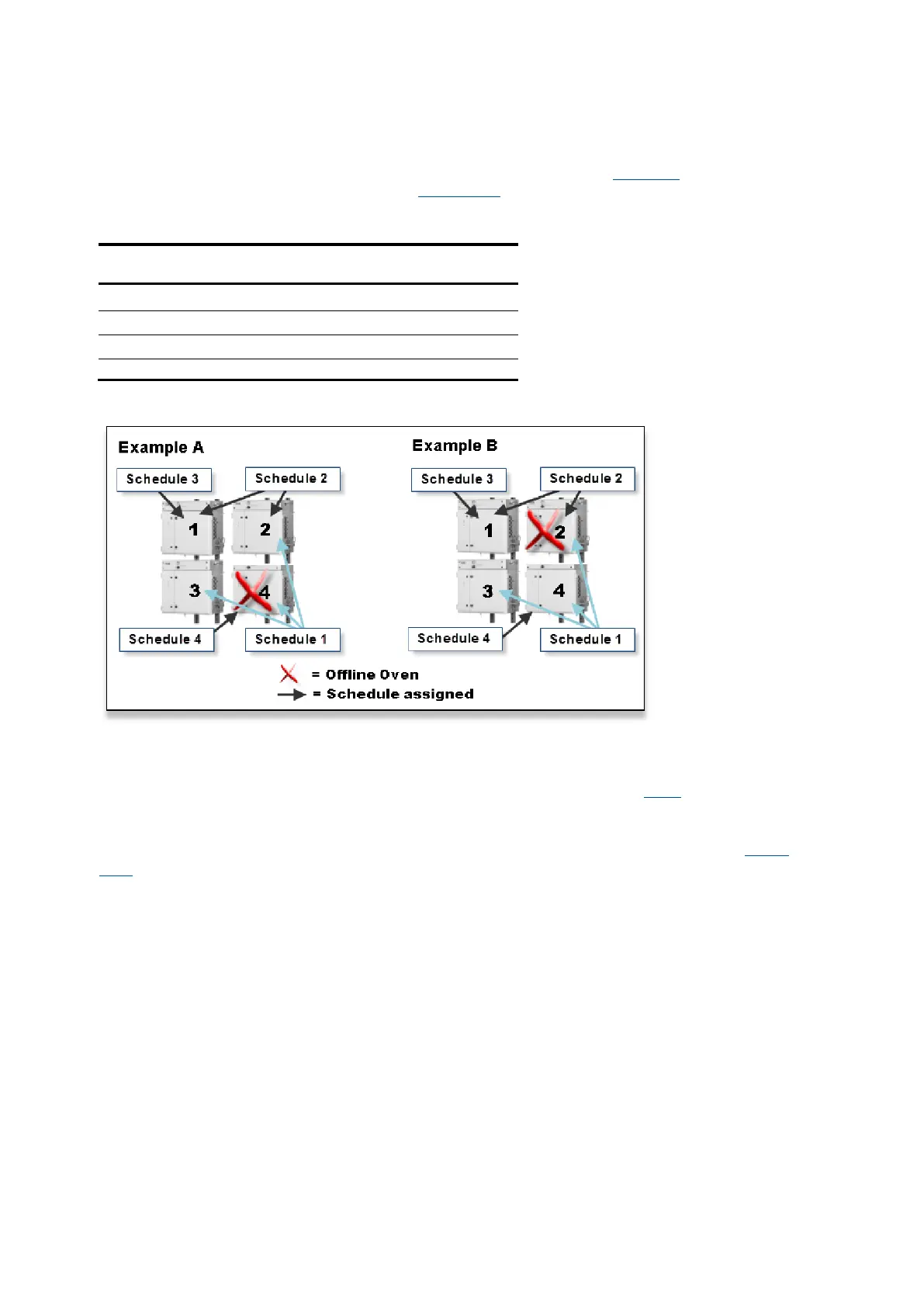
offline, it impacts only the schedules associated with the assigned oven. Table 4-1 provides an
example of a schedule/oven assignment and Figure 4-12 illustrates a typical multi-oven and schedule
relationship.
Table 4-1: Schedule/Oven Assignment Example
Figure 4-12: Multi-Oven and Schedule Relationship
In each example, a red X represents an offline oven. The offline condition may be initiated for
maintenance, power failure or possible associated equipment failure. In Example A, Oven 4 has gone
offline. Only schedules 1 and 4 are impacted. In Example B, Oven 2 is offline and impacts only
schedules 1 and 2. These schedules react and restart as described in section 4.4.2.
4.4.4 Queue subtab
The Schedule>Queue subtab displays the order of the current and upcoming analyses (see Figure
4-13). Schedules may be created, started, stopped, paused or deleted.



 To Next Page