60 | PGC5000 GEN 2 | 892 J006 MNAH
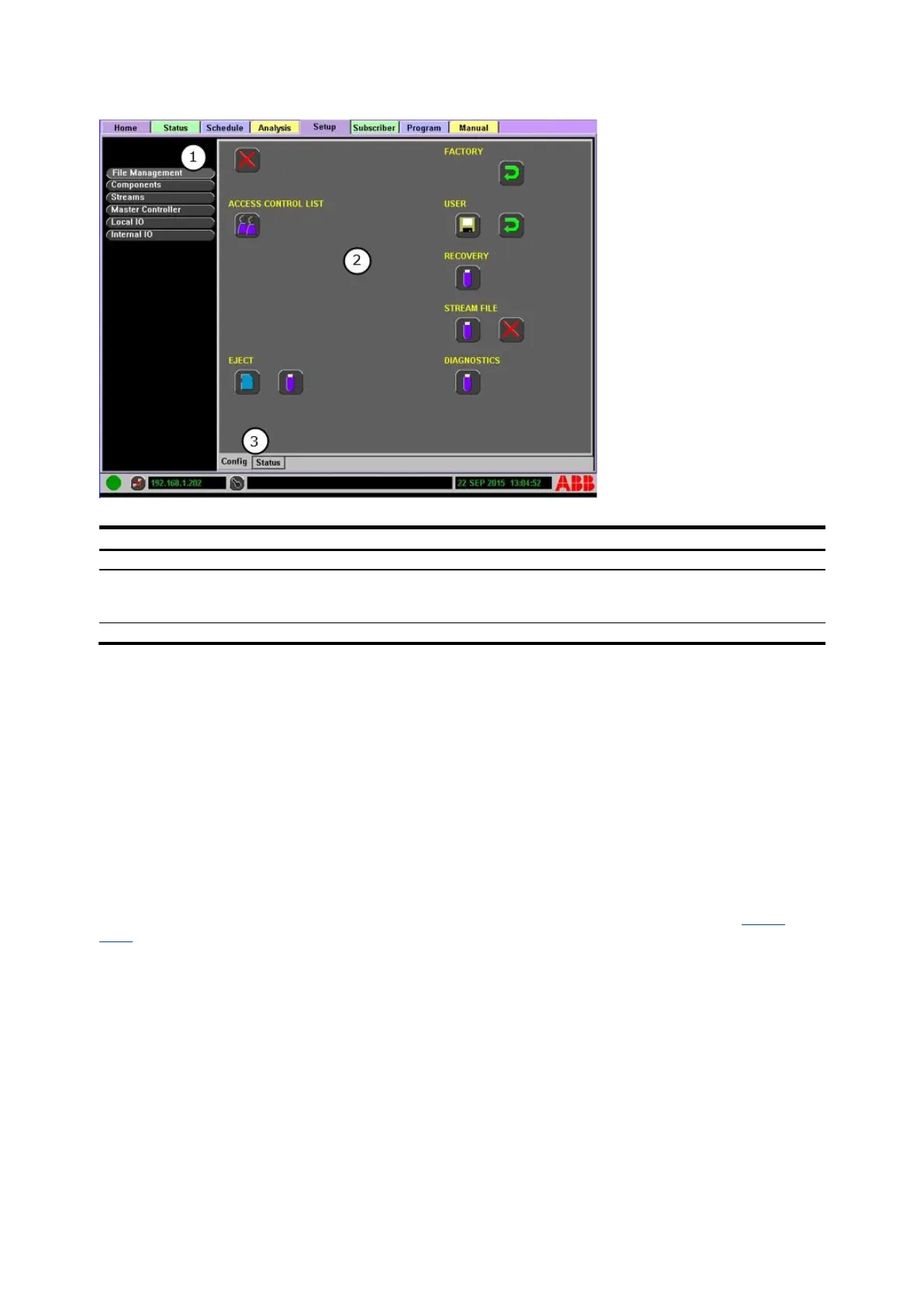
Figure 4-24: Setup>Config Subtab Example
Legend: Setup>Config Subtab Example
Object Configuration Information: Displays all information available for the selected list item
including Action Icons (if applicable) and Fields. Editable fields display with a white
background.
4.6.1 File management
The File Management button in the Function Select list allows the user to delete files from the analyzer
libraries, restore the analyzer to factory configuration, create a user restore point, restore the
analyzer to the user-created restore point, backup the analyzer to a USB drive, backup all stream files
to a USB drive and delete all stream files on the SBC.
To delete files from the Analysis Configuration or system Libraries:
1. Press the Abort button to open a window displaying the system libraries.
2. Select the file location and press the Next button to continue.
3. Highlight the file and then press the Next button to continue.
4. Press the Accept button to confirm the deletion, or press the Go Back button to choose a
different file, or press the Abort button to cancel the operation.
4.6.2 System restore and recovery
The analyzer has several recovery options and file transfer functions available as shown in Figure
4-25. These options allow restore point creation and/or chromatogram data file copy (for offline use)
or deletion, as shown below.



 To Next Page