72 | PGC5000 GEN 2 | 892 J006 MNAH
4.6.9 Isothermal oven
Note that the number of temperature zones is application-dependent, and each zone is independently
listed as a button. Zone temperature set points are set and verified under the Setup>Config Subtab.
The temperature setup is configured from the data sheets at the factory.
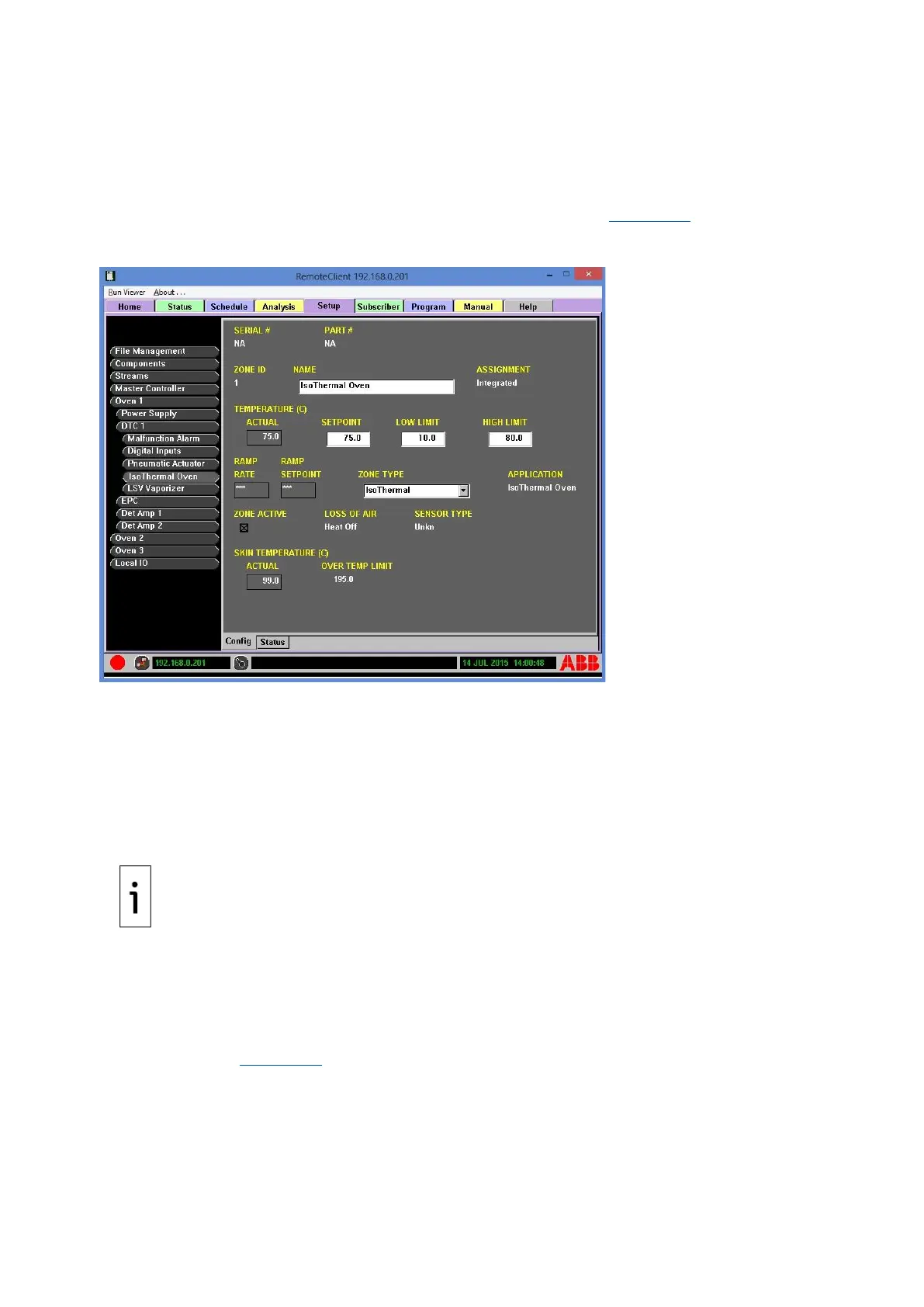
To configure the Isothermal Oven, enter the NAME, SETPOINT, LOW LIMIT, HIGH LIMIT, ZONE TYPE
and then mark ZONE ACTIVE to activate the zone from this screen (see Figure 4-39). The real-time
temperature associated with the oven is displayed.
Figure 4-39: Isothermal Oven Configuration Example
⎯ NAME: Since the name is factory-configured, changing the name will cause the analysis to fail.
⎯ SETPOINT: Normal operating temperature
⎯ LOW LIMIT: Minimum Alarm Level
⎯ HIGH LIMIT: Maximum Alarm Limit
⎯ ZONE TYPE: IsoThermal (set at factory)
To adjust the oven temperature:
1. Select the Oven>DTC 1>Isothermal Oven Config subtab.
2. On the Isothermal Oven screen, insert Setpoint and/or Limit values as appropriate.
3. Check and adjust the temperature configuration as necessary.
The Oven>DTC 1>Isothermal Oven>Status subtab displays the state and date/time of all active
indicators in the DTC zone group. Diagnostic information is also displayed.
4.6.10 Electronic pressure control (EPC)
Note that the number of pressure zones is application-dependent, and each zone is independently
listed as a button. The Oven>EPC>Config subtab allows viewing the EPC part number and displays the
NODE ID zone (see Figure 4-40).



 To Next Page