START UP and SHUTDOWN
AEROSET
®
Customer Training Guide 3-13
94858-103 — July 2003
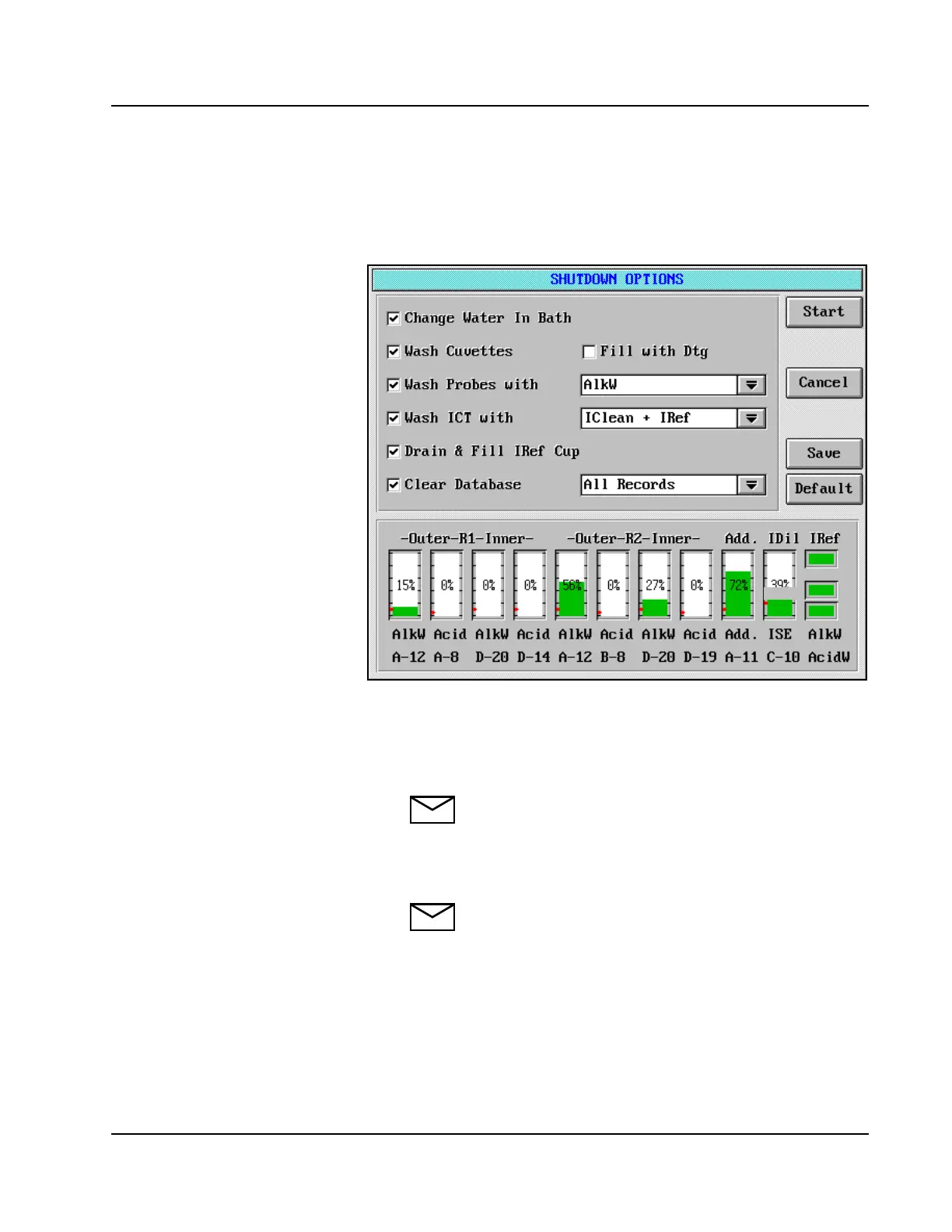
Performing the SHUTDOWN Procedure
1. Select <SHUTDOWN> in the Action Area to display the
SHUTDOWN OPTIONS screen.
Figure 3.4: SHUTDOWN OPTIONS Screen
2. Place a checkmark (;) in the box beside each desired option by
touching the box.
3. Ensure there are sufficient volumes of all solutions required.
NOTE: Refer to Solutions Used for START UP,
SHUTDOWN, and Daily Operation and Solution
Volume Display within this Module for details.
4. Select <Start> to begin the SHUTDOWN Procedure.
NOTE: A pink line below the text of any START UP
or SHUTDOWN option indicates the option was
not completed successfully, or power to the System
was turned off. Review any Error Log Message that
was generated, then repeat the START UP or
SHUTDOWN option that was underlined.
IDil
• Discuss need to clear database, due to
memory only able to hold 8,000
samples or 30,000 results.
• At 8,000 samples, it will not accept
any more orders, and you will get a
warning when there is only space for
100 more.
• If not bar coded, can’t reuse carrier/
position # until database is cleared.
Only have 200 total positions
{40 carriers x 5 positions in each},
must clear database.
• Water Bath Additive position must be
configured upon system install.



 To Next Page