Calibration Review
AEROSET
®
Customer Training Guide 6-25
94858-103 — July 2003
Viewing Calibration Details
For most Abbott AEROSET assay applications, each calibrator is
analyzed three times. The median value is used to calculate the
calibration curve. To view all three absorbance values measured for each
of the calibrators (or mV values for ICT™ assays), perform the
following steps:
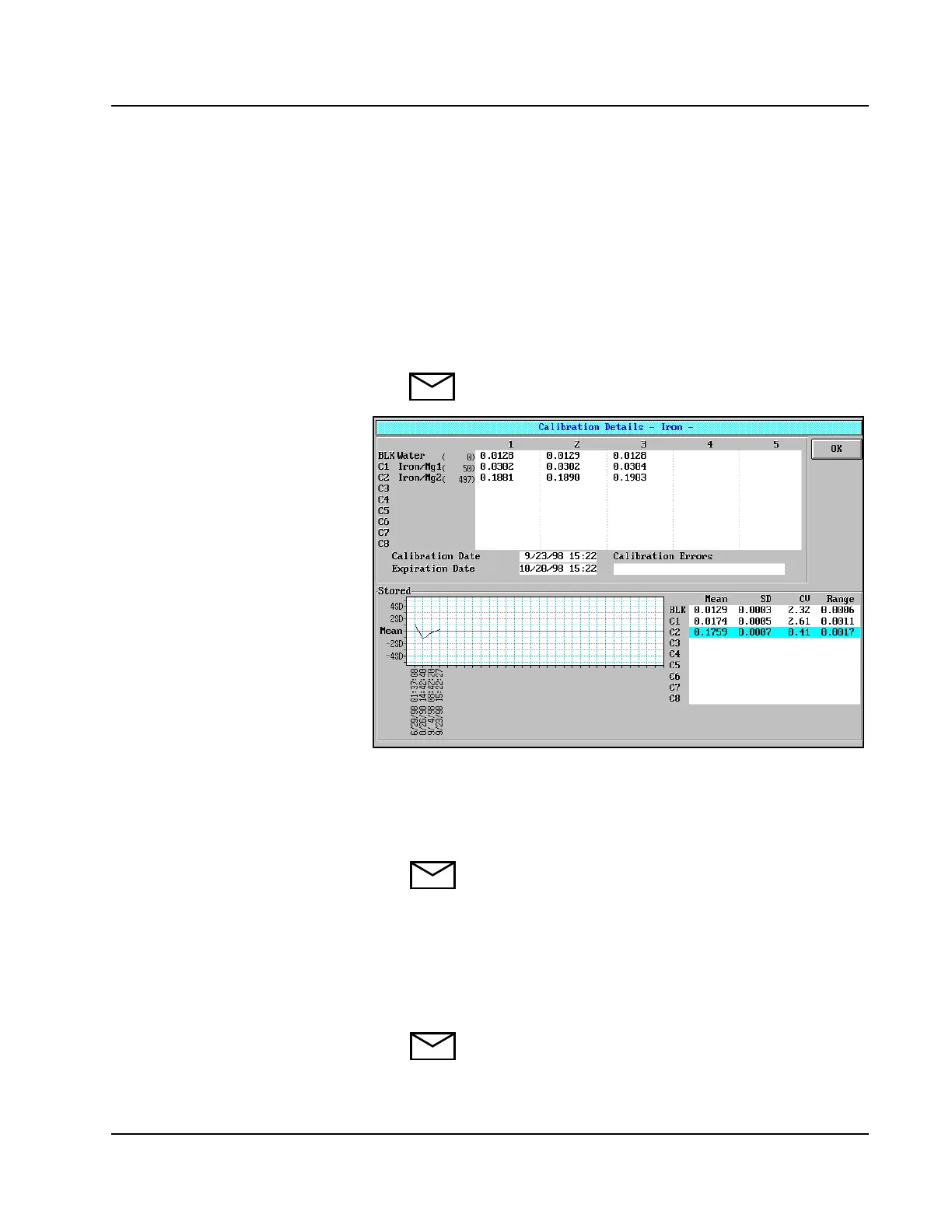
1. Select <Calib> in the right-hand column of the ASSAY STATUS
screen. The Calibration Details screen is displayed.
NOTE: This screen can also be accessed by selecting
<Detail> in the CALIBRATION SUMMARY screen.
Figure 6.8: Calibration Details Screen
2. The absorbance values measured for all the replicates are displayed
on the top half of the Calibration Details screen. The values
displayed have not been corrected for the reagent blank.
NOTE: The bottom half of the Calibration Details screen
displays the stored average data from the CALIBRATION
SUMMARY screens. The graph shows the absorbance of
the stored calibrators. The default view is the blank (BLK)
calibrator. Other calibrator levels may be selected from the
list to the right of the graph. The CALIBRATION
SUMMARY screen is discussed in the next section of this
Module.
NOTE: If the current curve was replaced with a previous
or stored curve, no absorbance values display.
• Scroll back through stored curves in
assay status screen to view the actual
absorbance values for each point on
the graphs.



 To Next Page