MODULE 6: CALIBRATION
6-26 AEROSET
®
Customer Training Guide
94858-103 — July 2003
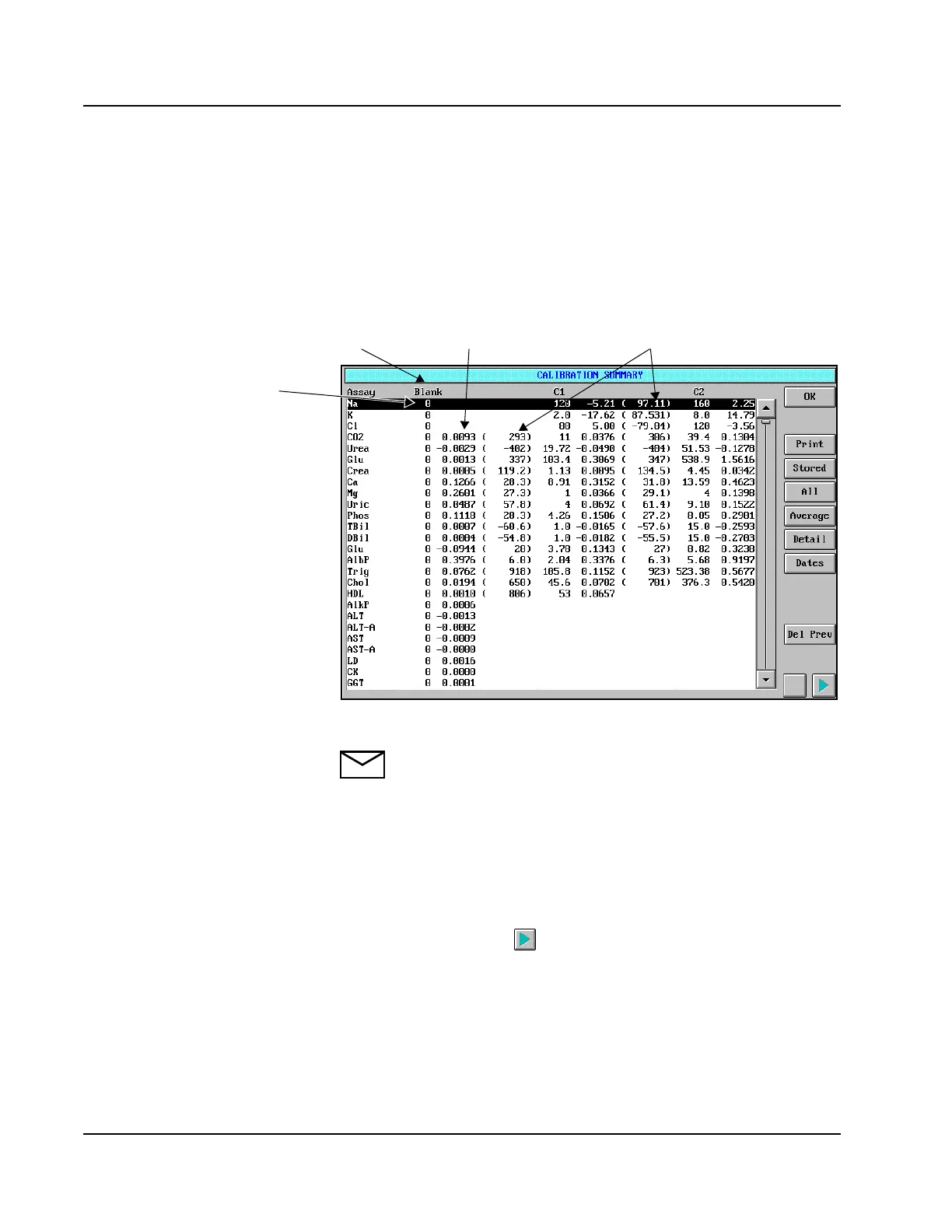
CALIBRATION SUMMARY Screen
The CALIBRATION SUMMARY screen displays the data from the
last calibration performed for all assays. Data from a calibration may be
added to a stored average. To view the Calibration Summary data, select
<Cal Summary> in the Information Access Area. The CALIBRATION
SUMMARY screen is displayed.
Figure 6.9: CALIBRATION SUMMARY Screen
NOTE: When “*******” is displayed in the Factor/Slope field,
the number of decimal places configured must be reduced to
allow the System to display the actual factor/slope. The
maximum number of digits that can be displayed in this field is 7
(including the negative sign and decimal point).
The current (last calibration performed) calibration data are displayed.
The absorbance and factors of the reagent blank, as well as the
absorbance and factors of all the calibrators, are displayed for
photometric assays. The button can be used to view calibrator levels
not currently displayed.
• Use arrow buttons to show Blank to Cal
8 on spreadsheet.
Abs or Absorbance ChangeCalibrator
Concentration
Factor/Slope



 To Next Page