MODULE 11: COMPONENT REPLACEMENT AND TROUBLESHOOTING
11-18 AEROSET
®
Customer Training Guide
94858-103 — July 2003
Rxn (Reaction) Area Page
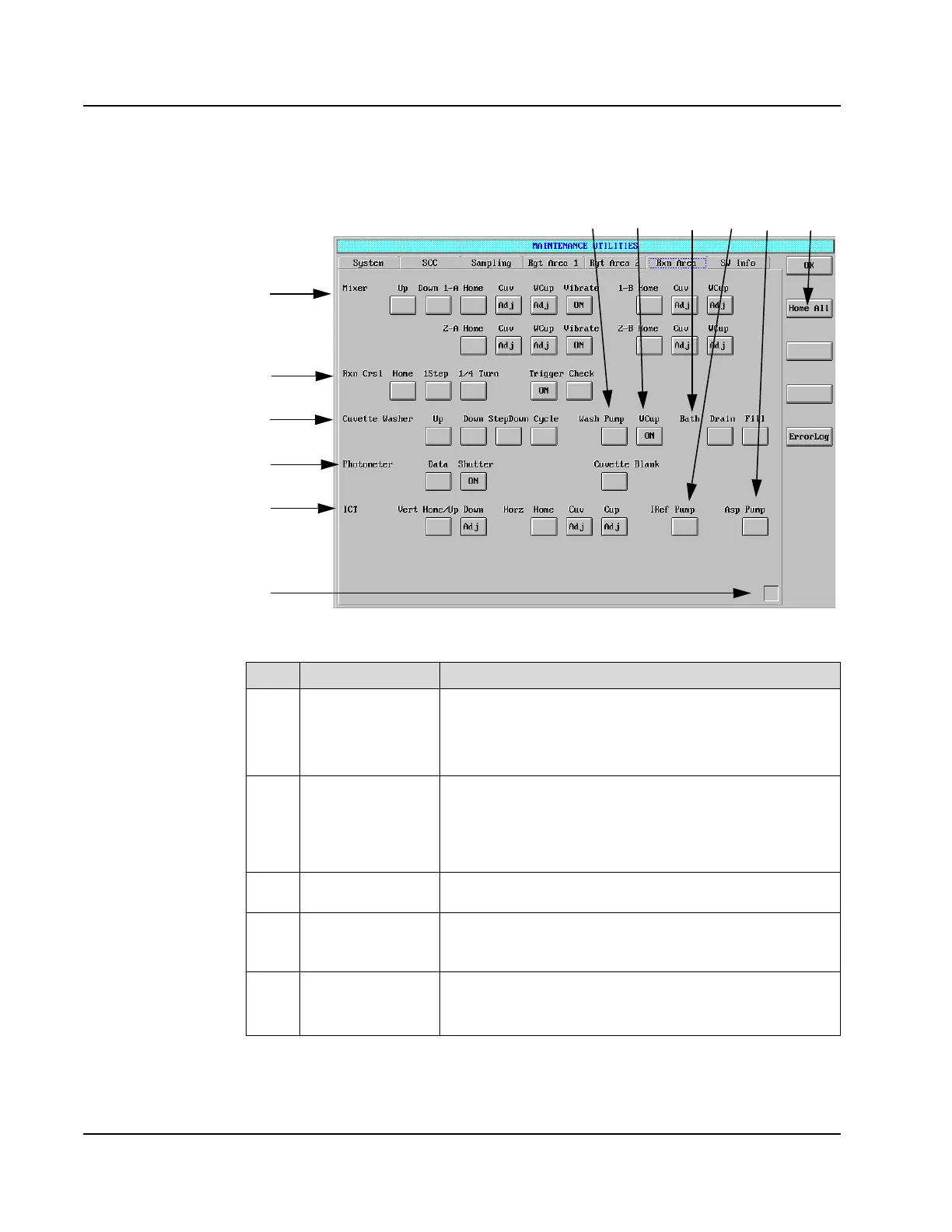
Figure 11.12: MAINTNENANCE UTILITIES Screen, Rxn Area Page
Item Field Allows the Operator to…
1
Mixer Move the Mixer horizontally or vertically. The horizontal
control allows the Mixer to move to the following positions:
Home, CUV (cuvette), and WCup (Wash Cup).
The Operator may also have the Mixer vibrate.
2
Rxn (Reaction)
Carousel
Move the Reaction Carousel home and move the carousel by
one step or by ¼ turn. The Operator may test the trigger
(triggers the photometer read). When the Trigger Check is
performed, an audible beep indicates that it is performing as
expected.
3
Cuvette Washer Move the Cuvette Washer up, down, step down, or through an
entire cycle.
4
Photometer Collect electronic A/D data for the photometer and the ICT™,
turn the shutter ON or OFF, and access the cuvette blank/
Cuvette Integrity data.
5
ICT Move the ICT Unit vertically and horizontally. The horizontal
control allows the ICT Unit to move to the following positions:
Home, Cuv (cuvette), and Cup (ICT Reference Solution cup).
•Rxn Carousel:
• Trigger= check on
the reaction
carousel
alignment.
Check = FSR use.
• Touch “ON” if
you hear a beep
beep (UFO
sound), is aligned
properly.
• Try one step for
each trigger.
• Photometer:
• Shutter-keeps
light from
shining in
photometer.
• Lamp/lens/
cuvette/lens
shutter/
photometer
(order of optics).
• Cuvette blank-A
line and B line
cuvettes
• Touch “check”
shows all 165
cuvettes
• If any #s here
exceed check
values it will be
highlighted in red
and cuvette won’t
be used. Generates
error log message
338.
• Instrument knows
to skip bad ones.
• If was red in past,
but next time OK,
will display yellow.
• Yellow designation
goes away after
6
8
10
1
2
3
4
5
11
9
7
12



 To Next Page