Installation and User Manual ADPRO FastTrace by Xtralis
6 Doc 11168_12
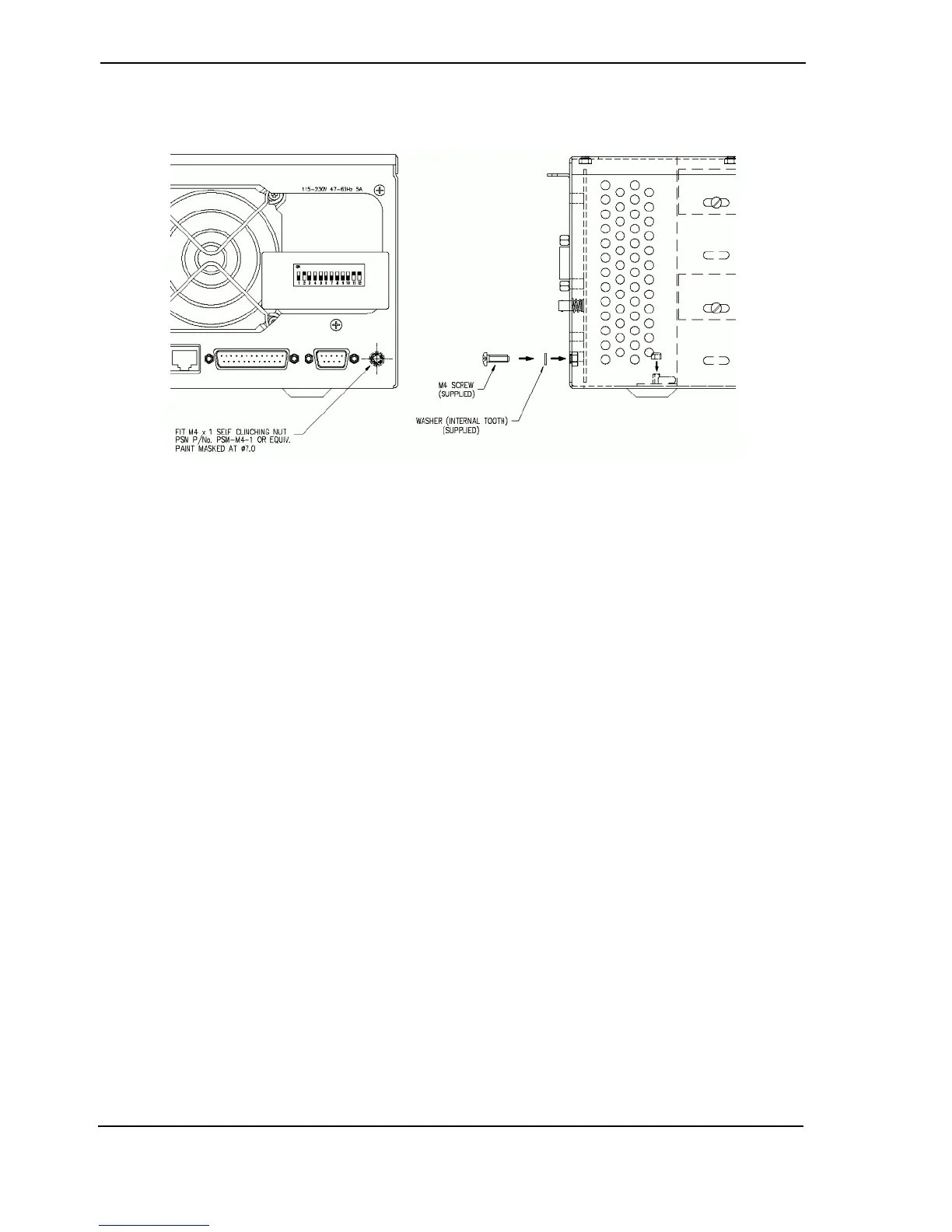
This permanent earth connection point is an M4 tapped insert on the metalwork and is supplied
with a screw and washer as shown below.
Figure 2: FastTrace Grounding Requirements
Connect this earth point to a protective earth point in the system installation using 2.5 mm 2 wire
(minimum) and suitable ring terminals.
The installation protective earth point must be installed in accordance with local electrical
installation codes and requirements.
2.4 Unpacking the FastTrace
When you first receive the FastTrace it is important to check that:
• You have received the equipment that you ordered.
• The box contains all the necessary components.
After unpacking the FastTrace, carefully check for any sign of damage. Any damage should be
reported before installation to your supplier or to Xtralis directly. Check that the FastTrace
packing carton contains the following items:
1 FastTrace chassis
1 DVD containing VideoCentral software
1 Installation and User Manual
1 Crossover Ethernet cable
1 9-way screw terminal plug
4 or 6 15-way screw terminal plug (Model 5005=4, Model 5010=4, Model 5020=6)
1 IEC power cord
The DVD contains software that must be loaded onto a PC or laptop in order to program the
system.
Note: The FastTrace Installation and User Manual is also available in PDF format
on the DVD.



 To Next Page